Dell W-Airwave 7.5 AMP with Centralized NMS Event Correlation User Manual
Summary
This document describes the integration of AirWave Management Platform with centralized Network Management System (NMS) event correlation systems. It covers alert/trap configuration, SNMP trap workflows, severity matching, and MIB compilation procedures. Target users are network administrators and IT professionals managing wireless infrastructure and enterprise network monitoring systems.
Page 1 Text Content
Integrating Dell Power Connect W-Air Wave 7.5 AMP with Centralized NMS Event Correlation
Overview This document describes Air Wave’s alert/trap workflow when integrating with a centralized NMS Event Correlation System, using the following topics: “Adding NMS Event Correlation Servers to Air Wave” on page 1 “Configuring Alerts/Traps in Air Wave” on page 2 “Viewing Alerts in Various Destinations” on page 2 “Acknowledging Alerts” on page 3 “Compiling the Air Wave MIB on NMS” on page 3 “Matching Severity in the NMS Event Correlation Servers” on page 4 “Enhanced Integration” on page 4 “Actual MIB” on page 4
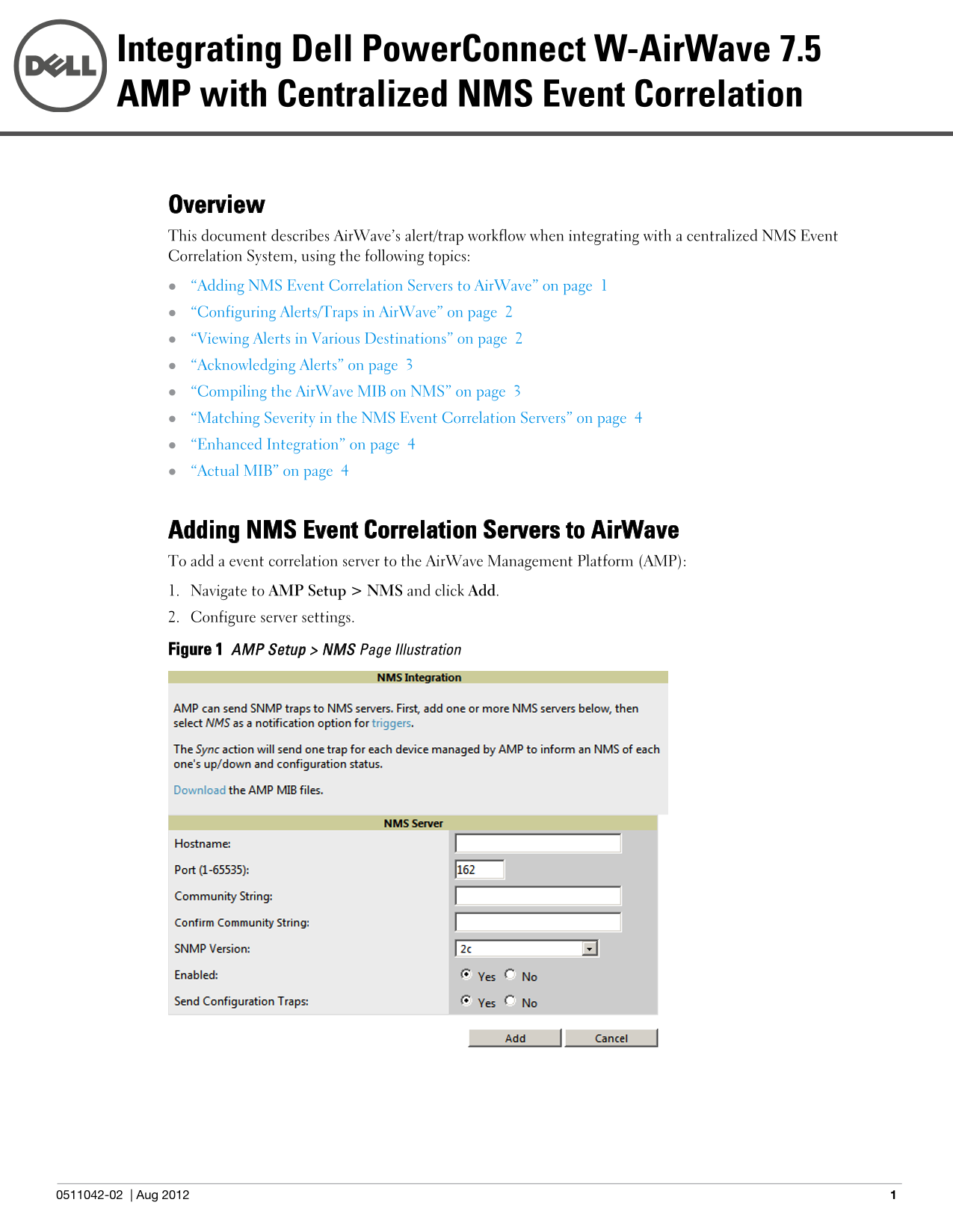
Adding NMS Event Correlation Servers to Air Wave To add a event correlation server to the Air Wave Management Platform (AMP): 1. Navigate to AMP Setup > NMS and click Add. 2. Configure server settings.
Figure 1 AMP Setup > NMS Page Illustration
0511042-02 Aug 2012
Page Summary Contents For Dell W-Airwave 7.5 AMP with Centralized NMS Event Correlation User Manual
Manual Details
| Brand | Dell |
|---|---|
| Pages | 8 |
| File Size | 240.51 KB |
| Published | June 25, 2026 |
Enter the captcha to get the download link:

Frequently Asked Questions
How do I add an NMS Event Correlation Server to AirWave?
Navigate to AMP Setup > NMS and click Add, then follow the steps to configure your server settings.
What are the available severities for airwave alerts in SNMP traps?
The OID 12028.4.15.1.102 contains the severity code: 2=Normal, 3=Warning, 4=Minor, 5=Major, or 6=Critical.
Can I acknowledge an AirWave alert from my external NMS system?
No, airwave alerts must be manually acknowledged directly from the System > Alert page; there is no external interface available for this function.
Which systems support enhanced integration with AirWave AMP?
Enhanced integrations are provided for IBM Netcool, ProCurve Manager, and HP OpenView NNM.