Dell Setup Guide
Summary
This setup and features information guide for the Dell Latitude 10 ST2 tablet provides detailed hardware specifications including power requirements with a 19.5V adapter, physical dimensions (274mm width, 176.6mm depth, 685g weight), and environmental operating conditions (0-35 degrees C). It includes front and side view diagrams identifying components such as smart card reader, front camera, ambient light sensor, memory card reader, and USB/mini HDMI connectors. Designed for enterprise IT teams deploying Windows tablets.
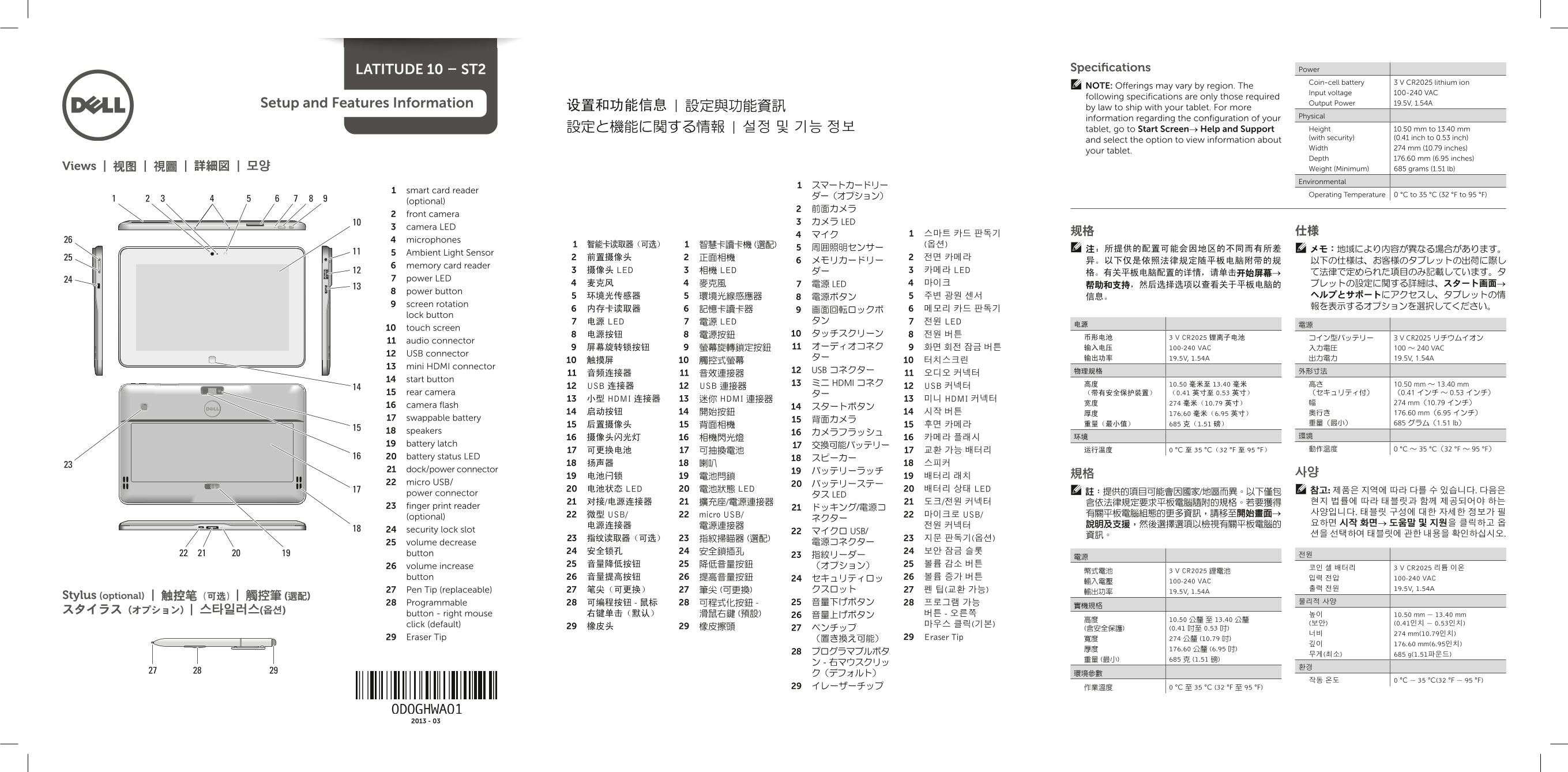
Page 1 Text Content
Latitude 10 – St2 Specifications Power
Coin-cell battery 3 V CR2025 lithium ion
NOte: Offerings may vary by region. The
Input voltage 100-240 VAC
following specifications are only those required
Setup and Features information Output Power 19.5V, 1.54A
设置和功能信息 | 設定與功能資訊 by law to ship with your tablet. For more
Physical
information regarding the configuration of your
設定と機能に関する情報 | 설정 및 기능 정보 tablet, go to Start Screen→ Help and Support Height 10.50 mm to 13.40 mm (with security) (0.41 inch to 0.53 inch)
and select the option to view information about
Width 274 mm (10.79 inches)
your tablet.
Depth 176.60 mm (6.95 inches)
Views | 视图 | 視圖 | 詳細図 | 모양 Weight (Minimum) 685 grams (1.51 lb)
Environmental
1 smart card reader
ダー(オプション) Operating Temperature 0 °C to 35 °C (32 °F to 95 °F)
(optional)
2 front camera
3 カメラ LED
3 camera LED
4 microphones
5 Ambient Light Sensor
6 memory card reader
3 摄像头 LED 3 相機 LED ダー 3 카메라 LED て法律で定められた項目のみ記載しています。タ
7 power LED
4 麦克风 4 麥克風 7 電源 LED 4 마이크 帮助和支持,然后选择选项以查看关于平板电脑的 ブレットの設定に関する詳細は、スタート画面→
8 power button
9 screen rotation 報を表示するオプションを選択してください。
lock button
7 电源 LED 7 電源 LED タン 7 전원 LED
10 touch screen
币形电池 3 V CR2025 锂离子电池 コイン型バッテリー 3 V CR2025 リチウムイオン
11 audio connector
9 屏幕旋转锁按钮 9 螢幕旋轉鎖定按鈕 11 オーディオコネク 9 화면 회전 잠금 버튼 输入电压 100-240 VAC 入力電圧 100 ~ 240 VAC
12 USB connector
13 mini HDMI connector
12 USB コネクター 物理规格 外形寸法
14 start button
13 ミニ HDMI コネク 高度 10.50 毫米至 13.40 毫米 高さ 10.50 mm ~ 13.40 mm
12 USB 连接器 12 USB 連接器 12 USB 커넥터
15 rear camera ター (带有安全保护装置) (0.41 英寸至 0.53 英寸) (セキュリティ付) (0.41 インチ ~ 0.53 インチ)
13 小型 HDMI 连接器 13 迷你 HDMI 連接器 13 미니 HDMI 커넥터
宽度 274 毫米(10.79 英寸) 274 mm(10.79 インチ)
16 camera flash 14 スタートボタン
14 启动按钮 14 開始按鈕 14 시작 버튼 厚度 176.60 毫米(6.95 英寸) 奥行き 176.60 mm(6.95 インチ)
17 swappable battery 15 背面カメラ
15 后置摄像头 15 背面相機 15 후면 카메라 重量(最小值) 685 克(1.51 磅) 重量(最小) 685 グラム(1.51 lb)
18 speakers 16 カメラフラッシュ
19 battery latch 17 交換可能バッテリー
20 battery status LED 18 スピーカー
21 dock/power connector 19 バッテリーラッチ
22 micro USB/ 20 バッテリーステー
20 电池状态 LED 20 電池狀態 LED 20 배터리 상태 LED 참고: 제품은 지역에 따라 다를 수 있습니다. 다음은
power connector 註:提供的項目可能會因國家/地區而異。以下僅包
タス LED
23 finger print reader 21 ドッキング/電源コ
22 微型 USB/ 22 micro USB/ 22 마이크로 USB/ 有關平板電腦組態的更多資訊,請移至開始畫面→ 사양입니다. 태블릿 구성에 대한 자세한 정보가 필
(optional) ネクター
24 security lock slot 22 マイクロ USB/
25 volume decrease 電源コネクター
button 24 安全锁孔 24 安全鎖插孔 24 보안 잠금 슬롯
26 volume increase 25 音量降低按钮 25 降低音量按鈕 (オプション) 25 볼륨 감소 버튼
코인 셀 배터리 3 V CR2025 리튬 이온
幣式電池 3 V CR2025 鋰電池
button 26 音量提高按钮 26 提高音量按鈕 24 セキュリティロッ 26 볼륨 증가 버튼 입력 전압 100-240 VAC
輸入電壓 100-240 VAC
27 Pen Tip (replaceable) 27 笔尖(可更换) 27 筆尖 (可更換) クスロット 27 펜 팁(교환 가능) 출력 전원 19.5V, 1.54A
Stylus (optional) | 触控笔(可选)| 觸控筆 (選配)
28 Programmable 28 可编程按钮 - 鼠标 28 可程式化按鈕 - 25 音量下げボタン 28 프로그램 가능 물리적 사양
button - right mouse 右键单击(默认) 滑鼠右鍵 (預設) 26 音量上げボタン 버튼 - 오른쪽 높이 10.50 mm ~ 13.40 mm
click (default) 마우스 클릭(기본) (보안) (0.41인치 ~ 0.53인치)
너비 274 mm(10.79인치)
29 Eraser Tip (置き換え可能) 29 Eraser Tip 寬度 274 公釐 (10.79 吋)
깊이 176.60 mm(6.95인치)
Page Summary Contents For Dell Setup Guide
Manual Details
| Brand | Dell |
|---|---|
| Pages | 2 |
| File Size | 2.05 MB |
| Published | July 01, 2026 |
Enter the captcha to get the download link:

Frequently Asked Questions
What is the minimum weight of this tablet model?
The weight is specified as a minimum of 685 grams (1.51 lb).
How do I properly shut down the device?<
To shut down, tap or click Power, and then tap or click Shut down.
What are the compatible input voltage standards?
The tablet accepts an input voltage range of 100-240 VAC.
Where can I find information regarding regulatory compliance?
For safety and regulatory best practices, consult the accompanying documents or www.dell.com/regulatory_compliance.