Dell S5000wi Projector User Guide - S500/S500wi RS232 Protocol
Summary
This is the Dell S500/S500wi RS232 Protocol Document. It provides detailed technical specifications for RS232 serial communication with Dell projectors, including pin assignments for MINI DIN-6 connectors, communication settings (19200 bps, 8 data bits, no parity, 1 stop bit), and command syntax structures. The document covers control command formats, projector response messages, system status codes, lamp hour reporting, and various projector control commands. It is intended for AV integrators and developers integrating Dell projectors into control systems.
Page 1 Text Content
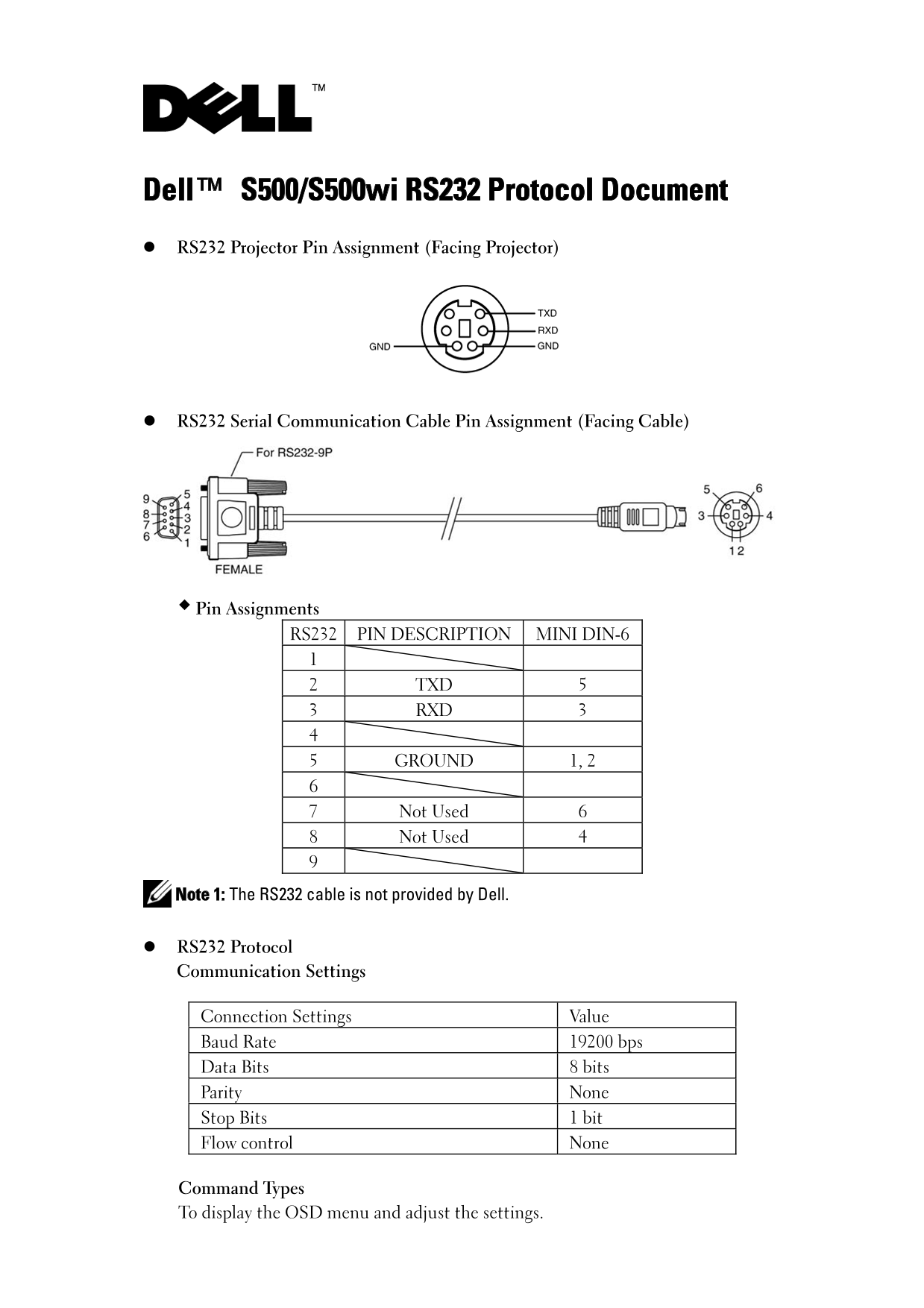
Dell™ S500/S500wi RS232 Protocol Document RS232 Projector Pin Assignment (Facing Projector)
RS232 Serial Communication Cable Pin Assignment (Facing Cable)
Pin Assignments RS232 PIN DESCRIPTION MINI DIN-6
2 TXD 5 3 RXD 3
5 GROUND 1, 2
7 Not Used 6 8 Not Used 4
Note 1: The RS232 cable is not provided by Dell.
RS232 Protocol Communication Settings
Connection Settings Value Baud Rate 19200 bps Data Bits 8 bits Parity None Stop Bits 1 bit Flow control None
Command Types To display the OSD menu and adjust the settings.
Page Summary Contents For Dell S5000wi Projector User Guide - S500/S500wi RS232 Protocol
Manual Details
| Brand | Dell |
|---|---|
| Pages | 6 |
| File Size | 196.27 KB |
| Published | June 29, 2026 |
Enter the captcha to get the download link:

Frequently Asked Questions
What physical pins are used for transmitting (TXD) and receiving (RXD) data on the projector?
TXD connects to Pin 2, and RXD connects to Pin 3 using the RS232 port.
What required communication settings must I use when connecting the projector via serial cable?
The settings require a Baud Rate of 19200 bps, Data Bits of 8 bits, Parity None, and Stop Bits of 1 bit.
If a command is executed incorrectly, what error response code should I look for?
A Projector Response message with Byte0 having the value `0x02` indicates an Error Command, potentially due to CRC issues or unknown commands.