Dell Dell 1609WX Projector Protocol Content
Summary
This technical documentation provides comprehensive documentation for the Dell™ 1609WX RS232 Protocol Document � RS232 Projector Pin Assignment. The document covers technical documentation and operational guidance. This documentation is intended for IT professionals and system administrators. The manual provides detailed guidance to ensure proper operation and maintenance of the Dell™ 1609WX RS232 Protocol Document � RS232 Projector Pin Assignment. Users will find step-by-step instructions and technical details necessary for effective utilization of the product.
Page 1 Text Content
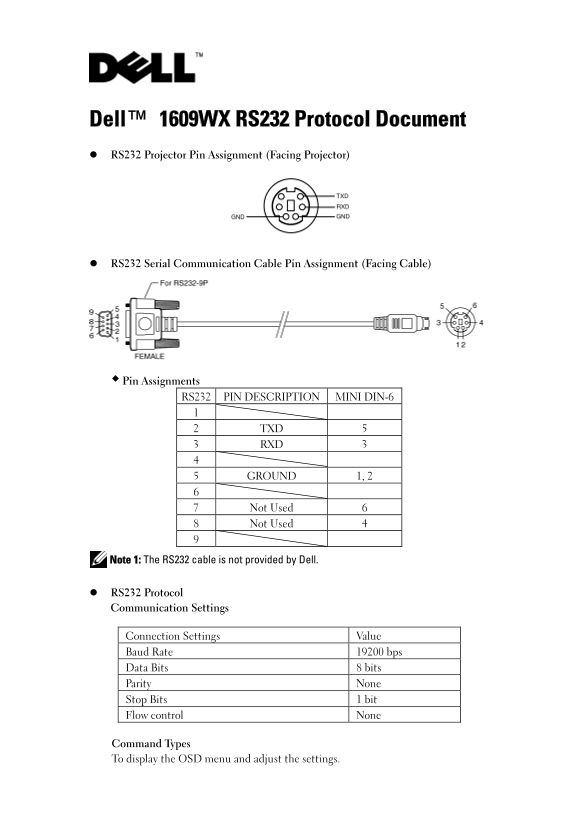
Dell™ 1609WX RS232 Protocol Document RS232 Projector Pin Assignment (Facing Projector)
RS232 Serial Communication Cable Pin Assignment (Facing Cable)
Pin Assignments RS232 PIN DESCRIPTION MINI DIN-6
2 TXD 5 3 RXD 3
5 GROUND 1, 2
7 Not Used 6 8 Not Used 4
Note 1: The RS232 cable is not provided by Dell.
RS232 Protocol Communication Settings
Connection Settings Value Baud Rate 19200 bps Data Bits 8 bits Parity None Stop Bits 1 bit Flow control None
Command Types To display the OSD menu and adjust the settings.
Page Summary Contents For Dell Dell 1609WX Projector Protocol Content
Manual Details
| Brand | Dell |
|---|---|
| Pages | 4 |
| File Size | 251.57 KB |
| Published | June 16, 2026 |
Enter the captcha to get the download link:

Frequently Asked Questions
What are the communication settings for RS232?
Baud Rate: 19200 bps, Data Bits: 8, Parity: None, Stop Bits: 1, Flow control: None.
How do I power on the projector via RS232?
Send the specific command code 0x01 with the header 0xefbe, address 0x10, and size 0x0005.
What are the valid values for the Key Pad Lock command?
0x24 turns it On, and 0x25 turns it Off.
Does Dell provide the RS232 cable?
No, the RS232 cable is not provided by Dell.