Dell PowerEdge MX-Series Storage Options and Use Cases Owner's Manual, User Guide
Summary
Dell EMC PowerEdge MX-Series Storage Options and Use Cases technical note. Explains how evolving workloads (virtualization, big data, in-memory databases) require flexible storage connectivity. The MX-Series provides redundant Brocade 32Gb FC switches for traditional SAN, SAS switches connecting to optional MX5016s drive sleds with future JBOD support, and integrated network switches supporting iSCSI, FCoE, and FC NPIV. Authored by Brad Lawrence, Eric Kuzmack, and Todd Mottershead.
Page 1 Text Content
Direct from Development Power Edge Product Group
Power Edge MX-Series Storage Options and Use Cases
Background Technical Note by: In many cases, workloads are now optimized for specific storage solutions. Virtualization environments benefit from the low latency, high capacity capabilities
Brad Lawrence of Software Defined Storage (SDS). Scale-up In-memory Databases benefit from Eric Kuzmack locally attached SSD’s for faster Database loading and Scale-out In-memory
Todd Mottershead Databases require low latency shared storage solutions like SAN for shared access to data and fast database loading.
SUMMARY
Adding to this complexity is wealth of options available for connection to storage environments. Traditional storage attach would include Fibre Channel (FC) or
Storage technologies have been
i SCSI and in recent years, Fibre Channel over Ethernet (FCo E). Conversely,
evolving at an accelerated rate
newer technologies, like SDS, benefit from large pools of locally attached SAS
driven primarily by changes in
storage using internal drive and/or JBOD enclosures.
workloads. Solutions like
virtualization, big data and in- MX storage connectivity options
memory databases utilize storage
To meet these diverse needs, the MX-Series has been designed to deliver a
in very different ways. This
wealth of storage connectivity options. Traditional SAN connections are available
evolution results in customers
through a pair of redundant Brocade 32Gb FC switches. In environments where
needing flexibility in their server
SAS is required, the FC switches can be replaced with a pair of redundant SAS
infrastructure to meet these switches that connect to the optional MX5016s drive sled, with future support for diverse needs. external SAS JBOD enclosures. Traditional i SCSI, FCo E, and FC NPIV support is
built into the integrated network switches and customers have the option to also
The Power Edge MX-Series has
use these devices to connect directly to a Dell EMC or 3rd party SAN.
been designed specifically to reduce this complexity while at the
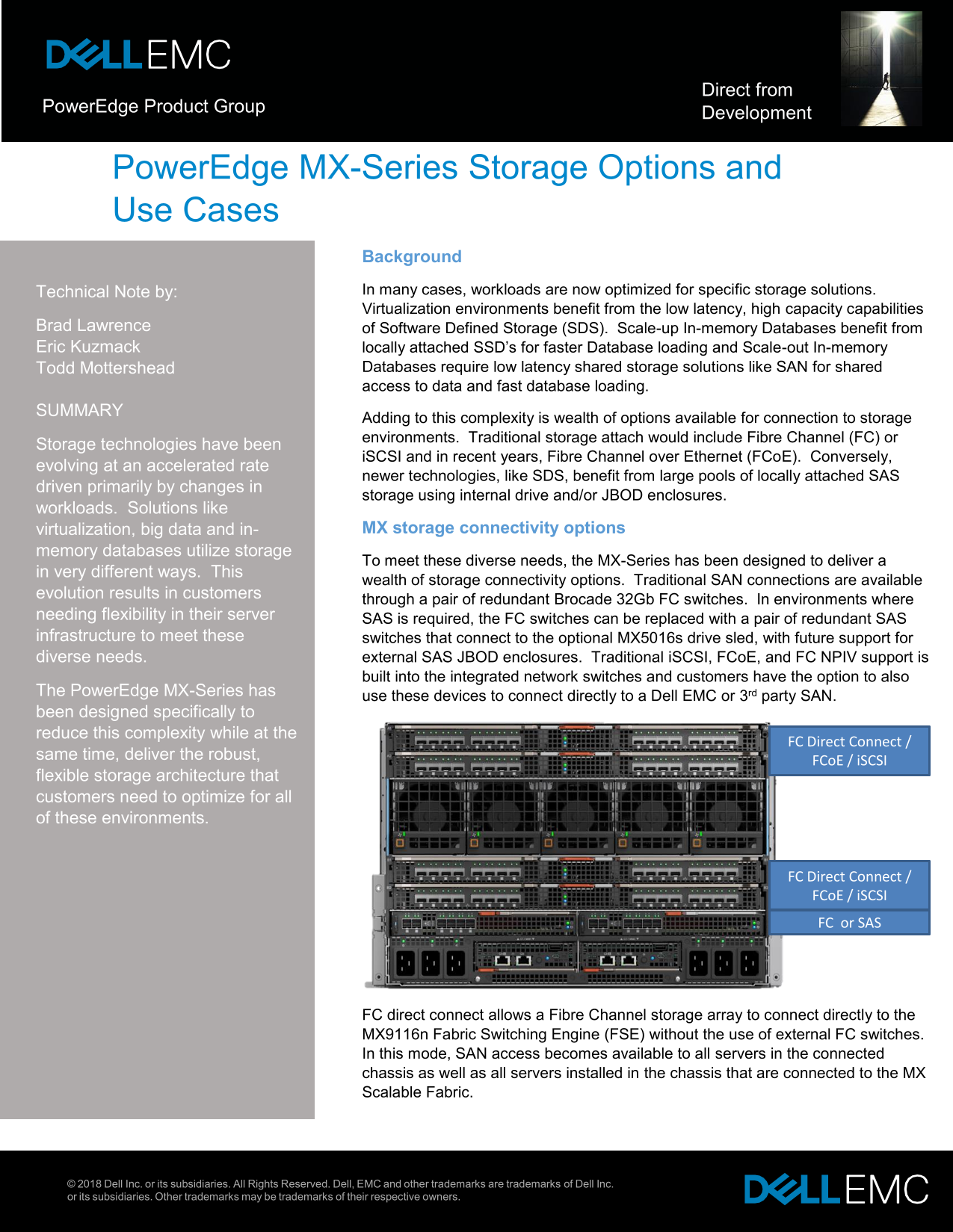
FC Direct Connect /
same time, deliver the robust,
FCo E / i SCSI
flexible storage architecture that customers need to optimize for all of these environments.
FC Direct Connect / FCo E / i SCSI FC or SAS
FC direct connect allows a Fibre Channel storage array to connect directly to the MX9116n Fabric Switching Engine (FSE) without the use of external FC switches. In this mode, SAN access becomes available to all servers in the connected chassis as well as all servers installed in the chassis that are connected to the MX Scalable Fabric.
© 2018 Dell Inc. or its subsidiaries. All Rights Reserved. Dell, EMC and other trademarks are trademarks of Dell Inc. or its subsidiaries. Other trademarks may be trademarks of their respective owners.
Page Summary Contents For Dell PowerEdge MX-Series Storage Options and Use Cases Owner's Manual, User Guide
Manual Details
| Brand | Dell |
|---|---|
| Pages | 2 |
| File Size | 373.17 KB |
| Published | July 03, 2026 |
Enter the captcha to get the download link:

Frequently Asked Questions
What connectivity options does the MX-Series support?
It supports Fibre Channel (FC), iSCSI, Fibre Channel over Ethernet (FCoE), and SAS.
How can I add more internal storage to the PowerEdge MX-Series?
You can use the optional MX5016s storage sled, which houses up to 16 x 2.5” drives, or use the BOSS card for mirrored M.2 drives.
Can the MX-Series connect directly to an external FC SAN?
Yes, the MX9116n FSE can be dedicatedly connected to a Dell EMC or third party FC storage array.
What is the maximum number of hot-plug drives supported in the MX-Series models?
The MX840c supports up to 8 hot-plug drives, while the MX740c supports up to 6 hot-plug drives.