Dell Storage NX430 System Quick Start Guide for Use
Summary
Getting started guide for the Dell Storage NX430 system, providing initial setup instructions including rack installation, power cable management, and peripheral connections. The guide includes multilingual safety warnings and notes about pre-installed Windows Storage Server 2016 or 2012 R2 operating system. Target users include storage administrators and IT professionals deploying Dell network-attached storage solutions in enterprise environments.
Page 1 Text Content
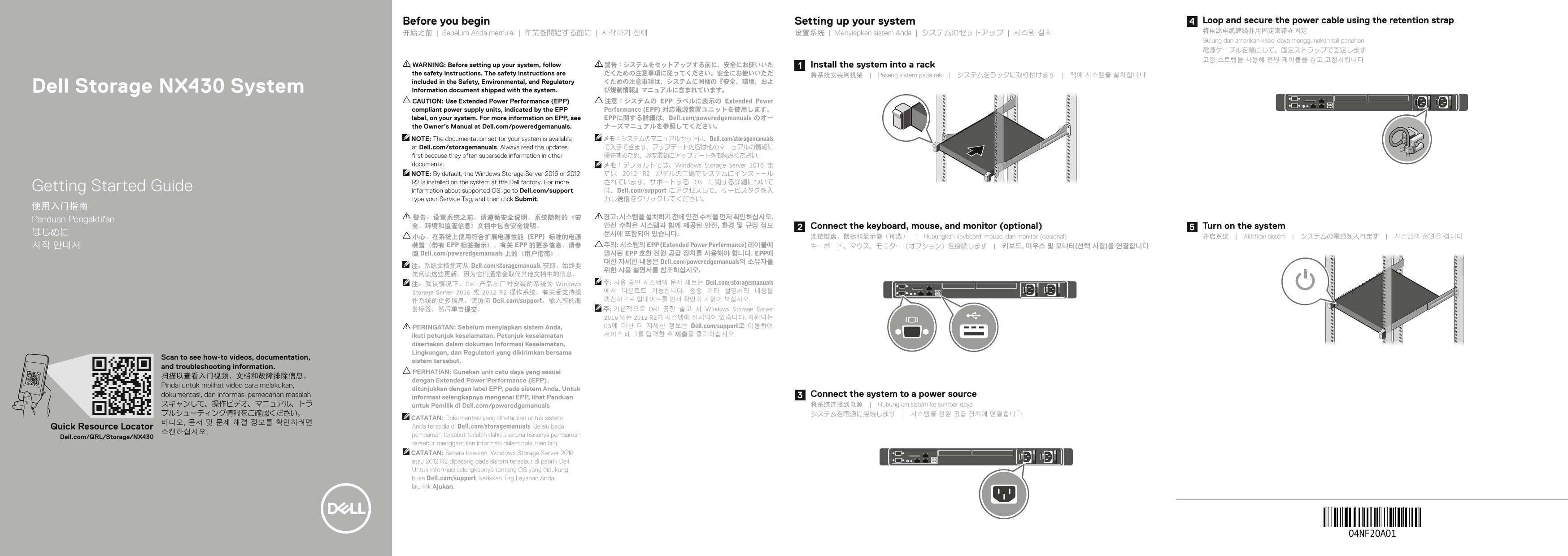
Before you begin Setting up your system Loop and secure the power cable using the retention strap 将电源电缆缠绕并用固定束带在固定
开始之前 | Sebelum Anda memulai | 作業を開始する前に | 시작하기 전에 设置系统 | Menyiapkan sistem Anda | システムのセットアップ | 시스템 설치
Gulung dan amankan kabel daya menggunakan tali penahan 電源ケーブルを輪にして、固定ストラップで固定します 고정 스트랩을 사용해 전원 케이블을 감고 고정시킵니다
WARNING: Before setting up your system, follow 警告:システムをセットアップする前に、安全にお使いいた Install the system into a rack the safety instructions. The safety instructions are だくための注意事項に従ってください。安全にお使いいただ 将系统安装到机架 | Pasang sistem pada rak | システムをラックに取り付けます | 랙에 시스템을 설치합니다 included in the Safety, Environmental, and Regulatory くための注意事項は、システムに同梱の『安全、環境、およ Dell Storage NX430 System Information document shipped with the system. び規制情報』マニュアルに含まれています。 CAUTION: Use Extended Power Performance (EPP) 注意:システムの EPP ラベルに表示の Extended Power compliant power supply units, indicated by the EPP Performance (EPP) 対応電源装置ユニットを使用します。 label, on your system. For more information on EPP, see EPPに関する詳細は、Dell.com/poweredgemanuals のオー the Owner’s Manual at Dell.com/poweredgemanuals. ナーズマニュアルを参照してください。 NOTE: The documentation set for your system is available メモ:システムのマニュアルセットは、Dell.com/storagemanuals at Dell.com/storagemanuals. Always read the updates で入手できます。アップデート内容は他のマニュアルの情報に first because they often supersede information in other 優先するため、必ず最初にアップデートをお読みください。 documents. メモ:デフォルトでは、Windows Storage Server 2016 ま NOTE: By default, the Windows Storage Server 2016 or 2012 たは 2012 R2 がデルの工場でシステムにインストール R2 is installed on the system at the Dell factory. For more されています。サポートする OS に関する詳細について
Getting Started Guide information about supported OS, go to Dell.com/support, は、Dell.com/support にアクセスして、サービスタグを入
type your Service Tag, and then click Submit. 力し送信をクリックしてください。
Panduan Pengaktifan
全、环境和监管信息》文档中包含安全说明。 안전 수칙은 시스템과 함께 제공된 안전, 환경 및 규정 정보 Connect the keyboard, mouse, and monitor (optional) Turn on the system
小心:在系统上使用符合扩展电源性能 (EPP) 标准的电源 连接键盘、鼠标和显示器(可选) | Hubungkan keyboard, mouse, dan monitor (opsional) 开启系统 | Aktifkan sistem | システムの電源を入れます | 시스템의 전원을 켭니다
시작 안내서 装置(带有 EPP 标签指示)。有关 EPP 的更多信息,请参 주의: 시스템의 EPP (Extended Power Performance) 레이블에 キーボード、マウス、モニター(オプション)を接続します | 키보드, 마우스 및 모니터(선택 사항)를 연결합니다 阅 Dell.com/poweredgemanuals 上的《用户指南》。 명시된 EPP 호환 전원 공급 장치를 사용해야 합니다. EPP에
대한 자세한 내용은 Dell.com/poweredgemanuals의 소유자를
注:系统文档集可从 Dell.com/storagemanuals 获取。始终要
注:默认情况下,Dell 产品出厂时安装的系统为 Windows 주: 사용 중인 시스템의 문서 세트는 Dell.com/storagemanuals Storage Server 2016 或 2012 R2 操作系统。有关受支持操 에서 다운로드 가능합니다. 종종 기타 설명서의 내용을 作系统的更多信息,请访问 Dell.com/support,输入您的服 갱신하므로 업데이트를 먼저 확인하고 읽어 보십시오.
务标签,然后单击提交。 주: 기본적으로 Dell 공장 출고 시 Windows Storage Server
2016 또는 2012 R2가 시스템에 설치되어 있습니다. 지원되는 PERINGATAN: Sebelum menyiapkan sistem Anda, OS에 대한 더 자세한 정보는 Dell.com/support로 이동하여 ikuti petunjuk keselamatan. Petunjuk keselamatan 서비스 태그를 입력한 후 제출을 클릭하십시오.
disertakan dalam dokumen Informasi Keselamatan, Lingkungan, dan Regulatori yang dikirimkan bersama
Scan to see how-to videos, documentation,
sistem tersebut.
and troubleshooting information.
PERHATIAN: Gunakan unit catu daya yang sesuai
dengan Extended Power Performance (EPP),
Pindai untuk melihat video cara melakukan,
ditunjukkan dengan label EPP, pada sistem Anda. Untuk
dokumentasi, dan informasi pemecahan masalah. Connect the system to a power source
informasi selengkapnya mengenai EPP, lihat Panduan
スキャンして、操作ビデオ、マニュアル、トラ untuk Pemilik di Dell.com/poweredgemanuals 将系统连接到电源 | Hubungkan sistem ke sumber daya ブルシューティング情報をご確認ください。 システムを電源に接続します | 시스템을 전원 공급 장치에 연결합니다
CATATAN: Dokumentasi yang ditetapkan untuk sistem
Quick Resource Locator Anda tersedia di Dell.com/storagemanuals. Selalu baca
pembaruan tersebut terlebih dahulu karena biasanya pembaruan
Dell.com/QRL/Storage/NX430
tersebut menggantikan informasi dalam dokumen lain. CATATAN: Secara bawaan, Windows Storage Server 2016 atau 2012 R2 dipasang pada sistem tersebut di pabrik Dell. Untuk informasi selengkapnya tentang OS yang didukung, buka Dell.com/support, ketikkan Tag Layanan Anda, lalu klik Ajukan.
Page Summary Contents For Dell Storage NX430 System Quick Start Guide for Use
Manual Details
| Brand | Dell |
|---|---|
| Pages | 2 |
| File Size | 627.71 KB |
| Published | June 26, 2026 |
Enter the captcha to get the download link:

Frequently Asked Questions
Before setting up the system, what safety information should I read?
Follow the safety instructions included in the 'Safety, Environmental, and Regulatory Information' manual shipped with the system.
What is required for connecting a power source to the system?
Use Extended Power Performance (EPP)-compliant power supply units, indicated by the EPP label on your system.
How do I find documentation or manuals for this device?
System manuals are available at Dell.com/storagemanuals. Always check for updates first.
What is the default operating temperature and humidity range?
Maximum room temperature is 35°C (95°F) and maximum relative humidity is 90% [29°C (84.2°F) dew point].
Where can I find technical specifications for this system?
Refer to Dell.com/storagemanuals for a complete and current listing of the system's specifications.