Dell OptiPlex 5080 Tower - Statement of Volatility
Summary
This technical guide is essential reading for IT technicians and advanced users handling the Dell OptiPlex 5080 Tower. It provides a detailed statement of volatility, clarifying which components lose data upon power removal and how various internal parts retain information. The manual covers complex topics like memory types (DDR4), BIOS functionality, and required procedures across different ACPI power states (S3–S5). Use this resource to ensure proper shutdowns, understand data retention across volatile/non-volatile hardware, and prevent system-related data loss during troubleshooting or maintenance.
Page 1 Text Content
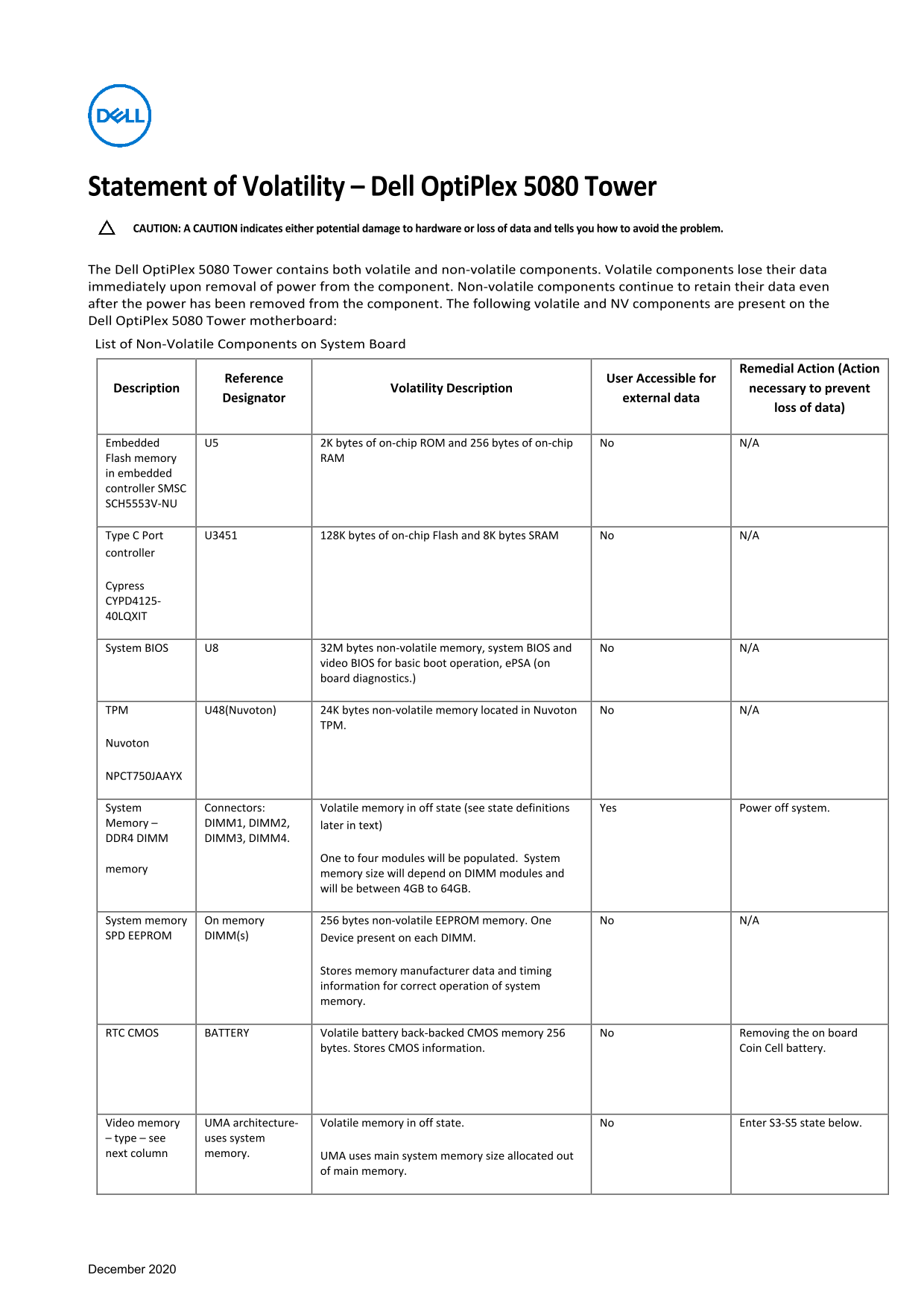
Statement of Volatility – Dell Opti Plex 5080 Tower CAUTION: A CAUTION indicates either potential damage to hardware or loss of data and tells you how to avoid the problem. The Dell Opti Plex 5080 Tower contains both volatile and non-volatile components. Volatile components lose their data immediately upon removal of power from the component. Non-volatile components continue to retain their data even after the power has been removed from the component. The following volatile and NV components are present on the Dell Opti Plex 5080 Tower motherboard: List of Non-Volatile Components on System Board
Remedial Action (Action
Reference User Accessible for
Description Volatility Description necessary to prevent
Designator external data
loss of data)
Embedded U5 2K bytes of on-chip ROM and 256 bytes of on-chip No N/A Flash memory RAM in embedded controller SMSC SCH5553V-NU
Type C Port U3451 128K bytes of on-chip Flash and 8K bytes SRAM No N/A controller
Cypress CYPD4125- 40LQXIT
System BIOS U8 32M bytes non-volatile memory, system BIOS and No N/A
video BIOS for basic boot operation, e PSA (on board diagnostics.)
TPM U48(Nuvoton) 24K bytes non-volatile memory located in Nuvoton No N/A
Nuvoton
NPCT750JAAYX
System Connectors: Volatile memory in off state (see state definitions Yes Power off system. Memory – DIMM1, DIMM2, later in text) DDR4 DIMM DIMM3, DIMM4.
One to four modules will be populated. System
memory
memory size will depend on DIMM modules and will be between 4GB to 64GB.
System memory On memory 256 bytes non-volatile EEPROM memory. One No N/A SPD EEPROM DIMM(s) Device present on each DIMM.
Stores memory manufacturer data and timing information for correct operation of system memory.
RTC CMOS BATTERY Volatile battery back-backed CMOS memory 256 No Removing the on board
bytes. Stores CMOS information. Coin Cell battery.
Video memory UMA architecture- Volatile memory in off state. No Enter S3-S5 state below. – type – see uses system next column memory. UMA uses main system memory size allocated out
of main memory.
December 2020
Page Summary Contents For Dell OptiPlex 5080 Tower - Statement of Volatility
Manual Details
| Brand | Dell |
|---|---|
| Pages | 2 |
| File Size | 163.49 KB |
| Published | June 22, 2026 |
Enter the captcha to get the download link:

Frequently Asked Questions
What happens if I remove the main power cord and battery?
Primary power loss will destroy all user data on the memory (DDR4, etc.).
What states can the Dell OptiPlex 5080 Tower model X enter?
It supports S0, S1, S3, S4, and S5 states.