Dell Latitude 5179 2-in-1 Quick User Guide - Windows 8
Summary
This comprehensive support guide and manual for the Latitude 5175/5179 provides everything necessary for setup, operation, and maintenance. It walks users through initial power-on procedures, completing Windows setup, connecting peripherals like micro-SIM and microSD cards, and mastering networking connectivity. The resource details all ports (USB-C, HDMI), explains physical features such as NFC sensors and fingerprint readers, and covers crucial topics including security activation, registering the computer, accessing Dell apps, and staying compliant with regulatory standards.
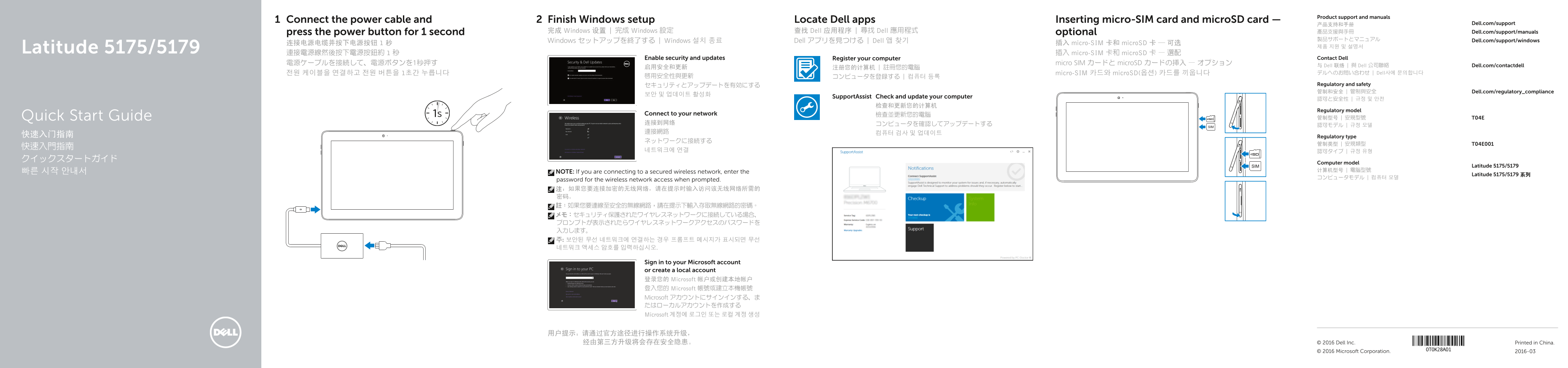
Page 1 Text Content
Product support and manuals
Connect the power cable and Finish Windows setup Locate Dell apps Inserting micro-SIM card and micro SD card —
产品支持和手册 Dell.com/support
press the power button for 1 second 完成 Windows 设置 | 完成 Windows 設定 查找 Dell 应用程序 | 尋找 Dell 應用程式 optional 產品支援與手冊 Dell.com/support/manuals
製品サポートとマニュアル Dell.com/support/windows
Windows セットアップを終了する | Windows 설치 종료 Dell アプリを見つける | Dell 앱 찾기
连接电源电缆并按下电源按钮 1 秒 插入 micro-SIM 卡和 micro SD 卡 — 可选
Latitude 5175/5179 連接電源線然後按下電源按鈕約 1 秒 插入 micro-SIM 卡和 micro SD 卡 — 選配
Enable security and updates Register your computer Contact Dell
電源ケーブルを接続して、電源ボタンを1秒押す micro SIM カードと micro SD カードの挿入 — オプション
与 Dell 联络 | 與 Dell 公司聯絡 Dell.com/contactdell
전원 케이블을 연결하고 전원 버튼을 1초간 누릅니다 micro-SIM 카드와 micro SD(옵션) 카드를 끼웁니다 デルへのお問い合わせ | Dell사에 문의합니다
セキュリティとアップデートを有効にする Regulatory and safety 管制和安全 | 管制與安全 Dell.com/regulatory_compliance
Support Assist Check and update your computer
Regulatory model
Connect to your network 檢查並更新您的電腦
Quick Start Guide 管制型号 | 安規型號 T04E
快速入门指南 Regulatory type
Computer model
Latitude 5175/5179
NOTE: If you are connecting to a secured wireless network, enter the
Latitude 5175/5179 系列
password for the wireless network access when prompted. 注:如果您要连接加密的无线网络,请在提示时输入访问该无线网络所需的 密码。 註:如果您要連線至安全的無線網路,請在提示下輸入存取無線網路的密碼。 メモ:セキュリティ保護されたワイヤレスネットワークに接続している場合、 プロンプトが表示されたらワイヤレスネットワークアクセスのパスワードを 入力します。 주: 보안된 무선 네트워크에 연결하는 경우 프롬프트 메시지가 표시되면 무선 네트워크 액세스 암호를 입력하십시오.
Sign in to your Microsoft account or create a local account 登录您的 Microsoft 帐户或创建本地帐户 登入您的 Microsoft 帳號或建立本機帳號 Microsoft アカウントにサインインする、ま たはローカルアカウントを作成する Microsoft 계정에 로그인 또는 로컬 계정 생성
用户提示:请通过官方途径进行操作系统升级, 经由第三方升级将会存在安全隐患。 © 2016 Dell Inc. Printed in China.
© 2016 Microsoft Corporation. 2016-03
Page Summary Contents For Dell Latitude 5179 2-in-1 Quick User Guide - Windows 8
Manual Details
| Brand | Dell |
|---|---|
| Pages | 2 |
| File Size | 1.16 MB |
| Published | June 23, 2026 |
Enter the captcha to get the download link:

Frequently Asked Questions
如何连接到加密的无线网络?
如果您要连接加密的无线网络,请在提示时输入访问该无线网络所需的密码。
是否可以使用 microSD 卡?
是的,产品具备相应的 MicroSD 卡插槽用于存储数据。
怎样启用系统和安全功能?
您需要“启用安全和更新”(Enable security and updates)并注册您的计算机以确保最佳运行状态。
除了 SIM/microSD 卡之外,还有哪些连接端口可用?
外设接口包括 USB 3.0、Micro-HDMI 连接埠以及专用的耳机端口等。