Dell Inspiron One 2330 Quick User Guide - Windows 8
Summary
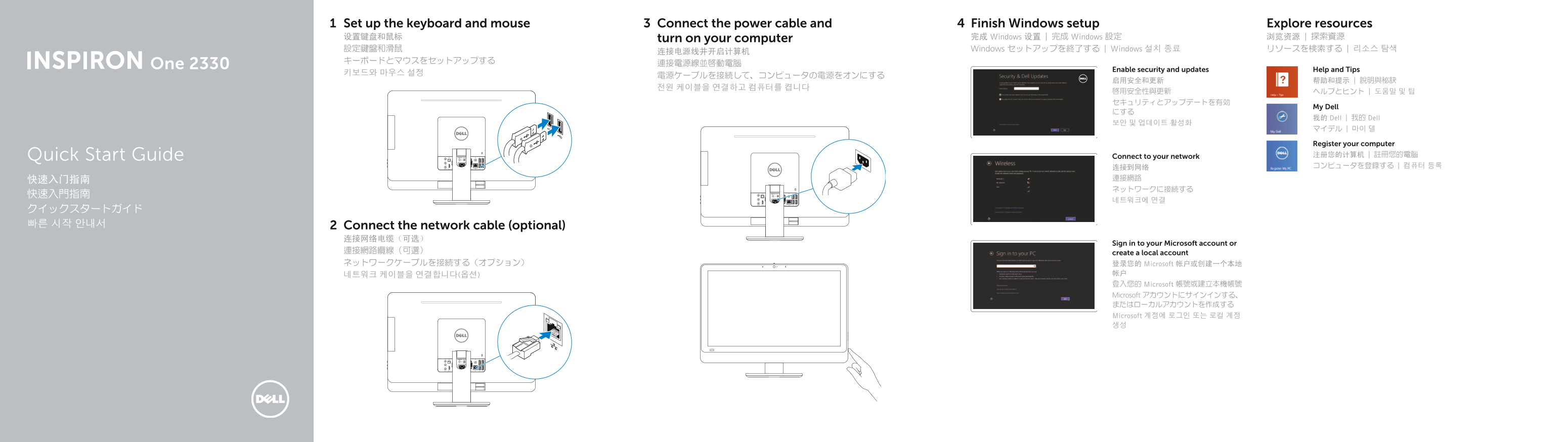
Dell Inspiron One 2330 All-in-One Quick Start Guide. This multilingual setup guide covers keyboard/mouse setup, network cable connection, power connection, Windows setup, security configuration, and network connectivity. Features comprehensive front/back component diagram including dual microphones, camera, optical drive, brightness controls, VGA in/out, S/PDIF, USB 3.0/2.0, audio, and network ports.
Page 1 Text Content
Set up the keyboard and mouse Connect the power cable and Finish Windows setup Explore resources 设置键盘和鼠标 turn on your computer 完成 Windows 设置 | 完成 Windows 設定 浏览资源 | 探索資源 設定鍵盤和滑鼠 Windows セットアップを終了する | Windows 설치 종료 リソースを検索する | 리소스 탐색
One 2330 連接電源線並啟動電腦
Enable security and updates Help and Tips
My Dell
我的 Dell | 我的 Dell
Register your computer Quick Start Guide Connect to your network 注册您的计算机 | 註冊您的電腦 连接到网络 コンピュータを登録する | 컴퓨터 등록
クイックスタートガイド 빠른 시작 안내서 Connect the network cable (optional)
Sign in to your Microsoft account or
連接網路纜線(可選) create a local account ネットワークケーブルを接続する(オプション) 登录您的 Microsoft 帐户或创建一个本地
네트워크 케이블을 연결합니다(옵션) 帐户 登入您的 Microsoft 帳號或建立本機帳號 Microsoft アカウントにサインインする、 またはローカルアカウントを作成する Microsoft 계정에 로그인 또는 로컬 계정 생성
Page Summary Contents For Dell Inspiron One 2330 Quick User Guide - Windows 8
Manual Details
| Brand | Dell |
|---|---|
| Pages | 2 |
| File Size | 371.63 KB |
| Published | July 02, 2026 |
Enter the captcha to get the download link:
