Dell Dimension 5100C Quick Reference Guide
Summary
This is a quick setup guide for a Dell desktop computer (April 2005), providing step-by-step instructions for initial hardware setup. It covers connecting essential peripherals including keyboard, mouse, and monitor through DVI-D and VGA interfaces, plus optional devices such as network cables, modems, CD/DVD drives, floppy drives, media card readers, headphones, microphones, IEEE 1394 ports, and front USB 2.0 connectors. The guide also covers powering on the system and accessing Dell support resources. It targets home and office users setting up their Dell desktop for the first time, with multilingual support.
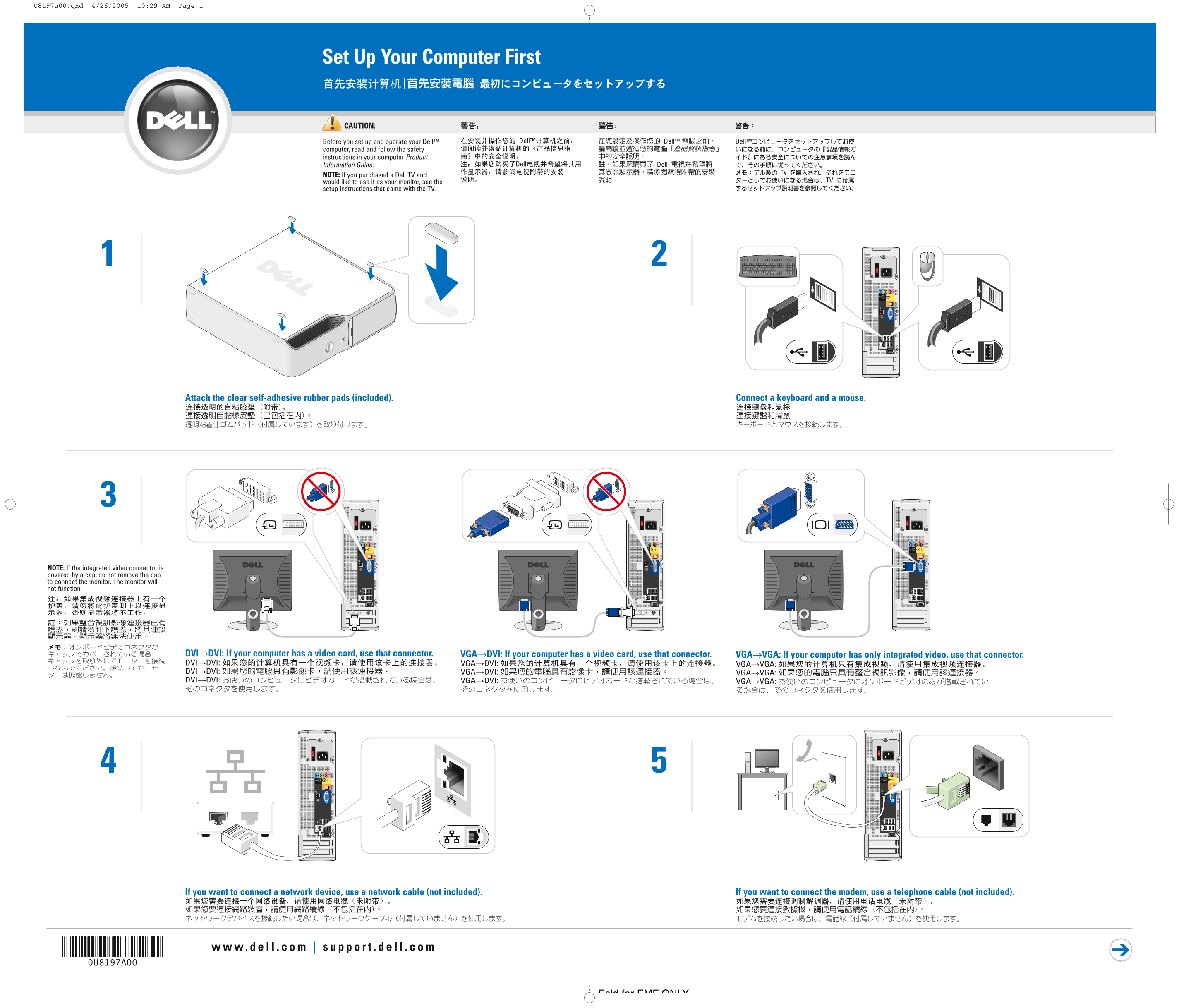
Page 1 Text Content
U8197a00.qxd 4/26/2005 10:29 AM Page 1
Set Up Your Computer First
CAUTION:
Before you set up and operate your Dell™ computer, read and follow the safety instructions in your computer Product Information Guide. NOTE: If you purchased a Dell TV and would like to use it as your monitor, see the setup instructions that came with the TV.
Attach the clear self-adhesive rubber pads (included). Connect a keyboard and a mouse.
NOTE: If the integrated video connector is covered by a cap, do not remove the cap to connect the monitor. The monitor will not function.
DVI→DVI: If your computer has a video card, use that connector. VGA→DVI: If your computer has a video card, use that connector. VGA→VGA: If your computer has only integrated video, use that connector.
If you want to connect a network device, use a network cable (not included). If you want to connect the modem, use a telephone cable (not included).
Fold for EMF ONLY
Page Summary Contents For Dell Dimension 5100C Quick Reference Guide
Manual Details
| Brand | Dell |
|---|---|
| Pages | 2 |
| File Size | 6.94 MB |
| Published | June 25, 2026 |
Enter the captcha to get the download link:

Frequently Asked Questions
What should I do if the monitor won't function?
Do not remove the cap covering the integrated video connector, as the monitor will not function.
Where can I find support tools for the Windows operating system?
Click the Start button and select Help and Support, or visit support.dell.com.
How do I connect devices to the front of the computer?
Use the IEEE 1394 connector for cameras, the headphone/microphone jacks, or the two USB 2.0 ports for game controllers.
What types of media slots are available on the front?
The front door opens to access a CD or DVD drive, a floppy drive, and a media card reader.