Dell 4220 Projector SNMP Configuration Guide
Summary
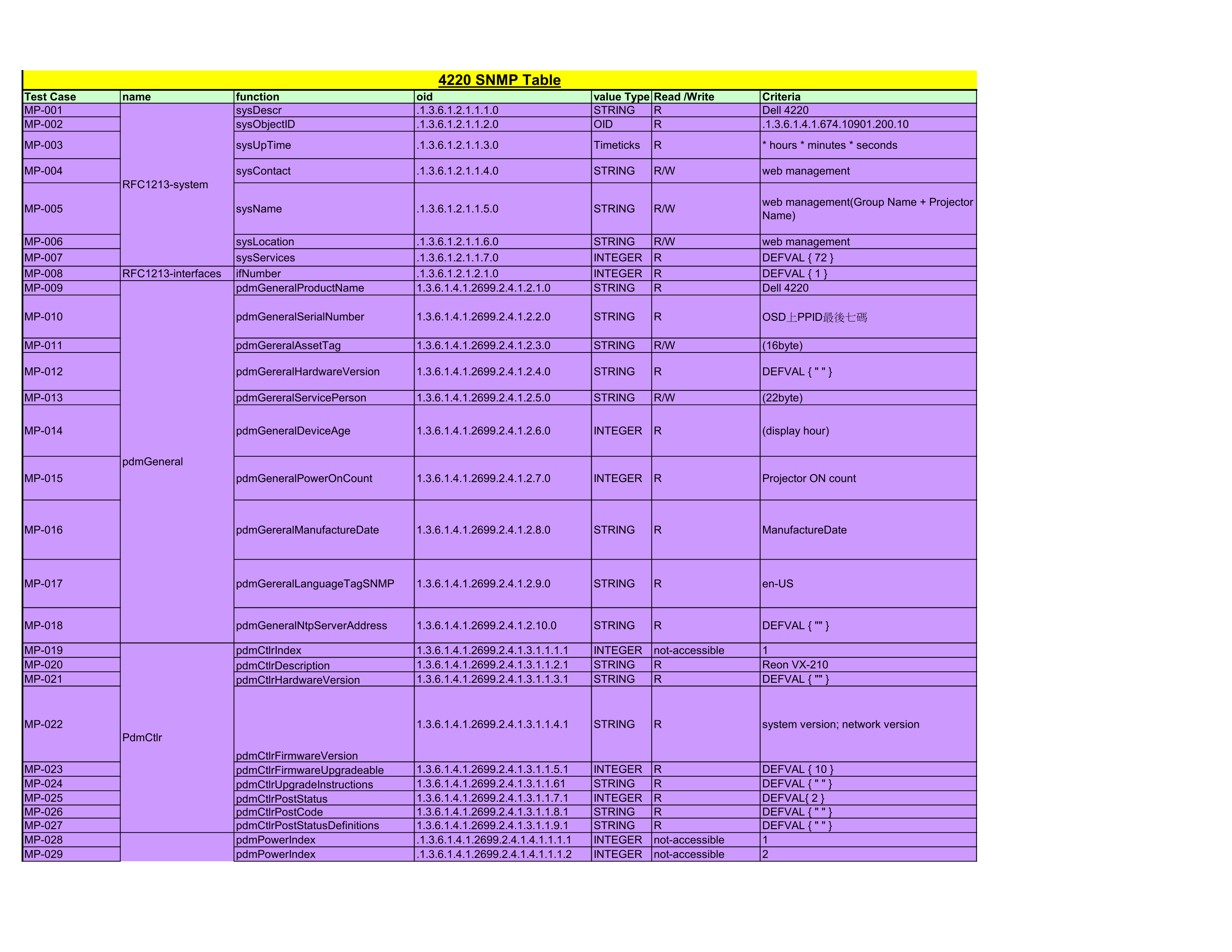
This SNMP Table Test Case document for the Dell 4220 projector defines a comprehensive set of SNMP MIB object identifiers and their properties for network-based projector monitoring and management. It documents system-level MIB objects including system description, contact, name, location, and uptime under RFC1213 standards, along with Dell proprietary MIB extensions covering product name, serial number, asset tag, hardware/firmware versions, device age, power-on count, lamp hours, and network c
Page 1 Text Content
4220 SNMP Table
Test Case name function oid value Type Read /Write Criteria MP-001 sys Descr .1.3.6.1.2.1.1.1.0 STRING Dell 4220 MP-002 sys Object ID .1.3.6.1.2.1.1.2.0 OID .1.3.6.1.4.1.674.10901.200.10 MP-003 sys Up Time .1.3.6.1.2.1.1.3.0 Timeticks * hours * minutes * seconds
MP-004 sys Contact .1.3.6.1.2.1.1.4.0 STRING R/W web management
RFC1213-system
web management(Group Name + Projector
MP-005 sys Name .1.3.6.1.2.1.1.5.0 STRING R/W
Name)
MP-006 sys Location .1.3.6.1.2.1.1.6.0 STRING R/W web management MP-007 sys Services .1.3.6.1.2.1.1.7.0 INTEGER DEFVAL { 72 } MP-008 RFC1213-interfaces if Number .1.3.6.1.2.1.2.1.0 INTEGER DEFVAL { 1 } MP-009 pdm General Product Name 1.3.6.1.4.1.2699.2.4.1.2.1.0 STRING Dell 4220
MP-010 pdm General Serial Number 1.3.6.1.4.1.2699.2.4.1.2.2.0 STRING OSD上PPID最後七碼
MP-011 pdm Gereral Asset Tag 1.3.6.1.4.1.2699.2.4.1.2.3.0 STRING R/W (16byte)
MP-012 pdm Gereral Hardware Version 1.3.6.1.4.1.2699.2.4.1.2.4.0 STRING DEFVAL { " " }
MP-013 pdm Gereral Service Person 1.3.6.1.4.1.2699.2.4.1.2.5.0 STRING R/W (22byte)
MP-014 pdm General Device Age 1.3.6.1.4.1.2699.2.4.1.2.6.0 INTEGER (display hour)
pdm General
MP-015 pdm General Power On Count 1.3.6.1.4.1.2699.2.4.1.2.7.0 INTEGER Projector ON count
MP-016 pdm Gereral Manufacture Date 1.3.6.1.4.1.2699.2.4.1.2.8.0 STRING Manufacture Date
MP-017 pdm Gereral Language Tag SNMP 1.3.6.1.4.1.2699.2.4.1.2.9.0 STRING en-US
MP-018 pdm General Ntp Server Address 1.3.6.1.4.1.2699.2.4.1.2.10.0 STRING DEFVAL { "" }
MP-019 pdm Ctlr Index 1.3.6.1.4.1.2699.2.4.1.3.1.1.1.1 INTEGER not-accessible MP-020 pdm Ctlr Description 1.3.6.1.4.1.2699.2.4.1.3.1.1.2.1 STRING Reon VX-210 MP-021 pdm Ctlr Hardware Version 1.3.6.1.4.1.2699.2.4.1.3.1.1.3.1 STRING DEFVAL { "" }
MP-022 1.3.6.1.4.1.2699.2.4.1.3.1.1.4.1 STRING system version; network version
Pdm Ctlr
pdm Ctlr Firmware Version
MP-023 pdm Ctlr Firmware Upgradeable 1.3.6.1.4.1.2699.2.4.1.3.1.1.5.1 INTEGER DEFVAL { 10 } MP-024 pdm Ctlr Upgrade Instructions 1.3.6.1.4.1.2699.2.4.1.3.1.1.61 STRING DEFVAL { " " } MP-025 pdm Ctlr Post Status 1.3.6.1.4.1.2699.2.4.1.3.1.1.7.1 INTEGER DEFVAL{ 2 } MP-026 pdm Ctlr Post Code 1.3.6.1.4.1.2699.2.4.1.3.1.1.8.1 STRING DEFVAL { " " } MP-027 pdm Ctlr Post Status Definitions 1.3.6.1.4.1.2699.2.4.1.3.1.1.9.1 STRING DEFVAL { " " } MP-028 pdm Power Index .1.3.6.1.4.1.2699.2.4.1.4.1.1.1.1 INTEGER not-accessible MP-029 pdm Power Index .1.3.6.1.4.1.2699.2.4.1.4.1.1.1.2 INTEGER not-accessible
Pdm Power
Page Summary Contents For Dell 4220 Projector SNMP Configuration Guide
Manual Details
| Brand | Dell |
|---|---|
| Pages | 7 |
| File Size | 391.30 KB |
| Published | July 02, 2026 |
Enter the captcha to get the download link:

Frequently Asked Questions
How do I check the projector's serial number or asset tag?
The serial number is typically found via pdmGeneralSerialNumber, and the asset tag can be retrieved using pdmGereralAssetTag.
What status indicates a major operational warning like overheating?
Overheating alerts are managed by setting pdmAlertGroupType to “ThermalSensor” with pdmAlertGroupID="Projector Overheating" and a severity of warning (4).
How can I track the number of times the projector has been powered on?
The power-on count is accessible via pdmGeneralPowerOnCount, which shows the recorded Projector ON count.
What does 'Lamp fail alert' indicate regarding the lamp status?
A Lamp Fail event sets pdmAlertGroupType to “Lamp” and has a Critical severity level (3).
Where can I find general information about the device model name?
The model information is stored in the 'pdmGeneralProductName' object using its specific OID.