Dell 4220 Projector Quick User Guide
Summary
This Dell projector quick setup guide provides multilingual instructions for initial projector installation and operation. It covers wireless dongle assembly, battery installation for the remote control, power and signal cable connections, power button operation, and image adjustment (focus and zoom). The guide includes control panel indicator descriptions in English, Chinese, Japanese, and other languages. Target users include projector installers, AV technicians, and end-users setting up Dell projectors in conference rooms and presentation environments.
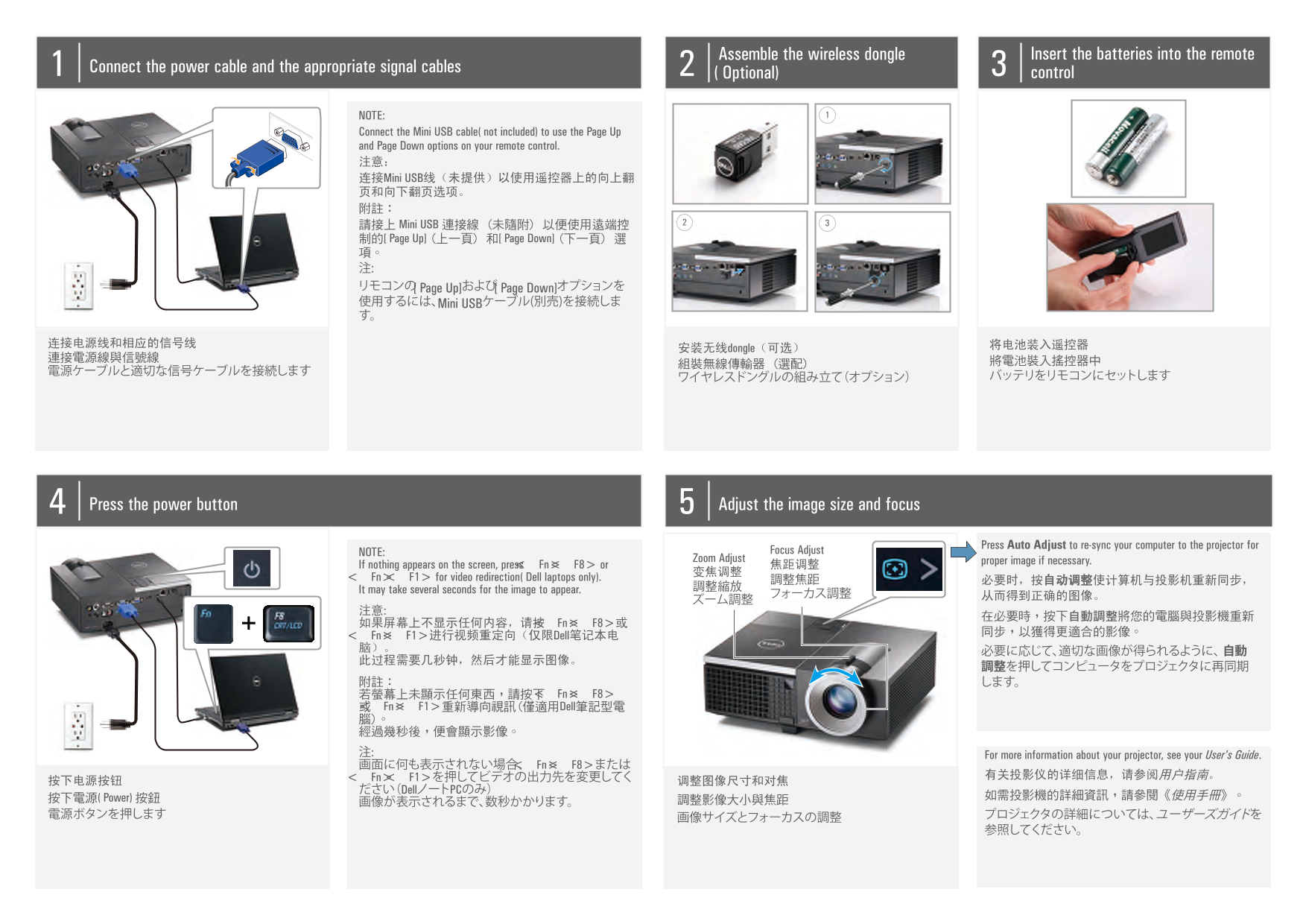
Page 1 Text Content
Assemble the wireless dongle Insert the batteries into the remote
Connect the power cable and the appropriate signal cables
(Optional) control
NOTE: Connect the Mini USB cable (not included) to use the Page Up and Page Down options on your remote control. 注意: 连接Mini USB线(未提供)以使用遥控器上的向上翻 页和向下翻页选项。 附註: 請接上 Mini USB 連接線 (未隨附) 以便使用遠端控 制的 [Page Up] (上一頁) 和 [Page Down] (下一頁) 選 項。 注: リモコンの[Page Up]および[Page Down]オプションを 使用するには、Mini USBケーブル(別売)を接続しま す。
安装无线dongle(可选)
Press the power button Adjust the image size and focus
Press Auto Adjust to re-sync your computer to the projector for
NOTE: Focus Adjust
Zoom Adjust proper image if necessary.
If nothing appears on the screen, press <Fn><F8> or 焦距调整
<Fn> <F1> for video redirection (Dell laptops only). 調整焦距
It may take several seconds for the image to appear.
如果屏幕上不显示任何内容,请按<Fn><F8>或
<Fn><F1>进行视频重定向(仅限Dell笔记本电 脑)。
附註: します。 若螢幕上未顯示任何東西,請按下<Fn><F8> 或<Fn><F1>重新導向視訊(僅適用Dell筆記型電 腦)。 經過幾秒後,便會顯示影像。 注: For more information about your projector, see your User's Guide. 画面に何も表示されない場合、<Fn><F8>または
<Fn> <F1>を押してビデオの出力先を変更してく 有关投影仪的详细信息,请参阅用户指南。
ださい(DellノートPCのみ)
按下電源 (Power) 按鈕 如需投影機的詳細資訊,請參閱《使用手冊》。
Page Summary Contents For Dell 4220 Projector Quick User Guide
Manual Details
| Brand | Dell |
|---|---|
| Pages | 2 |
| File Size | 810.77 KB |
| Published | June 29, 2026 |
Enter the captcha to get the download link:

Frequently Asked Questions
如何进行初步设置和操作?
在设置和使用Dell投影仪之前,必须阅读随附的产品信息指南中的安全注意事项。
如果屏幕上没有内容显示,我该怎么办?
请按<Fn><F8>或<Fn><F1>来执行视频重定向(仅限Dell笔记本电脑)。
如何确保计算机和投影仪重新同步以获得正确图像?
按下自动调整按钮即可使计算机与投影仪重新同步,以达到最佳的影像。
如果我需要更改画面的大小和焦点,应该按哪个按钮?
请使用‘画像尺寸和焦距调整’功能进行操作。