Dell S520 Interactive Projector Quick User Guide
Summary
Quick Start Guide for the Dell S520 Interactive Projector from 2013. Covers projector features including camera for interactivity, lamp cover, focus ring, mini USB, HDMI, VGA output/A-input/B-input, USB type-A/B, RJ-45 network, S-Video, audio input/output, composite video, RS232 serial, and laser curtain connector. Multi-language safety instructions emphasize following included safety documentation before setup and operation.
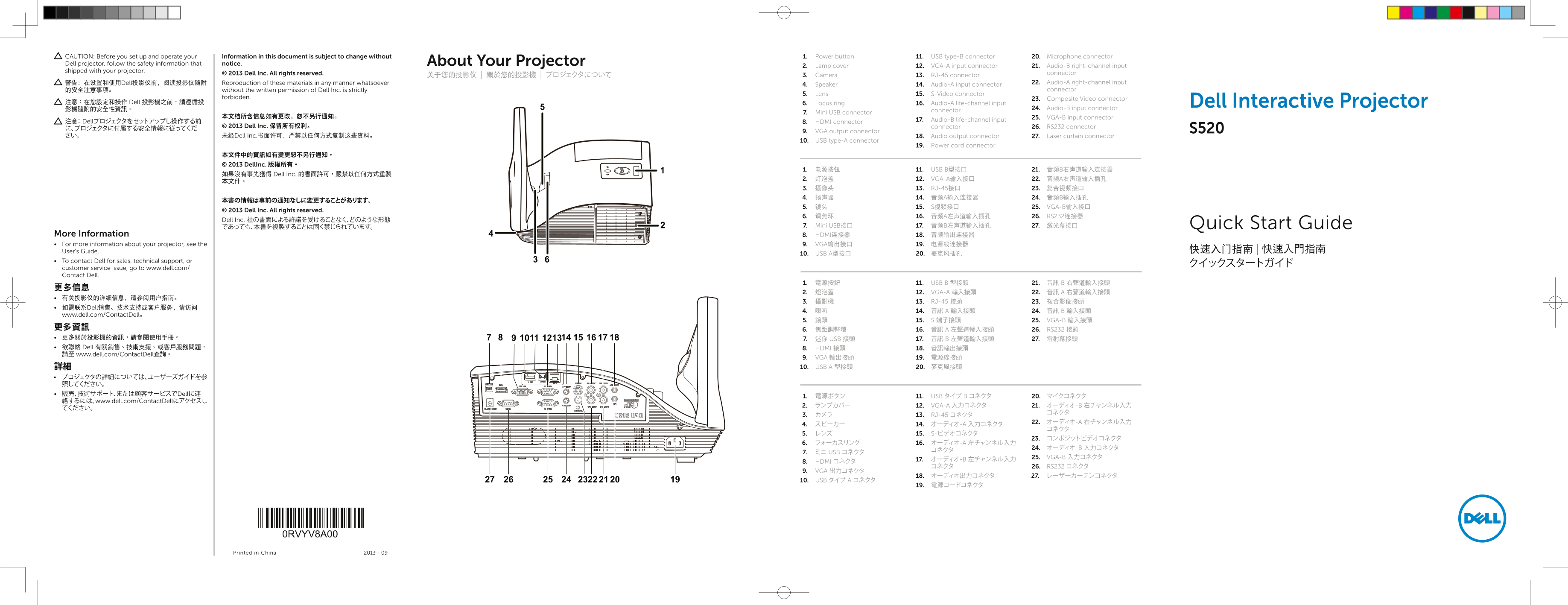
Page 1 Text Content
CAUTION: Before you set up and operate your Information in this document is subject to change without 1. Power button 11. USB type-B connector 20. Microphone connector Dell projector, follow the safety information that notice. About Your Projector
2. Lamp cover 12. VGA-A input connector 21. Audio-B right-channel input
shipped with your projector.
© 2013 Dell Inc. All rights reserved. connector
关于您的投影仪 | 關於您的投影機 | プロジェクタについて 3. Camera 13. RJ-45 connector
警告:在设置和使用Dell投影仪前,阅读投影仪随附 Reproduction of these materials in any manner whatsoever 22. Audio-A right-channel input
4. Speaker 14. Audio-A input connector
的安全注意事项。 without the written permission of Dell Inc. is strictly connector
5. Lens 15. S-Video connector
forbidden. 23. Composite Video connector
注意:在您設定和操作 Dell 投影機之前,請遵循投 6. Focus ring 16. Audio-A life-channel input Dell Interactive Projector
影機隨附的安全性資訊。 24. Audio-B input connector
connector
7. Mini USB connector
本文档所含信息如有更改,恕不另行通知。 25. VGA-B input connector
17. Audio-B life-channel input
注意: Dellプロジェクタをセットアップし操作する前 8. HDMI connector
© 2013 Dell Inc. 保留所有权利。 connector 26. RS232 connector
9. VGA output connector
さい。 未经Dell Inc.书面许可,严禁以任何方式复制这些资料。 18. Audio output connector 27. Laser curtain connector
10. USB type-A connector
19. Power cord connector
本文件中的資訊如有變更恕不另行通知。 © 2013 Dell Inc. 版權所有。
1. 电源按钮 11. USB B型接口 21. 音频B右声道输入连接器
如果沒有事先獲得 Dell Inc. 的書面許可,嚴禁以任何方式重製
2. 灯泡盖 12. VGA-A输入接口 22. 音频A右声道输入插孔
3. 摄像头 13. RJ-45接口 23. 复合视频接口 4. 扬声器 14. 音频A输入连接器 24. 音频B输入插孔
5. 镜头 15. S视频接口 25. VGA-B输入接口
© 2013 Dell Inc. All rights reserved.
6. 调焦环 16. 音频A左声道输入插孔 26. RS232连接器
Dell Inc. 社の書面による許諾を受けることなく、どのような形態
であっても、本書を複製することは固く禁じられています。 7. Mini USB接口 17. 音频B左声道输入插孔 27. 激光幕接口 Quick Start Guide
More Information 8. HDMI连接器 18. 音频输出连接器 For more information about your projector, see the 9. VGA输出接口 19. 电源线连接器
User’s Guide. 快速入门指南 | 快速入門指南
10. USB A型接口 20. 麦克风插孔
To contact Dell for sales, technical support, or
customer service issue, go to www.dell.com/ Contact Dell.
1. 電源按鈕 11. USB B 型接頭 21. 音訊 B 右聲道輸入接頭
2. 燈泡蓋 12. VGA-A 輸入接頭 22. 音訊 A 右聲道輸入接頭
3. 攝影機 13. RJ-45 接頭 23. 複合影像接頭
• 如需联系Dell销售、技术支持或客户服务,请访问
www.dell.com/Contact Dell。
5. 鏡頭 15. S 端子接頭 25. VGA-B 輸入接頭
更多資訊 6. 焦距調整環 16. 音訊 A 左聲道輸入接頭 26. RS232 接頭 • 更多關於投影機的資訊,請參閱使用手冊。 7. 迷你 USB 接頭 17. 音訊 B 左聲道輸入接頭 27. 雷射幕接頭 • 欲聯絡 Dell 有關銷售、技術支援、或客戶服務問題, 8. HDMI 接頭 18. 音訊輸出接頭 請至 www.dell.com/Contact Dell查詢。
9. VGA 輸出接頭 19. 電源線接頭 詳細 10. USB A 型接頭 20. 麥克風接頭
• プロジェクタの詳細については、ユーザーズガイドを参 照してください。 • 販売、技術サポート、または顧客サービスでDellに連
1. 電源ボタン 11. USB タイプ B コネクタ 20. マイクコネクタ
絡するには、www.dell.com/Contact Dellにアクセスし
2. ランプカバー 12. VGA-A 入力コネクタ 21. オーディオ-B 右チャンネル入力
3. カメラ 13. RJ-45 コネクタ
7. ミニ USB コネクタ
25. VGA-B 入力コネクタ
8. HDMI コネクタ
コネクタ 26. RS232 コネクタ
9. VGA 出力コネクタ
10. USB タイプ A コネクタ
0RVYV8A00
Printed in China 2013 - 09
Page Summary Contents For Dell S520 Interactive Projector Quick User Guide
Manual Details
| Brand | Dell |
|---|---|
| Pages | 2 |
| File Size | 939.55 KB |
| Published | July 03, 2026 |
Enter the captcha to get the download link:

Frequently Asked Questions
如何设置投影机以便通过手机连接?
将投影仪切换到无线显示或Intel WiDi输入源模式,并在移动设备上启动应用程序,如WiFi-Doc。
如果想查看系统要求怎么办?
请参阅用户指南获取完整的系统需求信息。
如何安装和初始化触摸功能?
将激光幕套件安装到白板上,然后在电脑上安装触控驱动程序并初始化触控功能。
投影机哪些端口可用于连接数据设备或配件?
它提供了HDMI、VGA输出、USB A/B接口、Mini USB以及多种音频输入和视频连接器(如Rj-45、复合视频等)。