ATMEL AVR32 EVK1100 Getting Started Guide
Summary
The AVR32 EVK1100 is a comprehensive development kit designed for embedded systems engineers working with the AT32UC3A microcontroller series. Featuring the built-in Control Panel, this board allows developers to acquire and log sensor/actuator data and events, making them available through local (USB) or remote web server connections. This Getting Started Guide provides clear, step-by-step instructions on powering up the device, configuring a PC for reliable static IP connectivity, connecting networks, and accessing the Control Panel’s functional web interface to begin rapid prototyping.
Page 1 Text Content
AVR32 EVK1100 Getting Started Guide
Introduction The EVK1100 provides a complete development environment for the AT32UC3A micro-
controller series from Atmel. The device is pre-loaded with an application, called the AT32UC3A Control Panel (in short Control Panel). The Control Panel application is a demonstration application. Its purpose is to log on- board sensors and actuators data and events (data acquisition through ADC channels) and make these available through the various connectivity channels supported by the AT32UC3A microcontroller series. The logs are accessible locally through USART or USB (Mass Storage class), and/or remotely through the Internet (Web server). The Control Panel is locally configurable through USART or USB (Mass Storage class) or remotely configurable through the Internet (Web server).
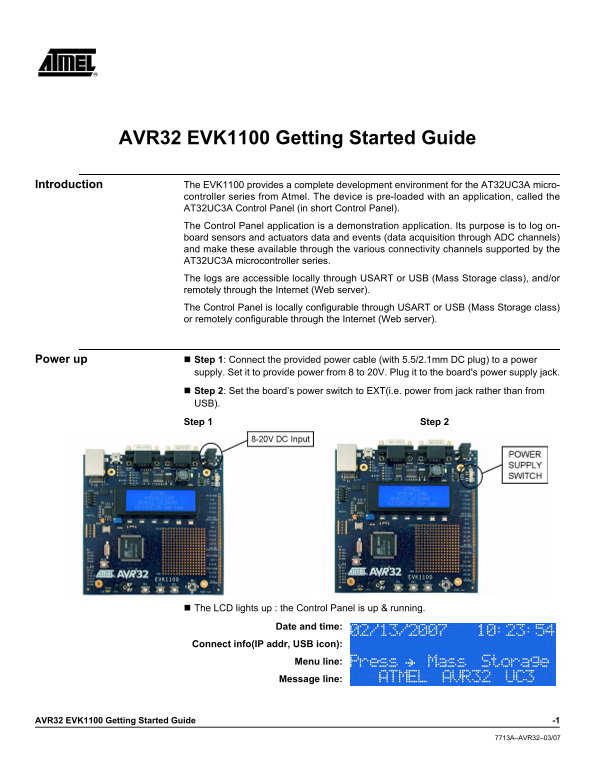
Power up Step 1: Connect the provided power cable (with 5.5/2.1mm DC plug) to a power
supply. Set it to provide power from 8 to 20V. Plug it to the board's power supply jack.
Step 2: Set the board’s power switch to EXT(i.e. power from jack rather than from USB).
Step 1 Step 2
The LCD lights up : the Control Panel is up & running.
Date and time:
Connect info(IP addr, USB icon):
Menu line: Message line:
AVR32 EVK1100 Getting Started Guide -1
7713A–AVR32–03/07
Page Summary Contents For ATMEL AVR32 EVK1100 Getting Started Guide
Manual Details
| Brand | Atmel |
|---|---|
| Pages | 4 |
| File Size | 695.18 KB |
| Published | May 15, 2026 |
Enter the captcha to get the download link:

Frequently Asked Questions
What voltage should be used when powering the EVK1100 board?
The power supply needs to provide power ranging from 8V to 20V using the attached cable.
How does the Control Panel transfer logged data?
Data is available locally through USART or USB (Mass Storage class) and/or remotely via a Web server.
Is special network configuration needed for PC connectivity?
Yes, connecting directly requires configuring the PC's network interface to use a static IP address and subnet mask.
What data types can the Control Panel monitor?
It monitors log on-board sensors and actuators data, performing acquisition through ADC channels.