ASUS ASUS Server Workstation Motherboard P8P67 WS Revolution P8P67 & P8H67 Series BIOS Update Insert Page.
Summary
Optimize your PC's startup sequence with this essential BIOS update for the ASUS P8P67/P8H67 series motherboards. This guide provides comprehensive instructions for managing the 'Boot' menu, allowing users to precisely set boot option priorities and select startup devices. Learn how to configure hardware parameters, manage hard drive and CD/DVD access settings, or enter Windows Safe Mode using simple keyboard shortcuts during system initialization (POST). Ideal for power users, PC builders, and advanced enthusiasts requiring full control over their computer's booting process.
Page 1 Text Content
華碩 P8P67/P8H67 系列 BIOS 更新 以下為 P8P67/P8H67 系列主板的信息更新。
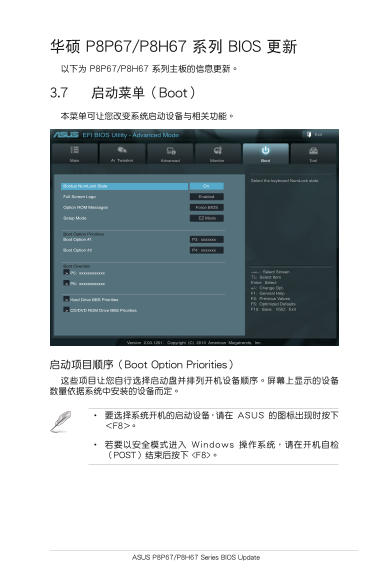
3.7 啟動菜單(Boot) 本菜單可讓您改變系統啟動設備與相關功能。
EFI BIOS Utility - Advanced Mode Exit
Main Ai Tweaker Advanced Monitor Boot Tool
Select the keyboard Num Lock state
Bootup Num Lock State On
Full Screen Logo Enabled
Option ROM Messages Force BIOS
Setup Mode EZ Mode
Boot Option Priorities Boot Option #1 P3: xxxxxxx
Boot Option #2 P4: xxxxxxx
Boot Override
→←: Select Screen
> P5: xxxxxxxxxxxx
↑↓: Select Item Enter: Select
> P6: xxxxxxxxxxxx
+/-: Change Opt. F1: General Help F2: Previous Values
> Hard Drive BBS Priorities
F5: Optimized Defaults F10: Save ESC: Exit
> CD/DVD ROM Drive BBS Priorities
Version 2.00.1201. Copyright (C) 2010 American Megatrends, Inc.
啟動項目順序(Boot Option Priorities) 這些項目讓您自行選擇啟動盤並排列開機設備順序。屏幕上顯示的設備 數量依據系統中安裝的設備而定。
• 要選擇系統開機的啟動設備,請在 ASUS 的圖標出現時按下 <F8>。
• 若要以安全模式進入 Windows 操作系統,請在開機自檢 (POST)結束後按下 <F8>。
ASUS P8P67/P8H67 Series BIOS Update
Page Summary Contents For ASUS ASUS Server Workstation Motherboard P8P67 WS Revolution P8P67 & P8H67 Series BIOS Update Insert Page.
Manual Details
| Brand | Server |
|---|---|
| Pages | 1 |
| File Size | 161.39 KB |
| Published | June 02, 2026 |
Enter the captcha to get the download link:

Frequently Asked Questions
如何更改系統的啟動設備或順序?
您可以在『啟動(Boot)』菜單中進行修改,選擇開機順序並使用F10儲存。
什麼是自定義BIOS更新的版本號和版權資訊?
版本為2.00.1201, 版權屬於(C) 2010 American Megatrends, Inc.。
在啟動菜單中,哪一個按鈕可供使用者選擇系統開機設備?
當ASUS圖標出現時,按下<F8>即可進入選擇系統開機設備的選項。
如果我需要以安全模式進入Windows作業系統,該怎麼操作?
請在開機自檢(POST)結束後按下 <F8> 鍵進行設定。