ViewSonic ePoster Content Creation Guidelines Low Res (English)
Summary
Master the creation of professional digital ePosters optimized for your viewSonic displays. This technical guide provides comprehensive, step-by-step instructions for content creators who utilize design software like PhotoShop. The manual covers essential specifications—including correct resolutions (1920 x 1080), DPI settings, image flattening, rotation, and optimal saving techniques—to ensure your artwork appears vibrant and flawless on any screen. Whether you are a graphic designer or marketer needing high-quality digital display content, this guide ensures your designs meet all industry standards for perfect presentation.
Page 1 Text Content
Solutions Powered by View Sonic®
View Sonic® e Poster Photo Shop Guidelines
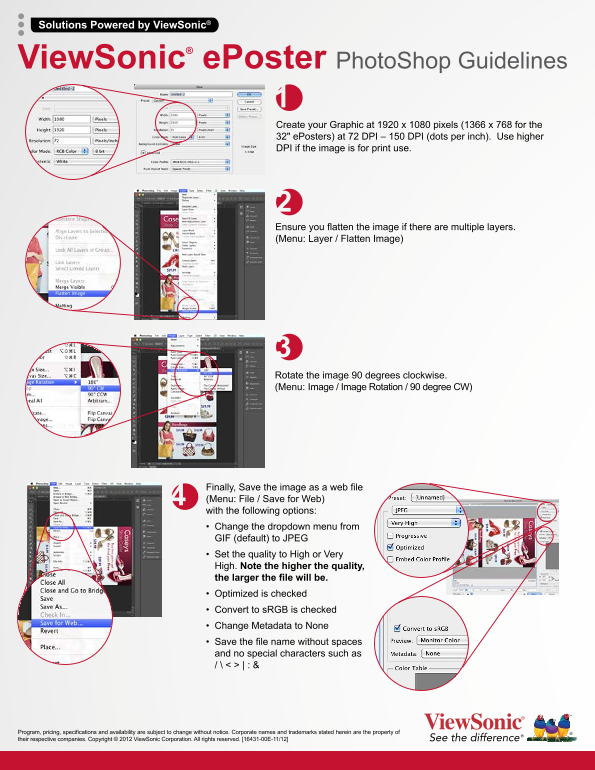
Create your Graphic at 1920 x 1080 pixels (1366 x 768 for the 32" e Posters) at 72 DPI – 150 DPI (dots per inch). Use higher DPI if the image is for print use.
Ensure you flatten the image if there are multiple layers. (Menu: Layer / Flatten Image)
Rotate the image 90 degrees clockwise. (Menu: Image / Image Rotation / 90 degree CW)
Finally, Save the image as a web file (Menu: File / Save for Web) with the following options: • Change the dropdown menu from GIF (default) to JPEG • Set the quality to High or Very High. Note the higher the quality, the larger the file will be. • Optimized is checked • Convert to s RGB is checked • Change Metadata to None • Save the file name without spaces and no special characters such as / \ < > | : &
Program, pricing, specifications and availability are subject to change without notice. Corporate names and trademarks stated herein are the property of their respective companies. Copyright © 2012 View Sonic Corporation. All rights reserved. [16431-00E-11/12]
Page Summary Contents For ViewSonic ePoster Content Creation Guidelines Low Res (English)
Manual Details
| Brand | VIEWSONIC |
|---|---|
| Pages | 1 |
| File Size | 173.47 KB |
| Published | May 31, 2026 |
Enter the captcha to get the download link:

Frequently Asked Questions
What are the recommended dimensions for creating a graphic for this device?
General graphics should be 1920 x 1080 pixels at 72–150 DPI. For 32" ePosters, use 1366 x 768 pixels.
How should I format a multi-layered image before saving it?
You must flatten the image by navigating to: Menu > Layer / Flatten Image.
What steps are needed immediately before saving the final web file?
Rotate your finished image 90 degrees clockwise using Menu > Image / Image Rotation / 90 degree CW.
When saving the graphic as a web file, what critical settings must I adjust?
Change the format from GIF to JPEG, set quality to High or Very High, ensure 'Optimized' is checked, and check 'Convert to sRGB'.