Ruijie RG-RCMS Series Laboratory Rack Control and Management Server 853B13 Version Configuration Manual
Summary
Master this advanced network management system with our technical guide to RLS Management Functionality in RCMS. This manual provides comprehensive, step-by-step instructions necessary for configuring and controlling specialized laboratory networking equipment via LIMP/LINP interfaces. It covers all aspects of setup—from initial feature enablement and IP address targeting to defining device permissions and executing complex configuration scripts (e.g., uploading/downloading configs). Ideal for network engineers and administrators who require expert, granular control over professional testing environments and dedicated hardware resources.
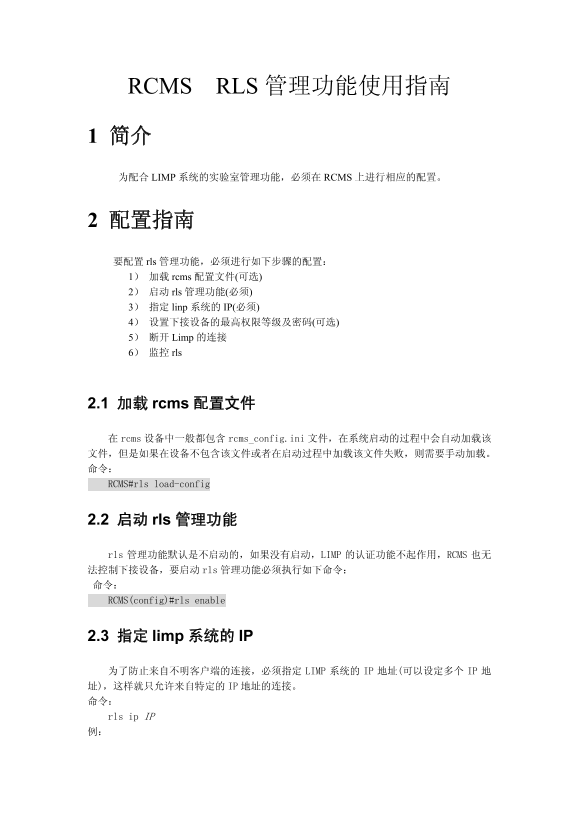
Page 1 Text Content
RCMS RLS 管理功能使用指南
1 简介 为配合 LIMP 系统的实验室管理功能,必须在 RCMS 上进行相应的配置。
2 配置指南 要配置 rls 管理功能,必须进行如下步骤的配置: 1) 加载 rcms 配置文件(可选) 2) 启动 rls 管理功能(必须) 3) 指定 linp 系统的 IP(必须) 4) 设置下接设备的最高权限等级及密码(可选) 5) 断开 Limp 的连接 6) 监控 rls
2.1 加载 rcms 配置文件
rcms 设备中一般都包含 rcms_config.ini 文件,在系统启动的过程中会自动加载该 文件,但是如果在设备不包含该文件或者在启动过程中加载该文件失败,则需要手动加载。 命令: RCMS#rls load-config
2.2 启动 rls 管理功能
rls 管理功能默认是不启动的,如果没有启动,LIMP 的认证功能不起作用,RCMS 也无 法控制下接设备,要启动 rls 管理功能必须执行如下命令: 命令: RCMS(config)#rls enable
2.3 指定 limp 系统的 IP
为了防止来自不明客户端的连接,必须指定 LIMP 系统的 IP 地址(可以设定多个 IP 址),这样就只允许来自特定的 IP 地址的连接。 命令: rls ip IP 例:
Page Summary Contents For Ruijie RG-RCMS Series Laboratory Rack Control and Management Server 853B13 Version Configuration Manual
Manual Details
| Brand | Server |
|---|---|
| Pages | 9 |
| File Size | 133.41 KB |
| Published | June 05, 2026 |
Enter the captcha to get the download link:

Frequently Asked Questions
如何启动RLS管理功能?
使用命令 RCMS(config)#rls enable 启动。
能否来自非指定IP地址的连接访问系统?
不可以。必须使用 'rls ip IP' 命令指定LIMP系统的IP地址,以限制只能来自特定IP的连接。
什么场景下需要手动加载rcms配置文件?
当设备不包含 rcms_config.ini 文件或在启动过程中自动加载失败时,需要执行命令 RCMS#rls load-config 手动加载。
如何检查哪些端口和设备正在使用RLS功能?
可以使用 show rls information 命令查看每个端口的设备基本信息、状态(idle/allow use)以及剩余时间。
如果LIMP系统发生连接问题,应执行何种命令?
可以清除与LIMP系统的连接,使用 'clea rls session [id num]' 来指定或清除ID号对应的会话。