Ruijie RG-RCMS Series Laboratory Rack Control and Management Server 853B13 Version Command Manual
Summary
Master the administration of your laboratory equipment with this comprehensive guide to RCMS system commands. This manual provides detailed instructions on monitoring facility status, clearing communication sessions, and managing device configurations. Covered functions include initial setup validation, enabling the experimental lifecycle management, updating network details, and performing advanced debugging. Designed for lab engineers and technical staff, it ensures seamless operation and troubleshooting across multiple connected devices and LIMP systems.
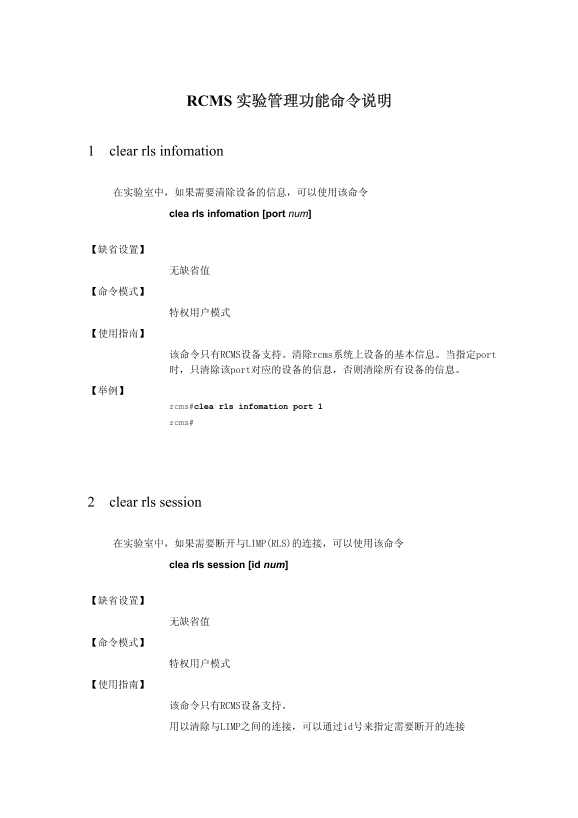
Page 1 Text Content
RCMS 实验管理功能命令说明
1 clear rls infomation
clea rls infomation [port num]
该命令只有RCMS设备支持。清除rcms系统上设备的基本信息。当指定port 时,只清除该port对应的设备的信息,否则清除所有设备的信息。
rcms#clea rls infomation port 1
rcms#
2 clear rls session
在实验室中,如果需要断开与LIMP(RLS)的连接,可以使用该命令
clea rls session [id num]
该命令只有RCMS设备支持。
用以清除与LIMP之间的连接,可以通过id号来指定需要断开的连接
Page Summary Contents For Ruijie RG-RCMS Series Laboratory Rack Control and Management Server 853B13 Version Command Manual
Manual Details
| Brand | Server |
|---|---|
| Pages | 8 |
| File Size | 269.13 KB |
| Published | June 05, 2026 |
Enter the captcha to get the download link:

Frequently Asked Questions
如何清除特定端口的设备信息?
使用命令 `clear rls information port [port num]`。
如果需要断开与LIMP系统的连接,应使用哪个命令?
`clear rls session [id num]` 可以通过ID号指定要断开的连接。
哪些调试信息可以显示RCMS系统运行状态?
可以使用 `debug rls user` (用户认证),`data` (设备交互数据) 或 `event` (与LIMP系统的交互情况)。
如何配置下接设备的最高权限级别和密码?
使用 `facility enable level num secret 0|7 line` 命令进行配置。