Roland F-50 Digital Piano MIDI Implementation User's Manual
Summary
Explore advanced performance capabilities with detailed insights into MIDI implementation for your digital piano. This technical manual provides comprehensive documentation on core controls, including Sostenuto, Soft pedal function, expressive dynamics, and full support for RPN/NRPN data entry. It covers critical setup parameters such as Volume, Expression, local control, and program changes. Ideal for professional musicians, advanced hobbyists, or technicians requiring deep knowledge of MIDI protocol integration to maximize your playing experience.
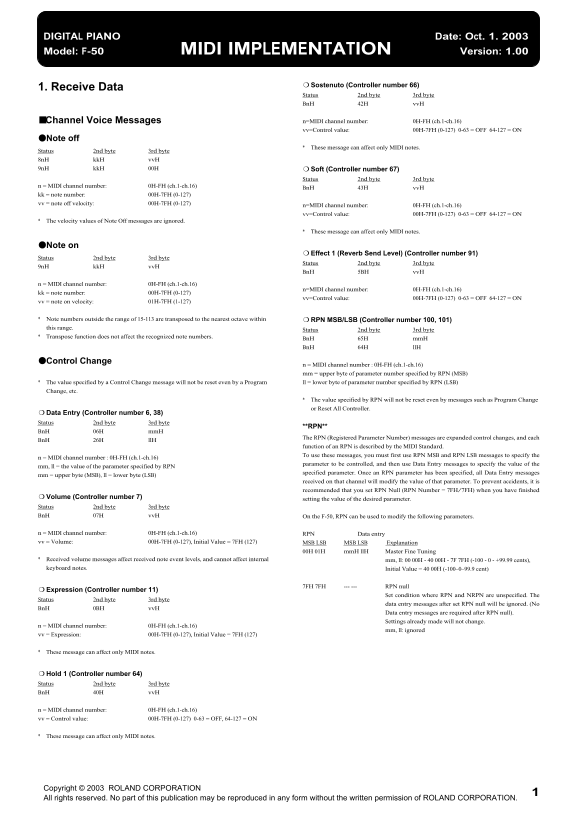
Page 1 Text Content
DIGITAL PIANO Date: Oct. 1. 2003 Model: F-50 MIDI IMPLEMENTATION Version: 1.00
Sostenuto (Controller number 66)
1. Receive Data
Status 2nd byte 3rd byte Bn H 42H vv H
■Channel Voice Messages n=MIDI channel number: 0H-FH (ch.1-ch.16) vv=Control value: 00H-7FH (0-127) 0-63 = OFF 64-127 = ON
●Note off
These message can affect only MIDI notes.
Status 2nd byte 3rd byte 8n H kk H vv H 9n H kk H 00H Soft (Controller number 67)
Status 2nd byte 3rd byte
n = MIDI channel number: 0H-FH (ch.1-ch.16)
Bn H 43H vv H
kk = note number: 00H-7FH (0-127) vv = note off velocity: 00H-7FH (0-127)
n=MIDI channel number: 0H-FH (ch.1-ch.16) vv=Control value: 00H-7FH (0-127) 0-63 = OFF 64-127 = ON
The velocity values of Note Off messages are ignored.
These message can affect only MIDI notes.
●Note on
Effect 1 (Reverb Send Level) (Controller number 91)
Status 2nd byte 3rd byte
Status 2nd byte 3rd byte
9n H kk H vv H
Bn H 5BH vv H
n = MIDI channel number: 0H-FH (ch.1-ch.16)
n=MIDI channel number: 0H-FH (ch.1-ch.16)
kk = note number: 00H-7FH (0-127)
vv=Control value: 00H-7FH (0-127) 0-63 = OFF 64-127 = ON
vv = note on velocity: 01H-7FH (1-127)
Note numbers outside the range of 15-113 are transposed to the nearest octave within RPN MSB/LSB (Controller number 100, 101) this range.
Status 2nd byte 3rd byte
Transpose function does not affect the recognized note numbers.
Bn H 65H mm H Bn H 64H ll H
●Control Change
n = MIDI channel number : 0H-FH (ch.1-ch.16) mm = upper byte of parameter number specified by RPN (MSB)
The value specified by a Control Change message will not be reset even by a Program ll = lower byte of parameter number specified by RPN (LSB) Change, etc.
The value specified by RPN will not be reset even by messages such as Program Change or Reset All Controller.
Data Entry (Controller number 6, 38) Status 2nd byte 3rd byte
**RPN**
Bn H 06H mm H
The RPN (Registered Parameter Number) messages are expanded control changes, and each
Bn H 26H ll H
function of an RPN is described by the MIDI Standard. To use these messages, you must first use RPN MSB and RPN LSB messages to specify the
n = MIDI channel number : 0H-FH (ch.1-ch.16)
parameter to be controlled, and then use Data Entry messages to specify the value of the
mm, ll = the value of the parameter specified by RPN
specified parameter. Once an RPN parameter has been specified, all Data Entry messages
mm = upper byte (MSB), ll = lower byte (LSB)
received on that channel will modify the value of that parameter. To prevent accidents, it is recommended that you set RPN Null (RPN Number = 7FH/7FH) when you have finished
Volume (Controller number 7) setting the value of the desired parameter. Status 2nd byte 3rd byte Bn H 07H vv H On the F-50, RPN can be used to modify the following parameters.
n = MIDI channel number: 0H-FH (ch.1-ch.16) RPN Data entry vv = Volume: 00H-7FH (0-127), Initial Value = 7FH (127) MSB LSB MSB LSB Explanation
00H 01H mm H ll H Master Fine Tuning
Received volume messages affect received note event levels, and cannot affect internal mm, ll: 00 00H - 40 00H - 7F 7FH (-100 - 0 - +99.99 cents), keyboard notes. Initial Value = 40 00H (-100–0–99.9 cent)
7FH 7FH --- --- RPN null
Expression (Controller number 11)
Set condition where RPN and NRPN are unspecified. The
Status 2nd byte 3rd byte
data entry messages after set RPN null will be ignored. (No
Bn H 0BH vv H
Data entry messages are required after RPN null). Settings already made will not change.
n = MIDI channel number: 0H-FH (ch.1-ch.16)
mm, ll: ignored
vv = Expression: 00H-7FH (0-127), Initial Value = 7FH (127)
These message can affect only MIDI notes.
Hold 1 (Controller number 64) Status 2nd byte 3rd byte Bn H 40H vv H
n = MIDI channel number: 0H-FH (ch.1-ch.16) vv = Control value: 00H-7FH (0-127) 0-63 = OFF, 64-127 = ON
These message can affect only MIDI notes.
1Copyright © 2003 ROLAND CORPORATION
All rights reserved. No part of this publication may be reproduced in any form without the written permission of ROLAND CORPORATION.
Page Summary Contents For Roland F-50 Digital Piano MIDI Implementation User's Manual
Manual Details
| Brand | Roland |
|---|---|
| Pages | 5 |
| File Size | 93.77 KB |
| Published | June 04, 2026 |
Enter the captcha to get the download link:

Frequently Asked Questions
How do I modify a specific parameter using RPN messages?
You must first use RPN MSB and RPN LSB messages to select the parameter, followed by Data Entry messages to specify its value.
What is required to reset all controller settings?
Send the 'Reset All Controllers' message (Controller number 121).
How are program change commands processed?
Receiving a Program Change automatically resets certain controllers, such as Grand Piano Expression and Bright Piano Hold 1.
What is the valid range for MIDI note numbers?
MIDI notes and general control values must fall within the range of 00H to 7FH (or 0-127).