# A B C D E F G H I J K L M N O P Q R S T U V W X Y Z

Philips MX800 Patient Monitor User Manual

Summary

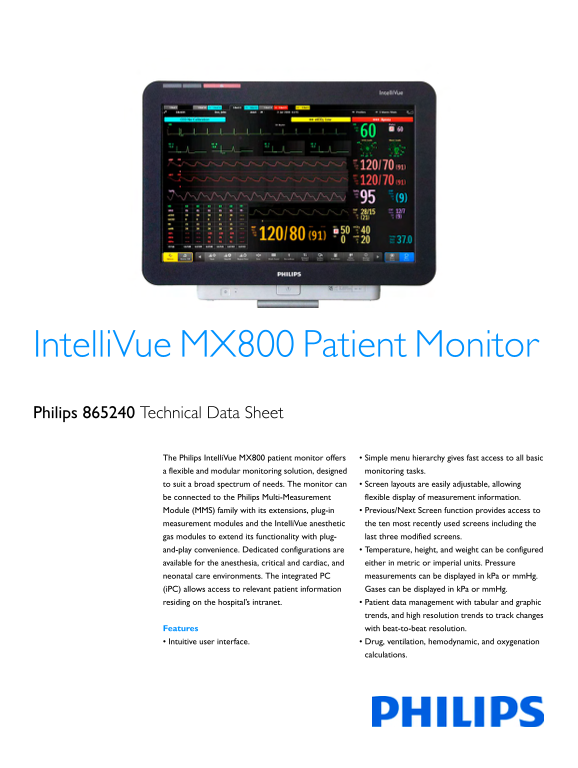
The Philips IntelliVue MX800 is a flexible, modular patient monitor designed for comprehensive physiological tracking in various hospital environments. It provides clinicians with high-resolution data presentation, supporting sophisticated life support calculations (hemodynamic, oxygenation) and offering customizable display layouts. The system features an integrated PC (iPC) and robust connectivity options, enabling advanced event surveillance and seamless integration into hospital IT networks. This manual details the setup, operational capabilities, and clinical applications intended for trained healthcare professionals monitoring adults, pediatrics, and neonates.
📄 Preview PAGE OF 16

Page 1 Text Content

Intelli Vue MX800 Patient Monitor Philips 865240 Technical Data Sheet

The Philips Intelli Vue MX800 patient monitor offers Simple menu hierarchy gives fast access to all basic a flexible and modular monitoring solution, designed monitoring tasks. to suit a broad spectrum of needs. The monitor can Screen layouts are easily adjustable, allowing be connected to the Philips Multi-Measurement flexible display of measurement information. Module (MMS) family with its extensions, plug-in Previous/Next Screen function provides access to measurement modules and the Intelli Vue anesthetic the ten most recently used screens including the gas modules to extend its functionality with plug- last three modified screens. and-play convenience. Dedicated configurations are Temperature, height, and weight can be configured available for the anesthesia, critical and cardiac, and either in metric or imperial units. Pressure neonatal care environments. The integrated PC measurements can be displayed in k Pa or mm Hg. (i PC) allows access to relevant patient information Gases can be displayed in k Pa or mm Hg. residing on the hospital’s intranet. Patient data management with tabular and graphic

trends, and high resolution trends to track changes

Features with beat-to-beat resolution. Intuitive user interface. Drug, ventilation, hemodynamic, and oxygenation

calculations.

Page Summary Contents For Philips MX800 Patient Monitor User Manual

Page 1 Intelli Vue MX800 Patient Monitor Philips 865240 Technical Data Sheet The Philips Intelli Vue MX800 patient monitor offers Simple menu hierarchy gives fast access to all basic a flexible and modular m...
Page 2 User or case-specific profiles enable rapid case turnover. Main Components Patented automatic alarm limits help clinicians provide care more efficiently. Display Event Surveillance including Neonatal ...
Page 3 Touchscreen Operation An MMS Extension can optionally be slotted onto the Multi- The touchscreen is the primary method of operation for the MX800 Measurement Module to add: monitors. The touchscreen d...
Page 4 Cardiac Output/Continuous Cardiac Output measurement Mounting (M3014A), or The mounting options available enable flexible, space saving placement an additional Invasive Pressure or Temperature measure...
Page 5 SO2 and Scv O2 measurements provide guidance for the treatment of Dual Sp O2 measurement provides clinical support through sepsis treatment protocols. comparison and trending of the pulse oximetry val...
Page 6 Screen Display Flexibility Events can be stored in a database for retrospective review, and Up to 20 different screens can be created per monitor, which means episode data including graphic event revi...
Page 7 Alarms Profiles The alarm system can be configured to present either the traditional Profiles are predefined configuration settings for Screens, measurement HP/Agilent/Philips alarm sounds or sounds c...
Page 8 Oxygenation Calculations: Independent Display Arterial Oxygen Content (Ca O2) Venous Oxygen Content (Cv O2) Network Interface Arteriovenous Oxygen Content (Cav O2) The network interface provides the s...
Page 9 Safety Specifications Product W x H x D The monitors, together with the Multi-Measurement Module Weight (M3001A), the X2 Multi-Measurement Module (M3002A) and the M1006B 36 x 99.6 x 97.5 mm Flexible M...
Page 10 Performance Specifications Product W x H x D Weight 35 x 17 x 57 mm MX800 Performance Specifications Intelli Bridge EC5 Module (1.1 oz) 1.4 x 0.7 x 2.1 in Power Power <200 W average 21.5 x 17 x 65 ...
Page 11 MX800 Performance Specifications MX800 Performance Specifications High Res Trend Measurements HR, Sp O2, Resp, Real Time Clock Range from: January 1, 1997, Waves available tcp O2, Pulse, Perf, 00:00 t...
Page 12 MX800 Interface Specifications MX800 Interface Specifications USB Interface Standard USB 2.0 full-speed Intelli Vue 802.11 Type Internal Wireless (4 ports) (embedded host) Bedside Adapter Adapter Conn...
Page 13 MX800 Interface Specifications Interfaces Analog ECG Signal gain 320 to 3200 in 19 steps Microphone input stereo 3.5 mm audio jack Output Full scale on display signal gain x measured heasphone output ...
Page 14 Application Options Measurements Option SSC Sepsis Protocol P02 Sp O2 (Nellcor Compatible) M1020B A02 Sp O2 (Masimo SET) M1020B A03 Measurement Options Sv O2 M1021A EEG M1027A Measurements Option Temp...
Page 15 Cables Documentation All documentation is available in .pdf format on documentation DVD and is shipped with the product. Additionally, a printed copy of the Length Description Product/Option Instructi...
Page 16 Philips Healthcare is part of Royal Philips Electronics M3001A complies with the requirements of How to reach us the Council Directive 93/42/EEC of 14 June www.philips.com/healthcare 1993 (Medical Dev...

Manual Details

Brand Philips
Pages 16
File Size 658.46 KB
Published June 06, 2026
35 views

Enter the captcha to get the download link:

captcha

Frequently Asked Questions

What kind of display resolution is supported on the MX800?

The monitor has a color 19” LCD TFT display that supports high-resolution waveform and data presentation, including widescreen formats.

How can I connect external computer peripherals?

It offers five USB 2.0 ports (High-Speed mode) for connectivity to external devices like keyboards, mice, barcode readers, or printers.

Does the MX800 support dual display setups?

Yes, a second independent display can be connected via an optional Independent Display Interface, or it supports connecting to another Philips or manufacturer's medical-grade display.

What operating system does the integrated PC (iPC) use?

The iPC uses MS Windows 7 or XP as the operating system and is designed for continuous operation in the patient vicinity.