PHILIPS Headband Headset User Manual User Guide
Summary
Optimize your audio experience with this comprehensive user guide for your neckband headset. This manual provides clear, step-by-step instructions covering initial setup, volume adjustment, and seamless connectivity to your computer. Whether you are navigating complex controls or simply setting up microphone usage, we provide reliable guidance to ensure optimal performance for calls, streaming, and work from home setups. Designed for all users, this guide ensures immediate operational success with your new PC headset.
Page 1 Text Content
Register your product and get support at
Neckband headset
www.philips.com/welcome User manual
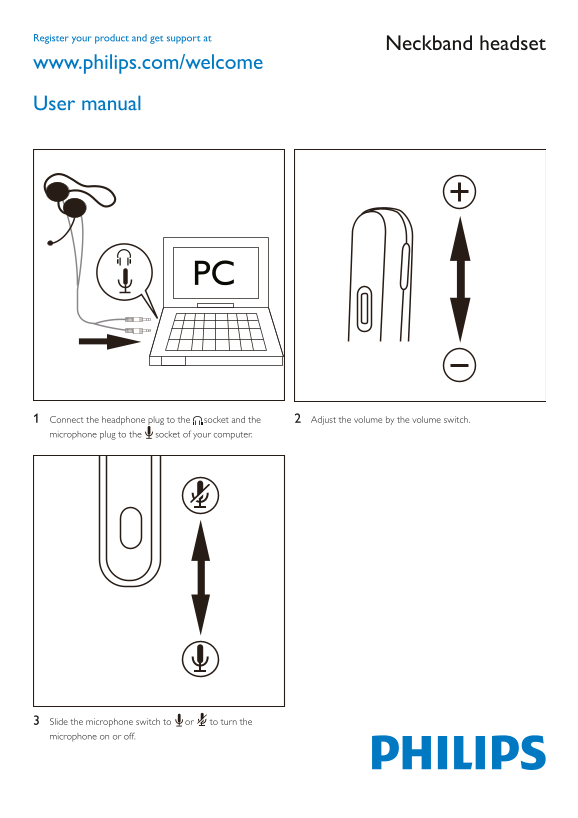
1 Connect the headphone plug to the socket and the 2 Adjust the volume by the volume switch.
microphone plug to the socket of your computer.
3 Slide the microphone switch to or to turn the microphone on or off.
Page Summary Contents For PHILIPS Headband Headset User Manual User Guide
Manual Details
| Brand | Philips |
|---|---|
| Pages | 1 |
| File Size | 337.16 KB |
| Published | June 06, 2026 |
Enter the captcha to get the download link:

Frequently Asked Questions
How do I connect the headset?
Connect the headphone plug to the socket and the microphone plug to the socket of your computer.
How do I control the microphone when I need it off?
Slide the microphone switch to position 1 or 2 to turn the microphone on or off.
What controls the audio volume?
Adjust the volume using the volume switch (Step 2).
Where can I get support for this product?
Visit www.philips.com/welcome and register your product to receive support.