Panasonic RQ-CR07V User Guide and Manual
Summary
This comprehensive manual guides the operation and maintenance of your portable stereo radio cassette player. It provides users with step-by-step instructions for mastering AM/FM tuning, utilizing headphone jacks, and performing normal tape playback. The guide is essential for ensuring optimal performance, as it covers troubleshooting common issues like weak reception or no sound, proper battery installation, and gentle cleaning procedures. Ideal for any user who wishes to operate their audio unit correctly and maximize its musical enjoyment.
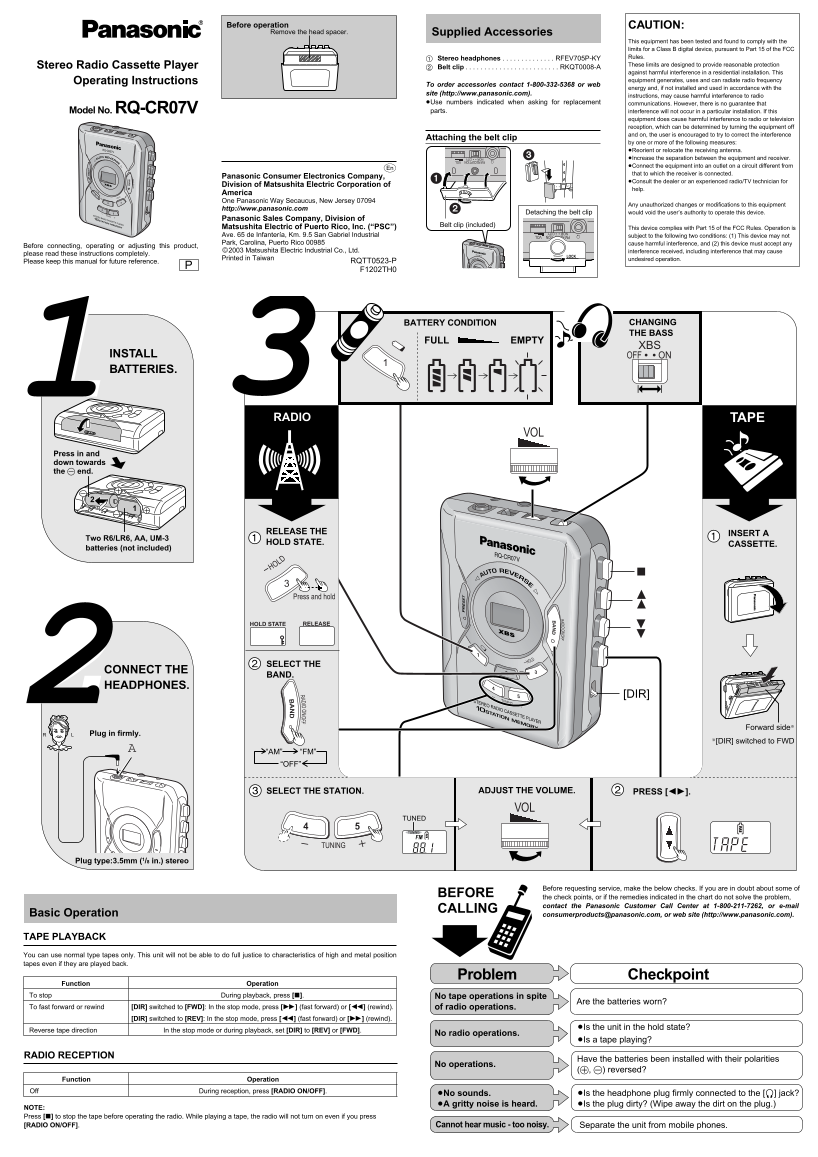
Page 1 Text Content
Before operation CAUTION:
Remove the head spacer. Supplied Accessories
This equipment has been tested and found to comply with the limits for a Class B digital device, pursuant to Part 15 of the FCC Stereo headphones . . . . . . . . . . . . . . RFEV705P-KY Rules. Stereo Radio Cassette Player These limits are designed to provide reasonable protection
Belt clip . . . . . . . . . . . . . . . . . . . . . . . . . RKQT0008-A
against harmful interference in a residential installation. This Operating Instructions equipment generates, uses and can radiate radio frequency
To order accessories contact 1-800-332-5368 or web
energy and, if not installed and used in accordance with the
site (http://www.panasonic.com).
instructions, may cause harmful interference to radio
≥Use numbers indicated when asking for replacement communications. However, there is no guarantee that Model No. RQ-CR07V parts. interference will not occur in a particular installation. If this
equipment does cause harmful interference to radio or television reception, which can be determined by turning the equipment off and on, the user is encouraged to try to correct the interference
Attaching the belt clip
by one or more of the following measures: ≥Reorient or relocate the receiving antenna. ≥Increase the separation between the equipment and receiver. ≥Connect the equipment into an outlet on a circuit different from that to which the receiver is connected.
Panasonic Consumer Electronics Company,
≥Consult the dealer or an experienced radio/TV technician for
Division of Matsushita Electric Corporation of
help.
America One Panasonic Way Secaucus, New Jersey 07094
Any unauthorized changes or modifications to this equipment
http://www.panasonic.com
Detaching the belt clip would void the user’s authority to operate this device.
Panasonic Sales Company, Division of
Belt clip (included)
Matsushita Electric of Puerto Rico, Inc. (“PSC”) This device complies with Part 15 of the FCC Rules. Operation is Ave. 65 de Infantería, Km. 9.5 San Gabriel Industrial subject to the following two conditions: (1) This device may not Park, Carolina, Puerto Rico 00985 cause harmful interference, and (2) this device must accept any
Before connecting, operating or adjusting this product,
©2003 Matsushita Electric Industrial Co., Ltd. interference received, including interference that may cause
please read these instructions completely.
Printed in Taiwan undesired operation.
Please keep this manual for future reference. RQTT0523-P F1202TH0
BATTERY CONDITION CHANGING THE BASS
FULL EMPTY
INSTALL ONOFF BATTERIES.
TAPERADIO
Press in and down towards the - end.
RADIO ON/OFF
RELEASE THE INSERT A
Two R6/LR6, AA, UM-3
HOLD STATE. CASSETTE.
batteries (not included)
Press and hold
HOLD STATE RELEASE
SELECT THE
CONNECT THE
BAND.
HEADPHONES.
[DIR]
Forward side§
Plug in firmly.
§[DIR] switched to FWD
“AM” “FM” “OFF”
THE STATION. THE VOLUME.SELECT PRESS [21].ADJUST
TUNED TUNING FM
TUNING
Plug type:3.5mm (1/8 in.) stereo
Before requesting service, make the below checks. If you are in doubt about some of
BEFORE
the check points, or if the remedies indicated in the chart do not solve the problem, contact the Panasonic Customer Call Center at 1-800-211-7262, or e-mail
CALLING
Basic Operation [email protected], or web site (http://www.panasonic.com).
FM RECEPTION VOL
NOR CITY
TAPE PLAYBACK You can use normal type tapes only. This unit will not be able to do full justice to characteristics of high and metal position tapes even if they are played back.
Problem Checkpoint
Function Operation
To stop During playback, press [∫]. FM RECEPTION VOL
NOR CITY No tape operations in spite
Are the batteries worn?
To fast forward or rewind [DIR] switched to [FWD]: In the stop mode, press [5] (fast forward) or [6] (rewind). of radio operations.
[DIR] switched to [REV]: In the stop mode, press [6] (fast forward) or [5] (rewind).
≥Is the unit in the hold state?
Reverse tape direction In the stop mode or during playback, set [DIR] to [REV] or [FWD].
No radio operations.
≥Is a tape playing?
RADIO RECEPTION
Have the batteries been installed with their polarities
No operations.
(+, -) reversed?
Function Operation
Off During reception, press [RADIO ON/OFF].
≥No sounds. ≥Is the headphone plug firmly connected to the [Ë] jack? ≥A gritty noise is heard. ≥Is the plug dirty? (Wipe away the dirt on the plug.)
NOTE: Press [∫] to stop the tape before operating the radio. While playing a tape, the radio will not turn on even if you press [RADIO ON/OFF]. Cannot hear music - too noisy. Separate the unit from mobile phones.
Page Summary Contents For Panasonic RQ-CR07V User Guide and Manual
Manual Details
| Brand | Panasonic |
|---|---|
| Pages | 2 |
| File Size | 274.40 KB |
| Published | June 17, 2026 |
Enter the captcha to get the download link:

Frequently Asked Questions
How do I install batteries in this player?
Insert two AA R6/LR6 batteries with correct (+,-) polarity.
Can I play metal cassette tapes on this unit?
No, it only supports normal type tapes for playback.
Why won't the radio turn on while a tape is playing?
Press [∫] to stop the tape first; radio won't turn on during tape playback.
How do I clean the tape heads?
Wipe the heads regularly with a soft cloth to remove dirt.