Panasonic LCD TV Setup Manual (2)
Summary
Optimize your new Panasonic VIERA television with this comprehensive setup guide. This resource assists first-time owners in maximizing their viewing experience by detailing initial setup procedures, connectivity options for cable or antenna inputs, and advanced picture adjustments (Vivid, Standard, Cinema modes). Whether you are connecting via HDMI or optimizing contrast settings, the manual provides clear instructions on system operation, troubleshooting resets, and integrating your television into any home entertainment setup.
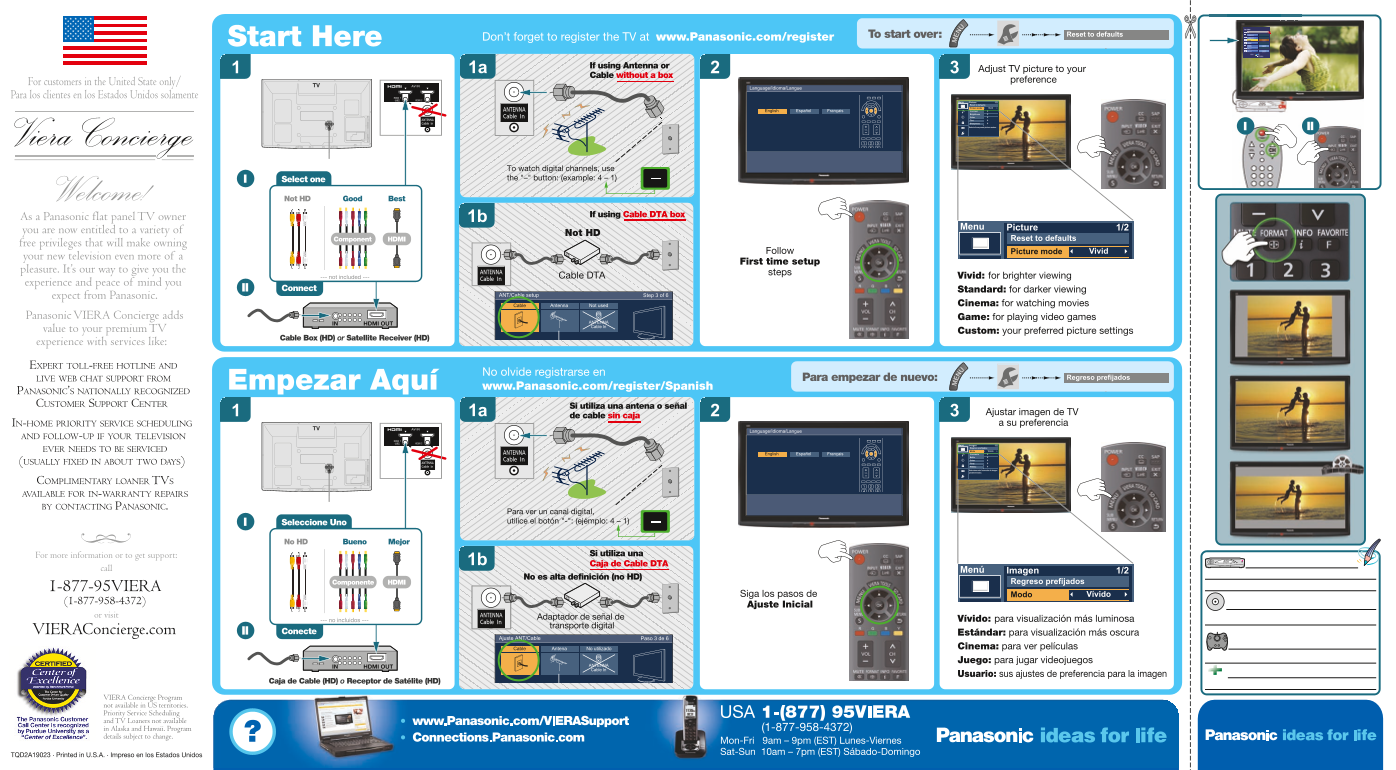
Page 1 Text Content
To start over: Unplug TV power for 3 minutes. Reset to defaults To start over:
Start Here Don’t forget to register the TV at www.Panasonic.com/register To start over: Unplug TV power for 3 minutes.
If using Antenna or
1a Adjust TV picture to your
Cable without a box
preference
For customers in the United State only/
Language/Idioma/Langue
Para los clientes en los Estados Unidos solamente
Menu Picture 1/2
Reset to defaults
Picture mode Vivid
English Español Français Contrast Brightness Color Tint Sharpness Selects from preset picture modes. II
To watch digital channels, use Select one the "–" button: (example: 4 – 1)
Welcome! Not HD Good Best
As a Panasonic flat panel TV owner If using Cable DTA box
Menu Picture 1/2
you are now entitled to a variety of
Not HD
HDMIComponent Reset to defaults
free privileges that will make owning
Follow Picture mode Vivid
your new television even more of
First time setup
pleasure. It’s our way to give you the
steps
--- not included --- Cable DTA Vivid: for brighter viewing
experience and peace of mind you
II Connect Standard: for darker viewing
expect from Panasonic. ANT/Cable setup Step 3 of 6
Cable Antenna Not used Cinema: for watching movies
Panasonic VIERA Concierge adds Game: for playing video games
HDMI OUTIN ANTENNA Cable In
value to your premium TV Custom: your preferred picture settings
Cable Box (HD) or Satellite Receiver (HD)
experience with services like: EXPERT TOLL-FREE HOTLINE AND
No olvide registrarse en
LIVE WEB CHAT SUPPORT FROM Pour recommencer : Débranchez le téléviseur pendant 3 minutes. nuevo: Regreso prefijados Para empezar d
Empezar Aquí To start over: Unplug TV power for 3 minutes.
www.Panasonic.com/register/Spanish
PANASONIC’S NATIONALLY RECOGNIZED CUSTOMER SUPPORT CENTER Si utiliza una antena o señal
1a Ajustar imagen de TV
de cable sin caja
IN-HOME PRIORITY SERVICE SCHEDULING a su preferencia
Language/Idioma/Langue
AND FOLLOW-UP IF YOUR TELEVISION
Menú Imagen 1/2
Regreso prefijados
EVER NEEDS TO BE SERVICED Modo Vívido
English Español Français Contraste Brillo Color (USUALLY FIXED IN ABOUT TWO DAYS) Tinte Nitidez Selecciona entre los modos de imagen predeterminados.
COMPLIMENTARY LOANER TVS AVAILABLE FOR IN-WARRANTY REPAIRS BY CONTACTING PANASONIC.
Para ver un canal digital, Seleccione Uno utilice el botón "-": (ejémplo: 4 – 1)
No HD Bueno Mejor
For more information or to get support: Si utiliza una
1b Caja de Cable DTA
call Menú Imagen 1/2
No es alta definición (no HD)
HDMIComponente Regreso prefijados
1-877-95VIERA
Siga los pasos de Modo Vívido
Ajuste Inicial
or visit Adaptador de señal de
--- no incluidos --- Vívido: para visualización más luminosa
transporte digital
VIERAConcierge.com II Conecte Estándar: para visualización más oscura
Ajuste ANT/Cable Paso 3 de 6
Cable Antena No utilizado Cinema: para ver películas
Juego: para jugar videojuegos
HDMI OUTIN ANTENNA Cable In
Usuario: sus ajustes de preferencia para la imagen
Caja de Cable (HD) o Receptor de Satélite (HD)
VIERA Concierge Program not available in US territories. Priority Service Scheduling and TV Loaners not available in Alaska and Hawaii. Program details subject to change.
TQD2A19023 . Printed in U.S.A. . Impreso en los Estados Unidos
Page Summary Contents For Panasonic LCD TV Setup Manual (2)
Manual Details
| Brand | Panasonic |
|---|---|
| Pages | 1 |
| File Size | 1.23 MB |
| Published | June 01, 2026 |
Enter the captcha to get the download link:

Frequently Asked Questions
How do I reset the television picture settings?
To reset, unplug the TV power for 3 minutes and then follow the instructions to use 'Reset to defaults' in the Picture menu.
Where can I register my new Panasonic TV?
You must register your TV at www.Panasonic.com/register.
What input settings are available for varied viewing experiences?
Available presets include Vivid (bright), Standard (darker), Cinema, and Custom settings for various media types.
How do I watch a specific digital channel on the TV?
Use the '-' button followed by the desired channel number (e.g., 4 - 1).