OMRON ZN-A ZN-A2502 Air Clean Unit Instruction Sheet
Summary
This specialized industrial monitoring system provides accurate filter clogging detection and localized air purification for sensitive manufacturing environments. It is designed to maintain optimal cleanliness by reducing airborne dust in production lines. This technical manual serves as a comprehensive guide detailing safe installation, electrical setup, and advanced configurations. Users—including automation engineers, maintenance technicians, and facility managers—will find detailed instructions on communication protocols (RS-422/RS-485), power requirements, warning precautions, and automatic air volume adjustment features for seamless system integration.
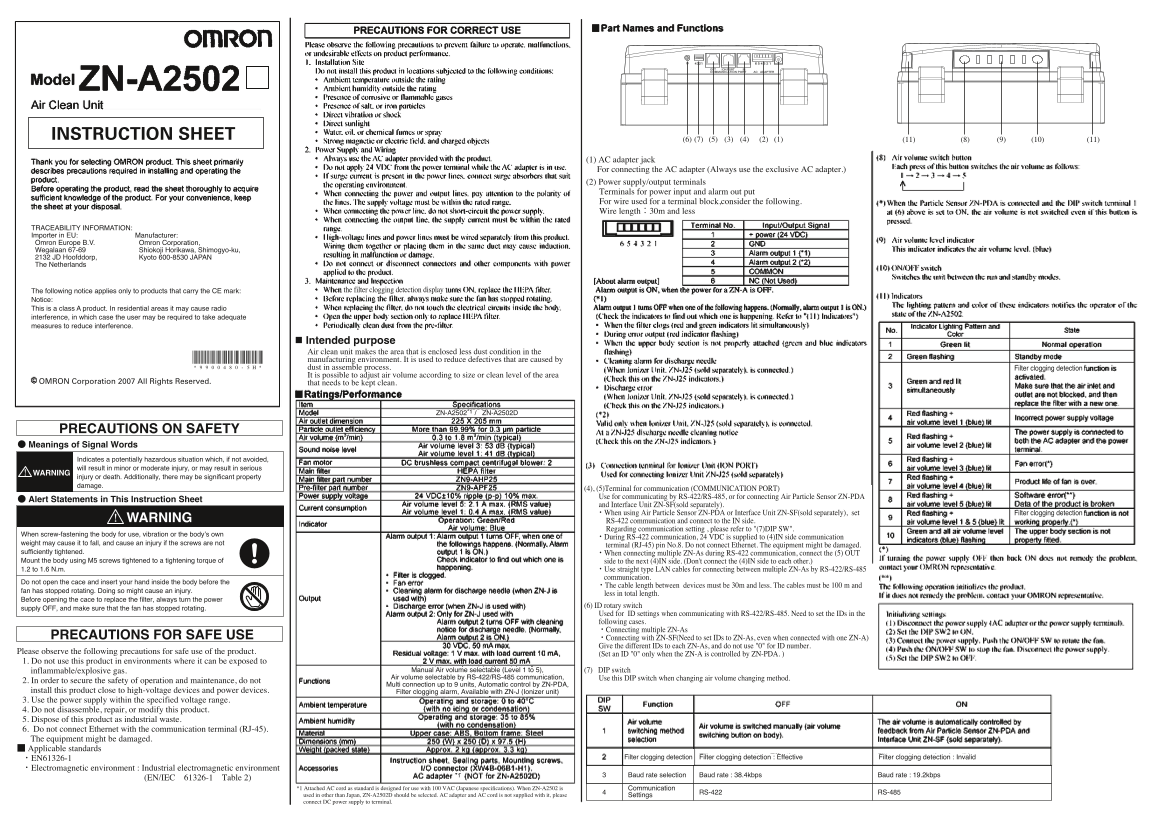
Page 1 Text Content
INSTRUCTION SHEET
(1) AC adapter jack For connecting the AC adapter (Always use the exclusive AC adapter.) (2) Power supply/output terminals Terminals for power input and alarm out put For wire used for a terminal block,consider the following. Wire length:30m and less
TRACEABILITY INFORMATION: Importer in EU: Manufacturer: Omron Europe B.V. Omron Corporation, Wegalaan 67-69 Shiokoji Horikawa, Shimogyo-ku, 2132 JD Hoofddorp, Kyoto 600-8530 JAPAN The Netherlands
The following notice applies only to products that carry the CE mark: the filter clogging detection display
Notice: This is a class A product. In residential areas it may cause radio interference, in which case the user may be required to take adequate measures to reduce interference.
Intended purpose Air clean unit makes the area that is enclosed less dust condition in the manufacturing environment. It is used to reduce defectives that are caused by dust in assemble process. Filter clogging detection It is possible to adjust air volume according to size or clean level of the area
OMRON Corporation 2007 All Rights Reserved. that needs to be kept clean.
9900480-5EF
ZN-A2502 / ZN-A2502D *1
PRECAUTIONS ON SAFETY ● Meanings of Signal Words Indicates a potentially hazardous situation which, if not avoided, will result in minor or moderate injury, or may result in serious WARNING injury or death. Additionally, there may be significant property damage.
(4), (5)Terminal for communication (COMMUNICATION PORT) Use for communicating by RS-422/RS-485, or for connecting Air Particle Sensor ZN-PDA
● Alert Statements in This Instruction Sheet
and Interface Unit ZN-SF(sold separately). ・When using Air Particle Sensor ZN-PDA or Interface Unit ZN-SF(sold separately), set Filter clogging detection
WARNING RS-422 communication and connect to the IN side.
Regarding communication setting , please refer to "(7)DIP SW".
When screw-fastening the body for use, vibration or the body’s own
・During RS-422 communication, 24 VDC is supplied to (4)IN side communication
weight may cause it to fall, and cause an injury if the screws are not
terminal (RJ-45) pin No.8. Do not connect Ethernet. The equipment might be damaged.
sufficiently tightened. ・When connecting multiple ZN-As during RS-422 communication, connect the (5) OUT Mount the body using M5 screws tightened to a tightening torque of side to the next (4)IN side. (Don't connect the (4)IN side to each other.) 1.2 to 1.6 N.m. ・Use straight type LAN cables for connecting between multiple ZN-As by RS-422/RS-485
communication.
Do not open the cace and insert your hand inside the body before the
・The cable length between devices must be 30m and less. The cables must be 100 m and
fan has stopped rotating. Doing so might cause an injury.
less in total length.
Before opening the cace to replace the filter, always turn the power
(6) ID rotary switch
supply OFF, and make sure that the fan has stopped rotating.
Used for ID settings when communicating with RS-422/RS-485. Need to set the IDs in the following cases. ・Connecting multiple ZN-As
PRECAUTIONS FOR SAFE USE ・Connecting with ZN-SF(Need to set IDs to ZN-As, even when connected with one ZN-A)
Give the different IDs to each ZN-As, and do not use "0" for ID number.
Please observe the following precautions for safe use of the product.
(Set an ID "0" only when the ZN-A is controlled by ZN-PDA. )
1. Do not use this product in environments where it can be exposed to
inflammable/explosive gas. Manual Air volume selectable (Level 1 to 5), (7) DIP switch Air volume selectable by RS-422/RS-485 communication, Use this DIP switch when changing air volume changing method.
2. In order to secure the safety of operation and maintenance, do not
Multi connection up to 9 units, Automatic control by ZN-PDA,
Keep terminal 4 always being OFF.
install this product close to high-voltage devices and power devices. Filter clogging alarm, Available with ZN-J (Ionizer unit) 3. Use the power supply within the specified voltage range. 4. Do not disassemble, repair, or modify this product. 5. Dispose of this product as industrial waste. 6. Do not connect Ethernet with the communication terminal (RJ-45). The equipment might be damaged. ■ Applicable standards
・EN61326-1 Filter clogging detection : Effective Filter clogging detection Filter clogging detection : Invalid
・Electromagnetic environment : Industrial electromagnetic environment
*1 Baud rate selection Baud rate : 38.4kbps d rate : 38.4kbps Baud rate : 19.2kbps d rate : 19.2kbps
(EN/IEC 61326-1 Table 2)
*1 Attached AC cord as standard is designed for use with 100 VAC (Japanese speci cations). When ZN-A2502 is Communication
RS-422 RS-485
used in other than Japan, ZN-A2502D should be selected. AC adapter and AC cord is not supplied with it, please Settings connect DC power supply to terminal.
Page Summary Contents For OMRON ZN-A ZN-A2502 Air Clean Unit Instruction Sheet
Manual Details
| Brand | Omron |
|---|---|
| Pages | 2 |
| File Size | 4.75 MB |
| Published | June 06, 2026 |
Enter the captcha to get the download link:

Frequently Asked Questions
What is the intended use of this air clean unit?
It is used in manufacturing environments to reduce dust and decrease defectives caused by dust during the assembly process.
How do I connect multiple z n-a units for RS-422 communication?
Connect the OUT side of one to the IN side of the next. Use straight type LAN cables, keeping total cable length at 30m or less.
What safety precautions should I follow before replacing a filter?
Always turn off the power supply using the rotary switch and ensure the fan has stopped rotating before opening the case to replace the filter.
Is it safe to connect an Ethernet cable to the communication terminal (RJ-45)?
No, do not connect Ethernet. Doing so might damage the equipment.