OMRON Servo AC Servo Motor Driver (W Series MECHATROLINK-Ⅱ Built-In Type) R88M-W, R88D-WN□-ML2 WS02-DRVC1CX-Drive Instruction Sheet
Summary
The CX-Drive software is a professional tool designed for PC integration of OMRON industrial control systems. This guide provides comprehensive instructions for installation, ensuring compatibility with various Windows operating systems (XP, Vista, etc.). It details the setup process, licensing requirements, and necessary steps for successful deployment. The manual also directs users on how to complete mandatory online registration to access essential future services, free upgrades, and technical support. Ideal for automation engineers or technicians requiring reliable system connectivity and management tools.
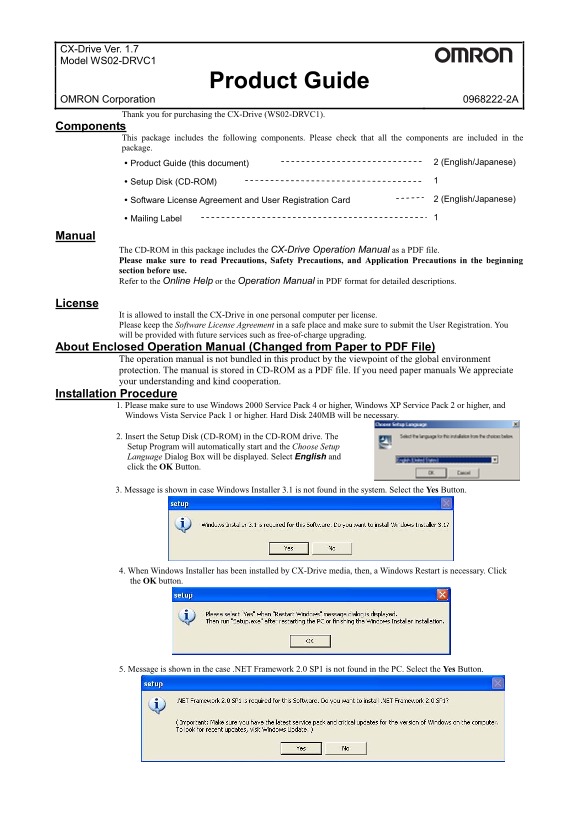
Page 1 Text Content
CX-Drive Ver. 1.7
Model WS02-DRVC1
Product Guide
OMRON Corporation 0968222-2A
Thank you for purchasing the CX-Drive (WS02-DRVC1).
Components
This package includes the following components. Please check that all the components are included in the
package.
Product Guide (this document) 2 (English/Japanese)
Setup Disk (CD-ROM) 1
Software License Agreement and User Registration Card 2 (English/Japanese)
Mailing Label 1
Manual
The CD-ROM in this package includes the CX-Drive Operation Manual as a PDF file.
Please make sure to read Precautions, Safety Precautions, and Application Precautions in the beginning
section before use.
Refer to the Online Help or the Operation Manual in PDF format for detailed descriptions.
License
It is allowed to install the CX-Drive in one personal computer per license.
Please keep the Software License Agreement in a safe place and make sure to submit the User Registration. You
will be provided with future services such as free-of-charge upgrading.
About Enclosed Operation Manual (Changed from Paper to PDF File)
The operation manual is not bundled in this product by the viewpoint of the global environment
protection. The manual is stored in CD-ROM as a PDF file. If you need paper manuals We appreciate
your understanding and kind cooperation.
Installation Procedure
1. Please make sure to use Windows 2000 Service Pack 4 or higher, Windows XP Service Pack 2 or higher, and
Windows Vista Service Pack 1 or higher. Hard Disk 240MB will be necessary.
2. Insert the Setup Disk (CD-ROM) in the CD-ROM drive. The
Setup Program will automatically start and the Choose Setup
Language Dialog Box will be displayed. Select English and
click the OK Button.
3. Message is shown in case Windows Installer 3.1 is not found in the system. Select the Yes Button.
4. When Windows Installer has been installed by CX-Drive media, then, a Windows Restart is necessary. Click
the OK button.
5. Message is shown in the case .NET Framework 2.0 SP1 is not found in the PC. Select the Yes Button.
Page Summary Contents For OMRON Servo AC Servo Motor Driver (W Series MECHATROLINK-Ⅱ Built-In Type) R88M-W, R88D-WN□-ML2 WS02-DRVC1CX-Drive Instruction Sheet
Manual Details
| Brand | Omron |
|---|---|
| Pages | 2 |
| File Size | 112.93 KB |
| Published | June 04, 2026 |
Enter the captcha to get the download link:

Frequently Asked Questions
What operating system requirements are needed to install CX-Drive?
You must use Windows 2000 Service Pack 4 (or higher), Windows XP Service Pack 2 (or higher), or Windows Vista Service Pack 1 (or higher), and require a 240MB Hard Disk.
How do I complete the CX-Drive installation process?
Follow the setup program, select English language, enter the 16-digit License Number, and restart the personal computer after the Setup Complete Dialog Box is displayed.
What happens if an older version of CX-Drive is installed?
A dialog box will display confirming whether to uninstall your earlier version. You must click 'OK' in that dialog and uninstall it before installing a newer version.