Nikon COOLPIX 4300 User's Manual
Summary
Enhance your photography with the 0-360 Panoramic Optic Attachment designed specifically for the Nikon COOLPIX 4300 camera. This manual is an essential guide for photographers seeking truly immersive, 360-degree panoramic images, capturing sharp focus from far above and below the horizon. It provides step-by-step instructions on advanced setup techniques, covering critical adjustments like Aperture, Depth of Field, and Manual Exposure settings to ensure optimal performance in any lighting condition. Get professional results for sweeping landscape shots with this comprehensive guide.
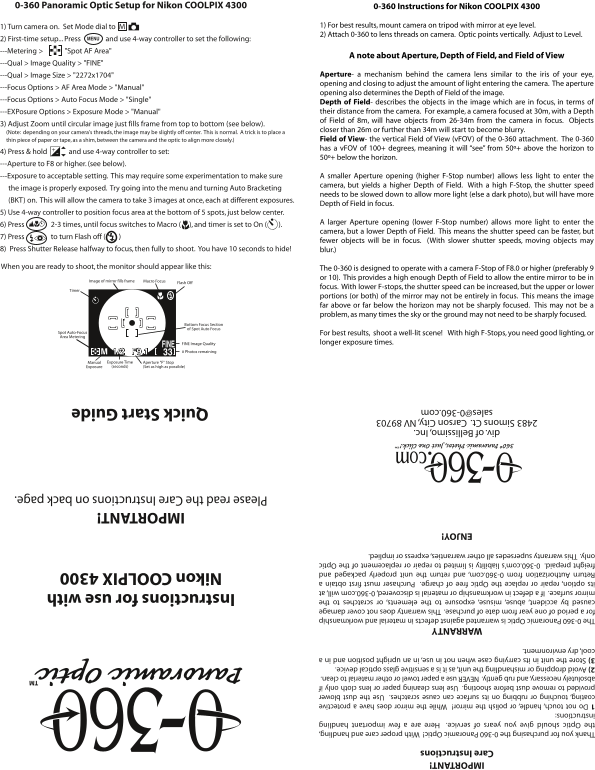
Page 1 Text Content
0-360 Panoramic Optic Setup for Nikon COOLPIX 4300 IMPORTANT! 0-360 Instructions for Nikon COOLPIX 4300
Care Instructions
1) Turn camera on. Set Mode dial to M 1) For best results, mount camera on tripod with mirror at eye level. Thank you for purchasing the 0-360 Panoramic Optic! With proper care and handling, 2) Attach 0-360 to lens threads on camera. Optic points vertically. Adjust to Level.
2) First-time setup... Press and use 4-way controller to set the following: MENU
the Optic should give you years of service. Here are a few important handling
---Metering > "Spot AF Area" instructions: A note about Aperture, Depth of Field, and Field of View
1 Do not touch, handle, or polish the mirror! While the mirror does have a protective ---Qual > Image Quality > "FINE"
coating, touching or rubbing on its surface can cause scratches. Use the dust blower Aperture- a mechanism behind the camera lens similar to the iris of your eye,
---Qual > Image Size > "2272x1704" provided to remove dust before shooting. Use lens cleaning paper or lens cloth only if opening and closing to adjust the amount of light entering the camera. The aperture
---Focus Options > AF Area Mode > "Manual" TM
absolutely necessary, and rub gently. NEVER use a paper towel or other material to clean. opening also determines the Depth of Field of the image.
2) Avoid dropping or mishandling the unit, as it is a sensitive glass optical device. ---Focus Options > Auto Focus Mode > "Single"
Depth of Field- describes the objects in the image which are in focus, in terms of
3) Store the unit in its carrying case when not in use, in an upright position and in a their distance from the camera. For example, a camera focused at 30m, with a Depth
---EXPosure Options > Exposure Mode > "Manual" cool, dry environment. of Field of 8m, will have objects from 26-34m from the camera in focus. Objects
3) Adjust Zoom until circular image just fills frame from top to bottom (see below).
closer than 26m or further than 34m will start to become blurry.
(Note: depending on your camera's threads, the image may be slightly off center. This is normal. A trick is to place a
thin piece of paper or tape, as a shim, between the camera and the optic to align more closely.) WARRANTY Field of View- the vertical Field of View (v FOV) of the 0-360 attachment. The 0-360
The 0-360 Panoramic Optic is warranted against defects in material and workmanship has a v FOV of 100+ degrees, meaning it will “see” from 50º+ above the horizon to
4) Press & hold and use 4-way controller to set:
for a period of one year from date of purchase. This warranty does not cover damage 50º+ below the horizon.
---Aperture to F8 or higher. (see below). caused by accident, abuse, misuse, exposure to the elements, or scratches to the
Instructions for use with
mirror surface. If a defect in workmanship or material is discovered, 0-360.com will, at ---Exposure to acceptable setting. This may require some experimentation to make sure A smaller Aperture opening (higher F-Stop number) allows less light to enter the
its option, repair or replace the Optic free of charge. Purchaser must first obtain a camera, but yields a higher Depth of Field. With a high F-Stop, the shutter speed
the image is properly exposed. Try going into the menu and turning Auto Bracketing
Return Authorization from 0-360.com, and return the unit properly packaged and needs to be slowed down to allow more light (else a dark photo), but will have more Nikon COOLPIX 4300
(BKT) on. This will allow the camera to take 3 images at once, each at different exposures.
freight prepaid. 0-360.com's liability is limited to repair or replacement of the Optic Depth of Field in focus.
only. This warranty supersedes all other warranties, express or implied. 5) Use 4-way controller to position focus area at the bottom of 5 spots, just below center.
A larger Aperture opening (lower F-Stop number) allows more light to enter the
6) Press 2-3 times, until focus switches to Macro ( ), and timer is set to On ( ).
camera, but a lower Depth of Field. This means the shutter speed can be faster, but
ENJOY!
7) Press to turn Flash off ( )
fewer objects will be in focus. (With slower shutter speeds, moving objects may
8) Press Shutter Release halfway to focus, then fully to shoot. You have 10 seconds to hide! blur.)
IMPORTANT!
When you are ready to shoot, the monitor should appear like this: The 0-360 is designed to operate with a camera F-Stop of F8.0 or higher (preferably 9
Please read the Care Instructions on back page.
or 10). This provides a high enough Depth of Field to allow the entire mirror to be in
Image of mirror fills frame Macro Focus Flash Off
focus. With lower F-stops, the shutter speed can be increased, but the upper or lower
Timer
portions (or both) of the mirror may not be entirely in focus. This means the image far above or far below the horizon may not be sharply focused. This may not be a problem, as many times the sky or the ground may not need to be sharply focused.
Bottom Focus Section of Spot Auto Focus
Spot Auto-Focus For best results, shoot a well-lit scene! With high F-Stops, you need good lighting, or Area Metering div. of Bellissimo, Inc.
FINE Image Quality longer exposure times.
2483 Simons Ct. Carson City, NV 89703
1/2 F9.1M # Photos remaining
[email protected] Quick Start Guide
Manual Exposure Time Aperture "F" Stop Exposure (seconds) (Set as high as possible)
Page Summary Contents For Nikon COOLPIX 4300 User's Manual
Manual Details
| Brand | Nikon |
|---|---|
| Pages | 1 |
| File Size | 274.95 KB |
| Published | June 01, 2026 |
Enter the captcha to get the download link:

Frequently Asked Questions
What F-stop is recommended for the best results when using the 0-360 Optic?
The optic is designed to operate with a camera F-Stop of F8.0 or higher, preferably F9 or F10.
How should I clean the mirror surface?
Use the provided dust blower to remove dust; only use lens cleaning paper or cloth gently if absolutely necessary. NEVER use a paper towel.
What is required for warranty claims on the Optic?
The purchaser must first obtain a Return Authorization from 0-360.com and return the unit in its original packaging, freight prepaid.
Why might my image appear blurry at the edges or poles?
If using low F-stops, objects far above or far below the horizon may not be entirely in focus, meaning the image edges can appear blurry.