# A B C D E F G H I J K L M N O P Q R S T U V W X Y Z

LINKSYS WRT54G3GV2-VF User Guide

Summary

Experience reliable wireless internet connectivity using this versatile Wireless-G Router designed for 3G/UMTS broadband services. This essential networking device ensures seamless connection setup, supporting both dedicated 3G/UMTS mode or enhanced connections linked to existing Broadband WAN infrastructure. The accompanying guide provides comprehensive, step-by-step instructions covering initial setup, configuration methods, and advanced troubleshooting, making it ideal for users requiring robust mobile internet access from Vodafone.
📄 Preview PAGE OF 12

Page 1 Text Content

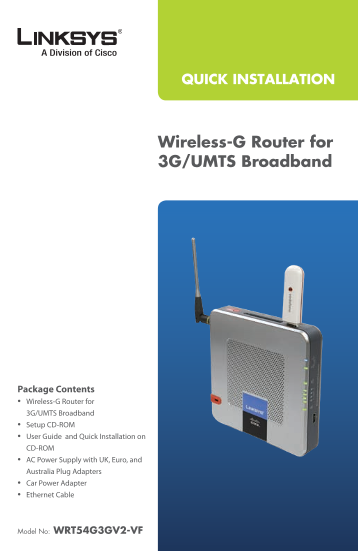
QUICK INSTALLATION

Wireless-G Router for 3G/UMTS Broadband

Package Contents Wireless-G Router for 3G/UMTS Broadband Setup CD-ROM User Guide and Quick Installation on CD-ROM AC Power Supply with UK, Euro, and Australia Plug Adapters Car Power Adapter Ethernet Cable

Model No: WRT54G3GV2-VF

Page Summary Contents For LINKSYS WRT54G3GV2-VF User Guide

Page 1 QUICK INSTALLATION Wireless-G Router for 3G/UMTS Broadband Package Contents Wireless-G Router for 3G/UMTS Broadband Setup CD-ROM User Guide and Quick Installation on CD-ROM AC Power Supply with UK, Eu...
Page 3 Overview There are two ways to set up the Router for Internet connection. Select one. 1. Broadband WAN and 3G/UMTS Broadband 2. 3G/UMTS Broadband Only Before you begin, make sure that you have the fol...
Page 4 Overview C. To accept the license agreement, click Next. Accept the License Agreement D. Make sure the Router is powered off. Insert the Vodafone 3G/UMTS Broadband Device into the Router’s PC Card slo...
Page 5 Broadband WAN and 3G/UMTS Broadband1� A. Make sure the Router is powered off. Disconnect the network cable from your computer. (This is the cable that connects the computer to your modem.) Click Next....
Page 6 Broadband WAN and 3G/UMTS Broadband D. Connect the other end of the yellow cable to one of the yellow Ethernet ports labeled 1- on the side panel of the Router. Repeat steps C and D to connect additi...
Page 7 Broadband WAN and 3G/UMTS Broadband G. Follow the on-screen instructions to complete the setup and configuration. NOTE: For advanced configuration changes, refer to “Chapter 3: Advanced Configuration”...
Page 8 3G/UMTS Broadband Only2� A. Connect the included yellow network cable to the Ethernet network port of your computer. Click Next. Connect the Network Cable to the Computer B. Connect the other end of t...
Page 9 3G/UMTS Broadband Only D. The Power LED will flash for about a minute during the self-test. It will be solidly lit when the self-test is complete. If the Power LED does not stop flashing, refer to “Ap...
Page 10 Notes 0110NC-DF
Page 12 Vodafone Mobile Phone Email Australia +3  1 www.vodafone.al/mobileconnect France 00 +33  1000 100 www.sfr.fr Germany 123 + 00 12 123 www.vodafone.de Greece 13 +30  0 13 www.vodafone....

Manual Details

Brand Linksys
Pages 12
File Size 843.37 KB
Published May 26, 2026
78 views

Enter the captcha to get the download link:

captcha

Frequently Asked Questions

What do I need before starting the router setup?

You must have activated 3G/UMTS broadband service from Vodafone, device service information, and potentially a broadband modem or settings.

What should I do if the Power LED keeps flashing during setup?

If the Power LED does not stop flashing, refer to 'Appendix A: Troubleshooting' in the User Guide on the CD-ROM.