LINKSYS 962 User Guide
Summary
Seamlessly set up and activate your Linksys SPA962 IP Phone system with this comprehensive quick guide. This manual provides step-by-step instructions for connecting all components, including the handset, Ethernet cables, and power adapter, to ensure optimal performance. Designed for users needing a reliable SIP phone solution, it walks you through network initialization, router connection points, and initial system boot-up procedures. Get your professional-grade VoIP phone operational quickly and effortlessly.
Page 1 Text Content
QUICK Installation Guide: Setting Up Your Linksys SPA962
INSTALLATION Color SIP Phone — 6 lines GUIDE
Linksys 962
Hub or Router
Internet
RJ-11 Port WAN/LAN
RJ-45 Ports
DSL or Cable Modem
Power
Handset Jet
(optional) Computer
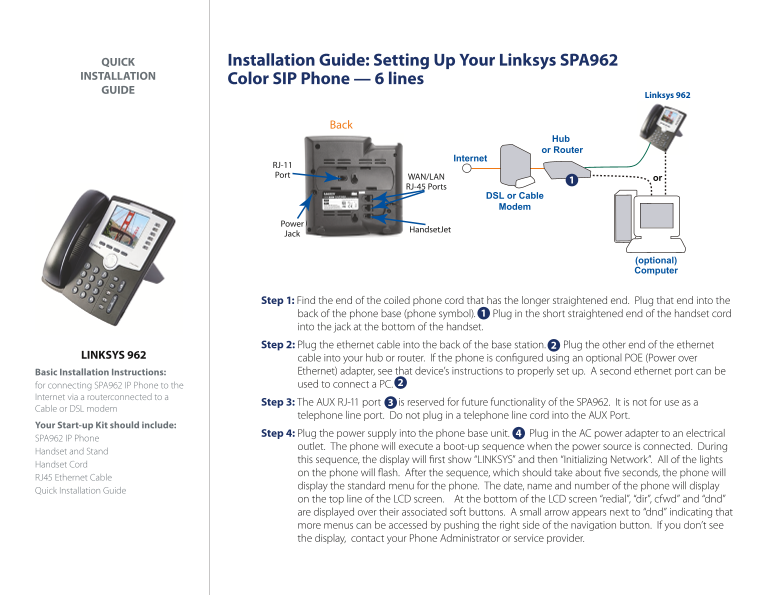
Step 1: Find the end of the coiled phone cord that has the longer straightened end. Plug that end into the back of the phone base (phone symbol). Plug in the short straightened end of the handset cord into the jack at the bottom of the handset. Step 2: Plug the ethernet cable into the back of the base station. Plug the other end of the ethernet
LINKSYS 962 cable into your hub or router. If the phone is con gured using an optional POE (Power over
Basic Installation Instructions: Ethernet) adapter, see that device’s instructions to properly set up. A second ethernet port can be for connecting SPA962 IP Phone to the used to connect a PC.
Internet via a router connected to a
Step 3: The AUX RJ-11 port is reserved for future functionality of the SPA962. It is not for use as a
Cable or DSL modem
telephone line port. Do not plug in a telephone line cord into the AUX Port.
Your Start-up Kit should include:
Step 4: Plug the power supply into the phone base unit. Plug in the AC power adapter to an electrical
SPA962 IP Phone
outlet. The phone will execute a boot-up sequence when the power source is connected. During
Handset and Stand
this sequence, the display will rst show “LINKSYS” and then “Initializing Network”. All of the lights
Handset Cord
on the phone will ash. After the sequence, which should take about ve seconds, the phone will
RJ45 Ethernet Cable
display the standard menu for the phone. The date, name and number of the phone will display
Quick Installation Guide
on the top line of the LCD screen. At the bottom of the LCD screen “redial”, “dir”, cfwd” and “dnd” are displayed over their associated soft buttons. A small arrow appears next to “dnd” indicating that more menus can be accessed by pushing the right side of the navigation button. If you don’t see the display, contact your Phone Administrator or service provider.
Page Summary Contents For LINKSYS 962 User Guide
Manual Details
| Brand | Linksys |
|---|---|
| Pages | 1 |
| File Size | 835.74 KB |
| Published | May 26, 2026 |
Enter the captcha to get the download link:

Frequently Asked Questions
How should I connect the phone to the internet?
Plug one end of the ethernet cable into the back of the base station and the other end into your hub or router.
What port must not be used for telephone lines?
The AUX RJ-11 port. It is reserved for future functionality and should not take a phone line cord.
What should I do if the display does not appear after booting up?
Contact your Phone Administrator or service provider immediately.