LINKSYS AM300 User Guide
Summary
The Linksys AM300 is a reliable ADSL/ADSL2+ Modem and Router designed for stable home internet connectivity. This manual serves as a comprehensive guide covering initial setup, full network configuration, and troubleshooting procedures. It walks users through factory resetting the modem to ensure optimal performance, establishing crucial PPPoE credentials using precise TCP/IP settings on your PC, and securing your connection by changing passwords. Ideal for customers needing reliable guidance to configure their ADSL line or resolve complex internet connectivity issues with ISP-provided service.
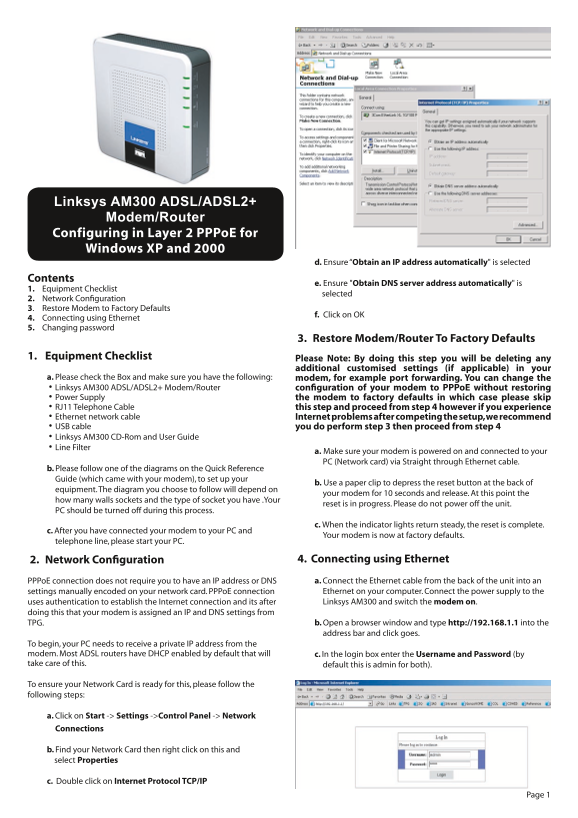
Page 1 Text Content
Linksys AM300 ADSL/ADSL2+ Modem/Router Configuring in Layer 2 PPPo E for Windows XP and 2000
d. Ensure “Obtain an IP address automatically" is selected
Contents
e. Ensure "Obtain DNS server address automatically" is
1. Equipment Checklist
selected
2. Network Configuration 3. Restore Modem to Factory Defaults
f. Click on OK
4. Connecting using Ethernet 5. Changing password
3. Restore Modem/Router To Factory Defaults
1. Equipment Checklist Please Note: By doing this step you will be deleting any
additional customised settings (if applicable) in your
a. Please check the Box and make sure you have the following: modem, for example port forwarding. You can change the · Linksys AM300 ADSL/ADSL2+ Modem/Router configuration of your modem to PPPo E without restoring · Power Supply the modem to factory defaults in which case please skip · RJ11 Telephone Cable this step and proceed from step 4 however if you experience · Ethernet network cable Internet problems after competing the setup, we recommend · USB cable you do perform step 3 then proceed from step 4 · Linksys AM300 CD-Rom and User Guide · Line Filter
a. Make sure your modem is powered on and connected to your PC (Network card) via Straight through Ethernet cable.
b. Please follow one of the diagrams on the Quick Reference Guide (which came with your modem), to set up your
b. Use a paper clip to depress the reset button at the back of
equipment. The diagram you choose to follow will depend on
your modem for 10 seconds and release. At this point the
how many walls sockets and the type of socket you have .Your
reset is in progress. Please do not power off the unit.
PC should be turned off during this process.
c. When the indicator lights return steady, the reset is complete.
c. After you have connected your modem to your PC and
Your modem is now at factory defaults.
telephone line, please start your PC.
2. Network Configuration 4. Connecting using Ethernet PPPo E connection does not require you to have an IP address or DNS a. Connect the Ethernet cable from the back of the unit into an settings manually encoded on your network card. PPPo E connection Ethernet on your computer. Connect the power supply to the uses authentication to establish the Internet connection and its after Linksys AM300 and switch the modem on.
doing this that your modem is assigned an IP and DNS settings from
TPG. b. Open a browser window and type http://192.168.1.1 into the address bar and click goes.
To begin, your PC needs to receive a private IP address from the modem. Most ADSL routers have DHCP enabled by default that will c. In the login box enter the Username and Password (by take care of this. default this is admin for both).
To ensure your Network Card is ready for this, please follow the following steps:
a. Click on Start -> Settings ->Control Panel -> Network Connections
b. Find your Network Card then right click on this and select Properties
c. Double click on Internet Protocol TCP/IP
Page Summary Contents For LINKSYS AM300 User Guide
Manual Details
| Brand | Linksys |
|---|---|
| Pages | 2 |
| File Size | 476.50 KB |
| Published | May 26, 2026 |
Enter the captcha to get the download link:

Frequently Asked Questions
How do I restore the modem to factory default settings?
Use a paper clip to press the reset button on the back for about 10 seconds, and wait until the indicator lights are steady again.
What is required to configure the unit without reverting to factory defaults?
Ensure you have the modem, power supply, Ethernet network cable, Line Filter, and Linksys CD-Rom/User Guide.
How do I set up a PPPoE connection on my PC for the router?
In your PC's Network Card properties (TCP/IP), select 'Obtain an IP address automatically,' 'Obtain DNS server address automatically,' and choose ‘PPPoE’ encapsulation.
Where can I change the default administrative password?
Go to https://cyberstore.tpg.com.au/youraccount/changepass.html, but remember this may take 15 minutes to activate.