LG GSM Phone Product Manual - LGC300.ACHNWO, EIRCOM (IRELAND)
Summary
Master your mobile experience with a comprehensive guide designed for new and existing owners of this digital communication device. This manual provides detailed instructions on every core function, including making calls, utilizing hands-free features, managing system settings, operating the camera, and transferring data. It covers everything from setting up SIM cards and charging the battery to advanced call filtering and essential troubleshooting steps. Essential reading for ensuring optimal operation and longevity of your smartphone.
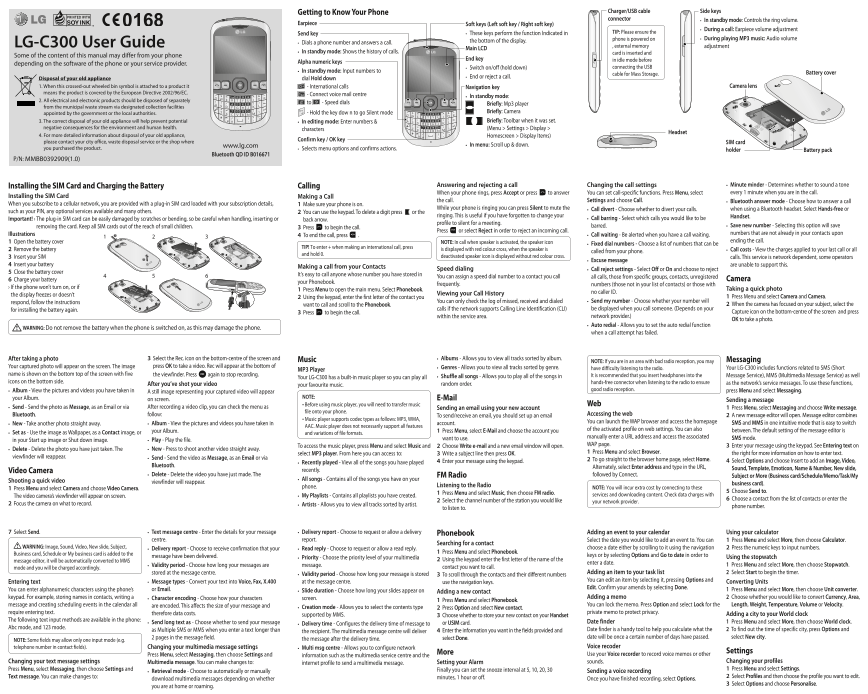
Page 1 Text Content
Getting to Know Your Phone Charger/USB cable Side keys connector In standby mode: Controls the ring volume.
Earpiece Soft keys (Left soft key / Right soft key)
During a call: Earpiece volume adjustment
Send key These keys perform the function Indicated in TIP: Please ensure the
phone is powered on During playing MP3 music: Audio volume
Dials a phone number and answers a call. the bottom of the display.
LG-C300 User Guide , external memory adjustment
Main LCD
In standby mode: Shows the history of calls. card is inserted and
Some of the content of this manual may differ from your phone
End key in idle mode before
depending on the software of the phone or your service provider. Alpha numeric keys
Switch on/off (hold down) connecting the USB
In standby mode: Input numbers to Battery cover
cable for Mass Storage.
Disposal of your old appliance dial Hold down End or reject a call.
1. When this crossed-out wheeled bin symbol is attached to a product it Navigation key Camera lens
- International calls
means the product is covered by the European Directive 2002/96/EC. - Connect voice mail centre
In standby mode:
2. All electrical and electronic products should be disposed of separately
to - Speed dials Briefly: Mp3 player
from the municipal waste stream via designated collection facilities
appointed by the government or the local authorities. - Hold the key dow n to go Silent mode Briefly: Camera 3. The correct disposal of your old appliance will help prevent potential In editing mode: Enter numbers & Briefly: Toolbar when it was set.
negative consequences for the environment and human health. characters (Menu > Settings > Display >
Headset
4. For more detailed information about disposal of your old appliance, Homescreen > Display Items)
Confirm key / OK key
please contact your city office, waste disposal service or the shop where SIM card
www.lg.com In menu: Scroll up & down.
you purchased the product. Selects menu options and confirms actions. holder
Battery pack
Bluetooth QD ID B016671
P/N: MMBB0392909(1.0)
Installing the SIM Card and Charging the Battery Calling Answering and rejecting a call Changing the call settings Minute minder - Determines whether to sound a tone When your phone rings, press Accept or press to answer You can set call-specific functions. Press Menu, select every 1 minute when you are in the call.
Installing the SIM Card Making a Call
the call. Settings and choose Call. Bluetooth answer mode - Choose how to answer a call
When you subscribe to a cellular network, you are provided with a plug-in SIM card loaded with your subscription details, Make sure your phone is on.
While your phone is ringing you can press Silent to mute the Call divert - Choose whether to divert your calls. when using a Bluetooth headset. Select Hands-free or
such as your PIN, any optional services available and many others. You can use the keypad. To delete a digit press or the
ringing. This is useful if you have forgotten to change your Handset.
Important! › The plug-in SIM card can be easily damaged by scratches or bending, so be careful when handling, inserting or back arrow. Call barring - Select which calls you would like to be
profile to silent for a meeting.
removing the card. Keep all SIM cards out of the reach of small children. barred. Save new number - Selecting this option will save
Press to begin the call.
Press or select Reject in order to reject an incoming call.
Illustrations Call waiting - Be alerted when you have a call waiting. numbers that are not already in your contacts upon
To end the call, press .
Open the battery cover NOTE: In call when speaker is activated, the speaker icon ending the call.
Fixed dial numbers - Choose a list of numbers that can be
TIP! To enter + when making an international call, press
Remove the battery is displayed with red colour cross, when the speaker is Call costs - View the charges applied to your last call or all
called from your phone.
and hold 0.
Insert your SIM deactivated speaker icon is displayed without red colour cross. calls. This service is network dependent, some operators
Excuse message
Insert your battery are unable to support this.
Making a call from your Contacts
Speed dialing Call reject settings - Select Off or On and choose to reject
Close the battery cover
It’s easy to call anyone whose number you have stored in
You can assign a speed dial number to a contact you call all calls, those from specific groups, contacts, unregistered
Charge your battery Camera
your Phonebook.
frequently. numbers (those not in your list of contacts) or those with
› If the phone won’t turn on, or if Taking a quick photo
Press Menu to open the main menu. Select Phonebook.
Viewing your Call History no caller ID.
the display freezes or doesn’t Press Menu and select Camera and Camera.
Using the keypad, enter the first letter of the contact you
respond, follow the instructions You can only check the log of missed, received and dialed Send my number - Choose whether your number will
want to call and scroll to the Phonebook. When the camera has focused on your subject, select the
for installing the battery again. calls if the network supports Calling Line Identification (CLI) be displayed when you call someone. (Depends on your
Press to begin the call. Capture icon on the bottom-centre of the screen and press
within the service area. network provider.)
OK to take a photo.
Auto redial - Allows you to set the auto redial function
WARNING: Do not remove the battery when the phone is switched on, as this may damage the phone.
when a call attempt has failed.
After taking a photo Select the Rec. icon on the bottom-centre of the screen and Music Albums - Allows you to view all tracks sorted by album. Messaging
NOTE: If you are in an area with bad radio reception, you may
Your captured photo will appear on the screen. The image press OK to take a video. Rec will appear at the bottom of Genres - Allows you to view all tracks sorted by genre. Your LG-C300 includes functions related to SMS (Short
MP3 Player have difficulty listening to the radio.
name is shown on the bottom top of the screen with five the viewfinder. Press again to stop recording. It is recommended that you insert headphones into the Message Service), MMS (Multimedia Message Service) as well
Your LG-C300 has a built-in music player so you can play all Shuffle all songs - Allows you to play all of the songs in
icons on the bottom side. hands-free connector when listening to the radio to ensure as the network’s service messages. To use these functions,
After you’ve shot your video your favourite music. random order.
Album - View the pictures and videos you have taken in good radio reception. press Menu and select Messaging.
A still image representing your captured video will appear
your Album. NOTE: E-Mail
on screen. Sending a message
• Before using music player, you will need to transfer music Web
Send - Send the photo as Message, as an Email or via After recording a video clip, you can check the menu as Sending an email using your new account Press Menu, select Messaging and choose Write message.
file onto your phone.
Bluetooth. follow: To send/receive an email, you should set up an email Accessing the web A new message editor will open. Message editor combines
• Music player supports codec types as follows: MP3, WMA,
Album - View the pictures and videos you have taken in account. You can launch the WAP browser and access the homepage SMS and MMS in one intuitive mode that is easy to switch
New - Take another photo straight away.
AAC. Music player does not necessarily support all features
your Album. Press Menu, select E-Mail and choose the account you of the activated profile on web settings. You can also between. The default setting of the message editor is
Set as - Use the image as Wallpaper, as a Contact image, or and variations of file formats.
want to use. manually enter a URL address and access the associated SMS mode.
in your Start up image or Shut down image. Play - Play the file.
To access the music player, press Menu and select Music and Choose Write e-mail and a new email window will open. WAP page. Enter your message using the keypad. See Entering text on
Delete - Delete the photo you have just taken. The New - Press to shoot another video straight away.
select MP3 player. From here you can access to: Write a subject line then press OK. Press Menu and select Browser. the right for more information on how to enter text.
viewfinder will reappear. Send - Send the video as Message, as an Email or via
Enter your message using the keypad. To go straight to the browser home page, select Home. Select Options and choose Insert to add an Image, Video,
Recently played - View all of the songs you have played
Bluetooth. Alternately, select Enter address and type in the URL,
recently. Sound, Template, Emoticon, Name & Number, New slide,
Video Camera
Delete - Delete the video you have just made. The FM Radio followed by Connect. Subject or More (Business card/Schedule/Memo/Task/My
Shooting a quick video All songs - Contains all of the songs you have on your
viewfinder will reappear. business card).
phone. Listening to the Radio
Press Menu and select Camera and choose Video Camera. NOTE: You will incur extra cost by connecting to these
Press Menu and select Music, then choose FM radio. Choose Send to.
The video camera’s viewfinder will appear on screen. My Playlists - Contains all playlists you have created. services and downloading content. Check data charges with
Select the channel number of the station you would like Choose a contact from the list of contacts or enter the
your network provider.
Focus the camera on what to record. Artists - Allows you to view all tracks sorted by artist.
to listen to. phone number.
7 Text message centre - Enter the details for your message Select Send. Delivery report - Choose to request or allow a delivery Phonebook Adding an event to your calendar Using your calculator
centre. report. Select the date you would like to add an event to. You can Press Menu and select More, then choose Calculator.
Searching for a contact
WARNING: Image, Sound, Video, New slide, Subject, Delivery report - Choose to receive confirmation that your Read reply - Choose to request or allow a read reply. choose a date either by scrolling to it using the navigation Press the numeric keys to input numbers.
Business card, Schedule or My business card is added to the Press Menu and select Phonebook.
message have been delivered. keys or by selecting Options and Go to date in order to
Priority - Choose the priority level of your multimedia Using the stopwatch
message editor, it will be automatically converted to MMS Using the keypad enter the first letter of the name of the
enter a date.
Validity period - Choose how long your messages are message. 1 Press Menu and select More, then choose Stopwatch.
mode and you will be charged accordingly. contact you want to call.
stored at the message centre. Validity period - Choose how long your message is stored Adding an item to your task list 2 Select Start to begin the timer.
To scroll through the contacts and their different numbers
Message types - Convert your text into Voice, Fax, X.400 at the message centre. You can edit an item by selecting it, pressing Options and
Entering text use the navigation keys. Converting Units
or Email. Edit. Confirm your amends by selecting Done.
You can enter alphanumeric characters using the phone’s Slide duration - Choose how long your slides appear on 1 Press Menu and select More, then choose Unit converter.
Adding a new contact
keypad. For example, storing names in contacts, writing a Character encoding - Choose how your characters screen. Adding a memo 2 Choose whether you would like to convert Currency, Area,
Press Menu and select Phonebook.
message and creating scheduling events in the calendar all are encoded. This affects the size of your message and You can lock the memo. Press Option and select Lock for the Length, Weight, Temperature, Volume or Velocity.
Creation mode - Allows you to select the contents type Press Option and select New contact.
require entering text. therefore data costs. private memo to protect privacy.
supported by MMS. Choose whether to store your new contact on your Handset Adding a city to your World clock
The following text input methods are available in the phone: Date finder 1 Press Menu and select More, then choose World clock.
Send long text as - Choose whether to send your message Delivery time - Configures the delivery time of message to or USIM card.
Abc mode, and 123 mode. Date finder is a handy tool to help you calculate what the 2 To find out the time of specific city, press Options and
as Multiple SMS or MMS when you enter a text longer than the recipient. The multimedia message centre will deliver Enter the information you want in the fields provided and
2 pages in the message field. select Done. date will be once a certain number of days have passed. select New city.
NOTE: Some fields may allow only one input mode (e.g. the message after the delivery time.
telephone number in contact fields). Changing your multimedia message settings Multi msg centre - Allows you to configure network Voice recoder
More Settings
Press Menu, select Messaging, then choose Settings and information such as the multimedia service centre and the Use your Voice recorder to record voice memos or other
Changing your text message settings Multimedia message. You can make changes to: Setting your Alarm sounds. Changing your profiles
internet profile to send a multimedia message.
Press Menu, select Messaging, then choose Settings and Finally you can set the snooze interval at 5, 10, 20, 30 Press Menu and select Settings.
Retrieval mode - Choose to automatically or manually Sending a voice recording
Text message. You can make changes to: minutes, 1 hour or off. Select Profiles and then choose the profile you want to edit.
download multimedia messages depending on whether Once you have finished recording, select Options.
Select Options and choose Personalise.
you are at home or roaming.
Page Summary Contents For LG GSM Phone Product Manual - LGC300.ACHNWO, EIRCOM (IRELAND)
Manual Details
| Brand | LG |
|---|---|
| Pages | 2 |
| File Size | 889.32 KB |
| Published | May 31, 2026 |
Enter the captcha to get the download link:

Frequently Asked Questions
What should I do if my phone won't turn on or charging fails?
Check if the battery is totally empty, use original LG accessories, and test plugging it into a different socket.
How should I safely handle the SIM card?
Be careful when handling, inserting, or removing the plug-in SIM card to avoid scratches or bending damage.
What are ways to manage frequently called numbers?
You can set up Speed Dials for often-called contacts or use Fixed Dial Numbers for specific local addresses.
Where must I properly dispose of this appliance?
Old appliances should be disposed of separately from the municipal waste stream via designated collection facilities.