LG GSM Phone LGC360.ACHNDB Product Manual CARPHONE WAREHOUSE (UK Open)
Summary
Master your LG-C360 mobile phone with this comprehensive user guide. This resource is designed for new owners, providing step-by-step instructions on all essential features. Learn how to successfully install SIM cards and expandable memory, make contacts calls, troubleshoot charging issues, and perform basic network adjustments. It ensures you understand the optimal setup and usage of your device from day one.
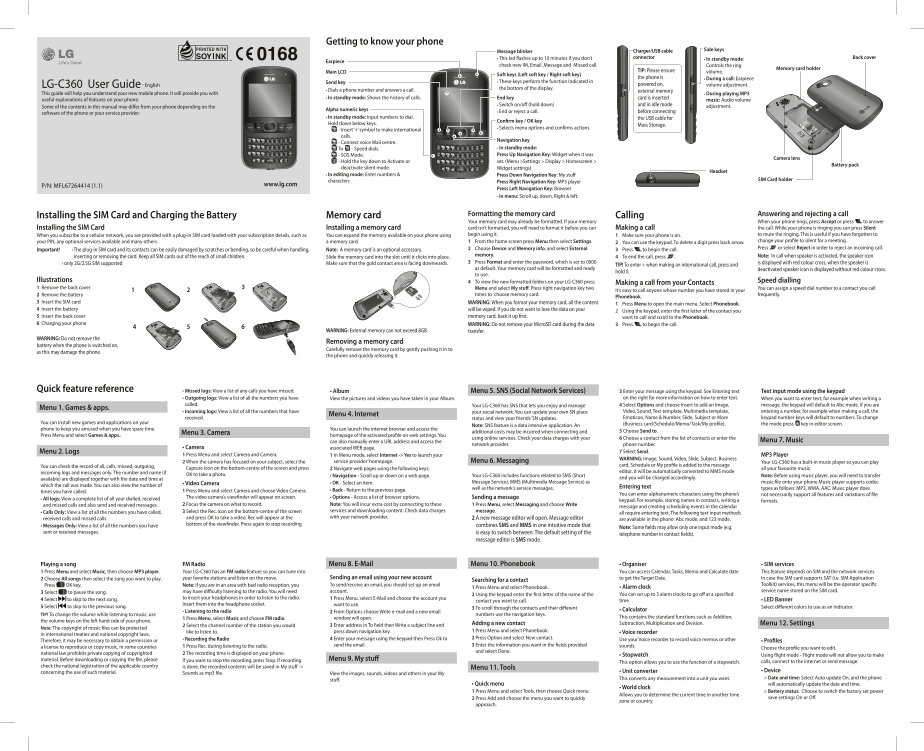
Page 1 Text Content
Getting to know your phone
Message blinker Charger/USB cable Side keys
• This led flashes up to 10 minutes if you don’t connector • In standby mode: Back cover
Earpiece
check new IM, Email ,Message and Missed call. Controls the ring
Memory card holder
Main LCD TIP: Please ensure volume.
Soft keys (Left soft key / Right soft key)
the phone is • During a call: Earpiece
Send key • These keys perform the function Indicated in
LG-C360 User Guide - English powered on, volume adjustment.
• Dials a phone number and answers a call. the bottom of the display.
external memory
This guide will help you understand your new mobile phone. It will provide you with • During playing MP3
• In standby mode: Shows the history of calls. End key card is inserted
useful explanations of features on your phone. music: Audio volume
• Switch on/off (hold down) and in idle mode adjustment.
Some of the contents in this manual may differ from your phone depending on the
Alpha numeric keys • End or reject a call. before connecting
software of the phone or your service provider.
• In standby mode: Input numbers to dial. the USB cable for
Confirm key / OK key
Hold down below keys. Mass Storage.
• Selects menu options and confirms actions.
- Insert ‘+’ symbol to make international calls.
Navigation key
- Connect voice Mail centre.
To - Speed dials. • In standby mode: Press Up Navigation Key: Widget when it was
- SOS Mode. Camera lens
set. (Menu >Settings > Display > Homescreen >
- Hold the key down to Activate or Battery pack deactivate silent mode. Widget settings)
Headset
• In editing mode: Enter numbers & Press Down Navigation Key: My stuff
characters SIM Card holder
Press Right Navigation Key: MP3 player
P/N: MFL67264414 (1.1) www.lg.com
Press Left Navigation Key: Browser • In menu: Scroll up, down, Right & left.
Formatting the memory card Answering and rejecting a call
Installing the SIM Card and Charging the Battery Memory card Calling
Your memory card may already be formatted. If your memory When your phone rings, press Accept or press to answer Installing the SIM Card Installing a memory card card isn’t formatted, you will need to format it before you can Making a call the call. While your phone is ringing you can press Silent When you subscribe to a cellular network, you are provided with a plug-in SIM card loaded with your subscription details, such as You can expand the memory available on your phone using begin using it. 1 Make sure your phone is on. to mute the ringing. This is useful if you have forgotten to
your PIN, any optional services available and many others. a memory card. 1 From the home screen press Menu then select Settings. 2 You can use the keypad. To delete a digit press back arrow. change your profile to silent for a meeting. 2 Choose Device and Memory info. and select External 3 Press to begin the call. Press or select Reject in order to reject an incoming call.
Important! › The plug-in SIM card and its contacts can be easily damaged by scratches or bending, so be careful when handling, Note: A memory card is an optional accessory.
inserting or removing the card. Keep all SIM cards out of the reach of small children. memory. 4 To end the call, press . Note: In call when speaker is activated, the speaker icon
Slide the memory card into the slot until it clicks into place.
› only 2G/2.5G SIM supported Make sure that the gold contact area is facing downwards. 3 Press Format and enter the password, which is set to 0000 is displayed with red colour cross, when the speaker is
TIP! To enter + when making an international call, press and
as default. Your memory card will be formatted and ready deactivated speaker icon is displayed without red colour cross.
hold 0.
to use.
Illustrations 4 To view the new formatted folders on your LG-C360 press Speed dialling
Making a call from your Contacts
1 Remove the back cover Menu and select My stuff. Press right navigation key two You can assign a speed dial number to a contact you call
It’s easy to call anyone whose number you have stored in your
2 Remove the battery times to choose memory card. frequently.
Phonebook.
3 Insert the SIM card WARNING: When you format your memory card, all the content
1 Press Menu to open the main menu. Select Phonebook.
4 Insert the battery will be wiped. If you do not want to lose the data on your
2 Using the keypad, enter the first letter of the contact you
5 Insert the back cover memory card, back it up first. want to call and scroll to the Phonebook. 6 Charging your phone WARNING: Do not remove your Micro SD card during the data 3 Press to begin the call.
WARNING: External memory can not exceed 8GB. transfer.
WARNING: Do not remove the
Removing a memory card
battery when the phone is switched on,
Carefully remove the memory card by gently pushing it in to
as this may damage the phone.
the phone and quickly releasing it.
Quick feature reference • Missed logs: View a list of any calls you have missed. • Album Menu 5. SNS (Social Network Services) 3 Enter your message using the keypad. See Entering text Text input mode using the keypad
• Outgoing logs: View a list of all the numbers you have View the pictures and videos you have taken in your Album. on the right for more information on how to enter text. When you want to enter text, for example when writing a
called. Your LG-C360 has SNS that lets you enjoy and manage 4 Select Options and choose Insert to add an Image, message, the keypad will default to Abc mode. If you are
Menu 1. Games & apps.
• Incoming logs: View a list of all the numbers that have your social network. You can update your own SN place Video, Sound, Text template, Multimedia template, entering a number, for example when making a call, the
Menu 4. Internet
received. status and view your friends’ SN updates. Emoticon, Name & Number, Slide, Subject or More keypad number keys will default to numbers. To change
You can install new games and applications on your (Business card/Schedule/Memo/Task/My profile). the mode press key in editor screen.
Note: SNS feature is a data intensive application. An
phone to keep you amused when you have spare time. You can launch the internet browser and access the
additional costs may be incurred when connecting and 5 Choose Send to.
Menu 3. Camera
Press Menu and select Games & apps.. homepage of the activated profile on web settings. You
using online services. Check your data charges with your 6 Choose a contact from the list of contacts or enter the
can also manually enter a URL address and access the Menu 7. Music
network provider. phone number.
• Camera associated WEB page.
Menu 2. Logs 7 Select Send.
1 Press Menu and select Camera and Camera. 1 In Menu mode, select Internet -> Yes to launch your MP3 Player
WARNING: Image, Sound, Video, Slide, Subject, Business
2 When the camera has focused on your subject, select the service provider’ homepage. Menu 6. Messaging Your LG-C360 has a built-in music player so you can play
You can check the record of all, calls, missed, outgoing, card, Schedule or My profile is added to the message
Capture icon on the bottom-centre of the screen and press 2 Navigate web pages using the following keys: all your favourite music.
incoming logs and messages only. The number and name (if editor, it will be automatically converted to MMS mode
OK to take a photo. • Navigation - Scroll up or down on a web page. Your LG-C360 includes functions related to SMS (Short Note: Before using music player, you will need to transfer
available) are displayed together with the date and time at and you will be charged accordingly.
• Video Camera • OK - Select an item. Message Service), MMS (Multimedia Message Service) as music file onto your phone.Music player supports codec
which the call was made. You can also view the number of Entering text
• Back - Return to the previous page. well as the network’s service messages. types as follows: MP3, WMA, AAC. Music player does
times you have called. 1 Press Menu and select Camera and choose Video Camera.
You can enter alphanumeric characters using the phone’s not necessarily support all features and variations of file
• All logs: View a complete list of all your dialled, received The video camera’s viewfinder will appear on screen. • Options - Access a list of browser options. Sending a message
keypad. For example, storing names in contacts, writing a formats.
and missed calls and also send and received messages. 2 Focus the camera on what to record. Note: You will incur extra cost by connecting to these 1 Press Menu, select Messaging and choose Write
message and creating scheduling events in the calendar
• Calls Only: View a list of all the numbers you have called, 3 Select the Rec. icon on the bottom-centre of the screen services and downloading content. Check data charges message.
all require entering text. The following text input methods
received calls and missed calls. and press OK to take a video. Rec will appear at the with your network provider. 2 A new message editor will open. Message editor
are available in the phone: Abc mode, and 123 mode.
• Messages Only: View a list of all the numbers you have bottom of the viewfinder. Press again to stop recording. combines SMS and MMS in one intuitive mode that
Note: Some fields may allow only one input mode (e.g.
sent or received messages. is easy to switch between. The default setting of the
telephone number in contact fields).
message editor is SMS mode.
Playing a song FM Radio Menu 8. E-Mail Menu 10. Phonebook • Organiser • SIM services
1 Press Menu and select Music, then choose MP3 player. Your LG-C360 has an FM radio feature so you can tune into You can access Calendar, Tasks, Memo and Calculate date This feature depends on SIM and the network services.
2 Choose All songs then select the song you want to play. your favorite stations and listen on the move. Sending an email using your new account to get the Target Date. In case the SIM card supports SAT (i.e. SIM Application
Searching for a contact
Press OK key. Note: If you are in an area with bad radio reception, you To send/receive an email, you should set up an email Toolkit) services, this menu will be the operator specific
1 Press Menu and select Phonebook. • Alarm clock
3 Select to pause the song. may have difficulty listening to the radio. You will need account. service name stored on the SIM card.
2 Using the keypad enter the first letter of the name of the You can set up to 3 alarm clocks to go off at a specified
4 Select to skip to the next song. to insert your headphones in order to listen to the radio. 1 Press Menu, select E-Mail and choose the account you
contact you want to call. time. • LED Banner
Insert them into the headphone socket. want to use.
5 Select to skip to the previous song. 3 To scroll through the contacts and their different Select different colors to use as an Indicator.
• Listening to the radio • Calculator
2 From Options choose Write e-mail and a new email
TIP! To change the volume while listening to music, use numbers use the navigation keys.
1 Press Menu, select Music and choose FM radio. window will open. This contains the standard functions such as Addition,
the volume keys on the left hand side of your phone.
Adding a new contact Subtraction, Multiplication and Division. Menu 12. Settings
2 Select the channel number of the station you would 3 Enter address in To field then Write a subject line and
Note: The copyright of music files can be protected
like to listen to. press down navigation key. 1 Press Menu and select Phonebook. • Voice recorder
in international treaties and national copyright laws.
• Recording the Radio 4 Enter your message using the keypad then Press Ok to 2 Press Option and select New contact. Use your Voice recorder to record voice memos or other
Therefore, it may be necessary to obtain a permission or • Profiles
1 Press Rec. during listening to the radio. send the email. 3 Enter the information you want in the fields provided sounds.
a license to reproduce or copy music. In some countries Choose the profile you want to edit.
and select Done.
national law prohibits private copying of copyrighted 2 The recording time is displayed on your phone. • Stopwatch Using flight mode - Flight mode will not allow you to make
material. Before downloading or copying the file, please If you want to stop the recording, press Stop. If recording Menu 9. My stuff
This option allows you to use the function of a stopwatch. calls, connect to the internet or send message.
check the national legistration of the applicable country is done, the recorded contents will be saved in My stuff ->
Menu 11. Tools
concerning the use of such material. • Unit converter • Device
Sounds as mp3 file. View the images, sounds, videos and others in your My
This converts any measurement into a unit you want. > Date and time: Select Auto update On, and the phone
stuff.
• Quick menu will automatically update the date and time.
• World clock
1 Press Menu and select Tools, then choose Quick menu. > Battery status: Choose to switch the factory set power
Allows you to determine the current time in another time
2 Press Add and choose the menu you want to quickly save settings On or Off.
zone or country.
approach.
Page Summary Contents For LG GSM Phone LGC360.ACHNDB Product Manual CARPHONE WAREHOUSE (UK Open)
Manual Details
| Brand | LG |
|---|---|
| Pages | 2 |
| File Size | 3.40 MB |
| Published | May 31, 2026 |
Enter the captcha to get the download link:

Frequently Asked Questions
How do I format my external memory card?
Under 'Device and Memory info,' select 'External' memory, then press Format and enter your password (default: 0000).
What should I do if the phone won't power on or has charging issues?
Ensure you are using a genuine LG charger. If problems persist, check both the internal battery/contacts and power sources.
How can I go silent mode quickly?
Press the On/Off key for at least two seconds to activate Quick silent mode on the display.
Can I call contacts using numbers saved in my Phonebook?
Enter the first letter of the contact, then use the navigation keys and keypad to locate and dial the number.