HP Officejet H470 Mobile Printer Series Setup Guide
Summary
Get complete guidance for your HP Officejet H470 printer with this essential user manual. This guide is designed for new owners needing step-by-step instructions on setup, operation, and maintaining peak performance. It provides detailed coverage on getting started, troubleshooting common issues, understanding ink usage, and ensuring safe printing practices across wireless and USB connections. Start printing confidently knowing you have all the expert support needed.
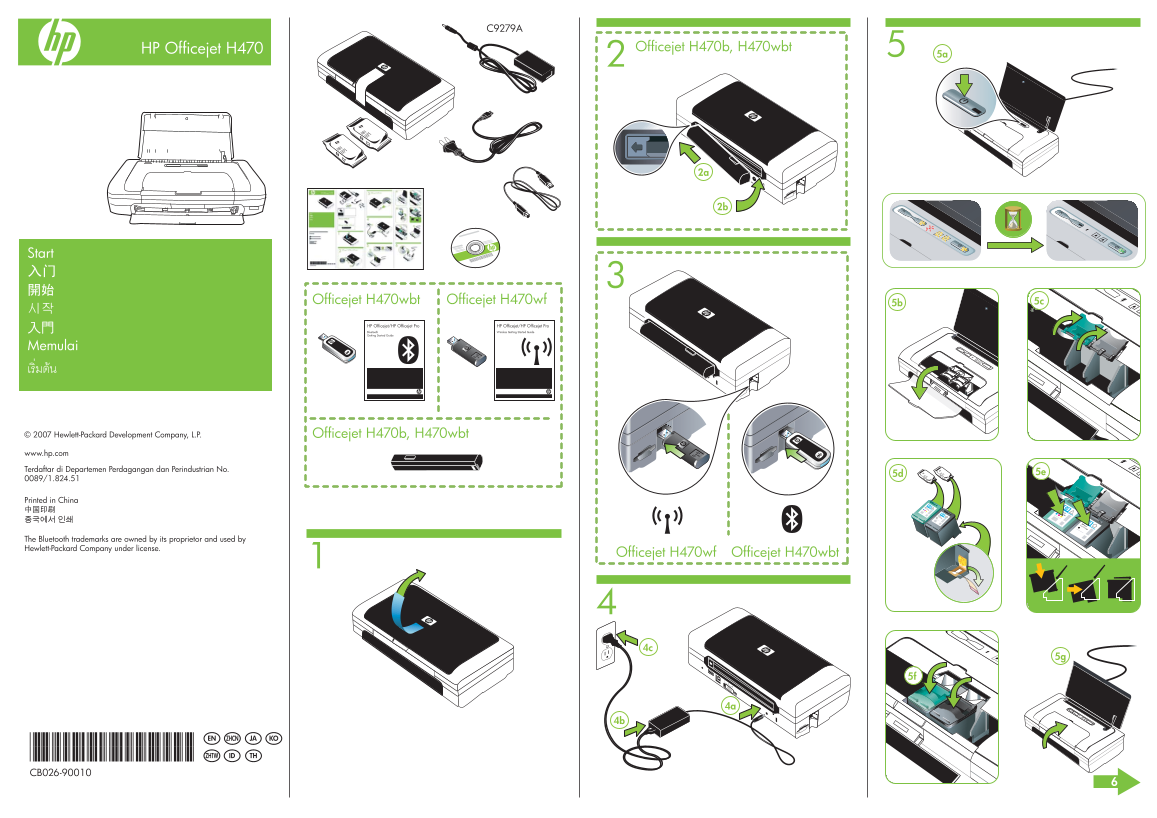
Page 1 Text Content
HP Officejet H470 Officejet H470b, H470wbt
Start
Officejet H470wbt Officejet H470wf 5b 5c
HP Officejet/HP Officejet Pro HP Officejet/HP Officejet Pro Bluetooth Wireless Getting Started Guide Getting Started Guide
Memulai
© 2007 Hewlett-Packard Development Company, L.P. Officejet H470b, H470wbt www.hp.com Terdaftar di Departemen Perdagangan dan Perindustrian No.
Printed in China
The Bluetooth trademarks are owned by its proprietor and used by Hewlett-Packard Company under license.
Officejet H470wbt Officejet H470wf1
*CB026-90010* EN ZHCN KOJA
*CB026-90010* ID THZHTW
CB026-90010
Page Summary Contents For HP Officejet H470 Mobile Printer Series Setup Guide
Manual Details
| Brand | HP |
|---|---|
| Pages | 2 |
| File Size | 1.09 MB |
| Published | May 30, 2026 |
Enter the captcha to get the download link:

Frequently Asked Questions
Where can I find user guides and support information?
An electronic User Guide is available on your computer after you install the software. Detailed support info is also at www.hp.com/support.
How does ink usage affect maintenance?
Ink is used during initialization, for preparing devices (printhead servicing), and to keep print nozzles clear and flowing. Some residual ink remains in the cartridge afterward.
What should I do when connecting the device via USB or wireless?
Install software first. If using USB or wireless, connect the cable only when prompted.