EverFocus EPHD08 HD DVR Quick Reference Guide
Summary
This comprehensive guide provides detailed operational instructions for the EPHD08 HD DVR, a powerful digital video recorder designed for professional surveillance systems. Learn how to manage multiple camera feeds, perform advanced event or time-based searches, and export high-resolution footage via USB drive or media disc. Perfect for security users and integrators who require mastery over multi-view layouts, precise playback control, system settings, and alarm management for reliable video monitoring.
Page 1 Text Content
Operating elements EPHD08 HD DVR Quick Reference Guide
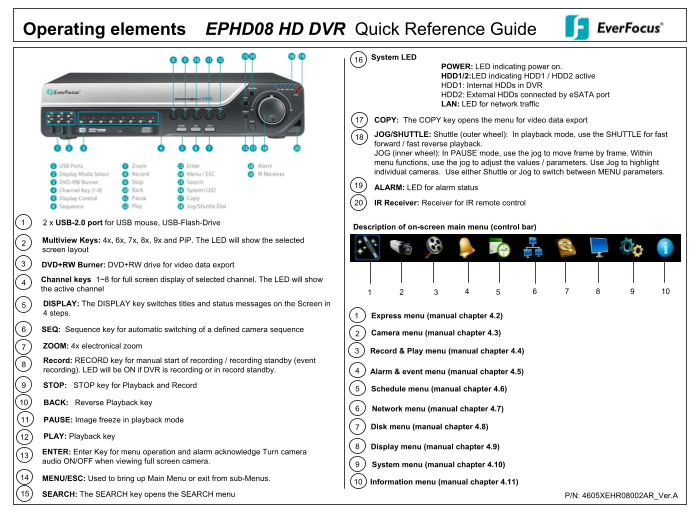
System LED
POWER: LED indicating power on. HDD1/2:LED indicating HDD1 / HDD2 active HDD1: Internal HDDs in DVR HDD2: External HDDs connected by e SATA port LAN: LED for network traffic
COPY: The COPY key opens the menu for video data export
JOG/SHUTTLE: Shuttle (outer wheel): In playback mode, use the SHUTTLE for fast forward / fast reverse playback. JOG (inner wheel): In PAUSE mode, use the jog to move frame by frame. Within menu functions, use the jog to adjust the values / parameters. Use Jog to highlight individual cameras. Use either Shuttle or Jog to switch between MENU parameters.
ALARM: LED for alarm status
IR Receiver: Receiver for IR remote control
2 x USB-2.0 port for USB mouse, USB-Flash-Drive
Description of on-screen main menu (control bar)
Multiview Keys: 4x, 6x, 7x, 8x, 9x and Pi P. The LED will show the selected screen layout
DVD+RW Burner: DVD+RW drive for video data export
Channel keys 1~8 for full screen display of selected channel. The LED will show the active channel
DISPLAY: The DISPLAY key switches titles and status messages on the Screen in 4 steps.
Express menu (manual chapter 4.2)
SEQ: Sequence key for automatic switching of a defined camera sequence
Camera menu (manual chapter 4.3)
ZOOM: 4x electronical zoom
Record & Play menu (manual chapter 4.4)
Record: RECORD key for manual start of recording / recording standby (event recording). LED will be ON if DVR is recording or in record standby. Alarm & event menu (manual chapter 4.5)
STOP: STOP key for Playback and Record
Schedule menu (manual chapter 4.6)
BACK: Reverse Playback key
Network menu (manual chapter 4.7)
PAUSE: Image freeze in playback mode
Disk menu (manual chapter 4.8)
PLAY: Playback key
Display menu (manual chapter 4.9)
ENTER: Enter Key for menu operation and alarm acknowledge Turn camera audio ON/OFF when viewing full screen camera.
System menu (manual chapter 4.10)
MENU/ESC: Used to bring up Main Menu or exit from sub-Menus.
Information menu (manual chapter 4.11)
SEARCH: The SEARCH key opens the SEARCH menu P/N: 4605XEHR08002AR_Ver.A
Page Summary Contents For EverFocus EPHD08 HD DVR Quick Reference Guide
Manual Details
| Brand | EverFocus |
|---|---|
| Pages | 2 |
| File Size | 89.49 KB |
| Published | May 20, 2026 |
Enter the captcha to get the download link:

Frequently Asked Questions
How do I fast forward or rewind video during playback?
Use the SHUTTLE wheel for fast forward/fast reverse playback, supporting up to 32x and >>>> speed.
What is the maximum zoom available?
The device provides a 4x electronic zoom function when activated via the ZOOM key.
Can I export video data using external media?
Yes. For USB, insert a stick; for CD/DVD, use the DVD+RW burner and press the COPY key to start export.
What keys control viewing layout and channels?
Multiview keys (4x, 6x, etc.) adjust display layouts. Channel keys 1~8 select specific full-screen cameras.