Delta Industrial Automation PLC Programmable Controller DVP-E64FM DVP-ES2 Data Backup Memory Card Installation Manual
Summary
Master this advanced PLC capability for seamless program and parameter management. This guide provides comprehensive technical details on backing up PLC data to memory cards and restoring system programs from external storage. It covers operational procedures, special function setting via M1163/D1063, and diagnostics for password or data mismatch errors (e.g., 0xC421). Ideal for automation engineers and technicians responsible for robust PLC maintenance, ensuring data integrity during control system upgrades and commissioning.
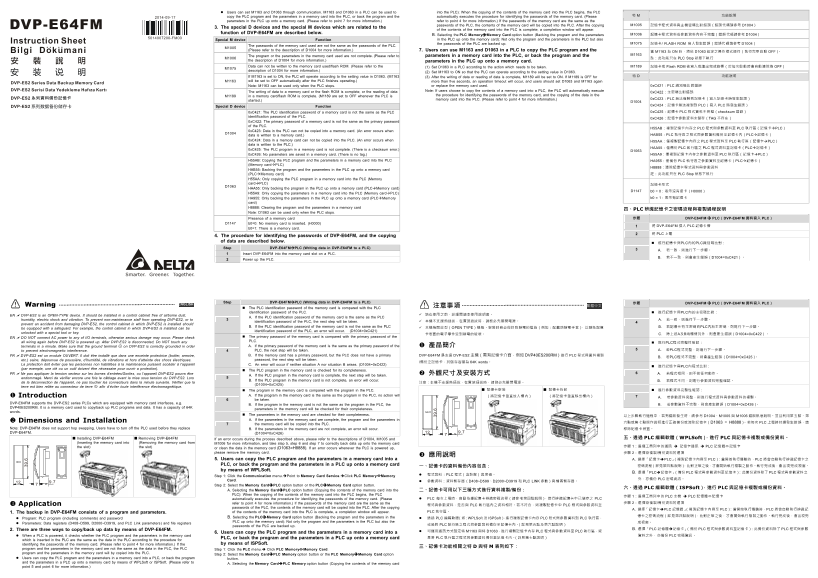
Page 1 Text Content
Users can set M1163 and D1063 through communication. M1163 and D1063 in a PLC can be used to into the PLC): When the copying of the contents of the memory card into the PLC begins, the PLC
copy the PLC program and the parameters in a memory card into the PLC, or back the program and the automatically executes the procedure for identifying the passwords of the memory card. (Please M 功能說明
parameters in the PLC up onto a memory card. (Please refer to point 7 for more information.) refer to point 4 for more information.) If the passwords of the memory card are the same as the
.6 passwords of the PLC, the contents of the memory card will be copied into the PLC. After the copying M1005 記憶卡程式資料與主機密碼比對錯誤(錯誤代碼請參考 D1004)
3. The special D devices and the special M devices which are related to the
of the contents of the memory card into the PLC is complete, a completion window will appear.
function of DVP-E64FM are described below. B. Selecting the PLC Memory Memory Card option button (Backing the program and the parameters M1006 記憶卡程式資料或參數資料內容不完整(錯誤代碼請參考 D1004)
Special M device Function in the PLC up onto the memory card): Not only the program and the parameters in the PLC but also
the passwords of the PLC are backed up. M1075 記憶卡/ FLASH ROM 寫入發生錯誤(錯誤代碼請參考 D1004)
M1005 The passwords of the memory card used are not the same as the passwords of the PLC.
(Please refer to the description of D1004 for more information.) 7. Users can use M1163 and D1063 in a PLC to copy the PLC program and the M1163 ON 時,將依 D1063 設定之操作模式運行(執行完畢自動 OFF)。
parameters in a memory card into the PLC, or back the program and the M1163
M1006 The program or the parameters in the memory card used are not complete. (Please refer to 註:此功能只在 PLC Stop 狀態下執行
the description of D1004 for more information.) parameters in the PLC up onto a memory card.
(1) Set D1063 in a PLC according to the action which needs to be taken. M1189 記憶卡或 Flash ROM 被寫入或讀出完成旗標(於每次啟動時會自動清除為 OFF)
M1075 Data can not be written to the memory card used/flash ROM. (Please refer to the
description of D1004 for more information.) (2) Set M1163 to ON so that the PLC can operate according to the setting value in D1063.
If M1163 is set to ON, the PLC will operate according to the setting value in D1063. (M1163 (3) After the writing of data or reading of data is complete, M1189 will be set to ON. If M1189 is OFF for D 功能說明
M1163 will be set to OFF automatically after the PLC finishes operating.) more than five seconds, an operation timeout will occur, and users should set D1063 and M1163 again
Note: M1163 can be used only when the PLC stops. or replace the memory card used. 0x C421:PLC 識別碼比 對錯誤
The writing of data to a memory card or the flash ROM is complete, or the reading of data Note: If users choose to copy the contents of a memory card into a PLC, the PLC will automatically execute 0x C422:主密碼比對錯誤 M1189 in a memory card/flash ROM is complete. (M1189 are set to OFF whenever the PLC is the procedure for identifying the passwords of the memory card, and the copying of the data in the
started.) memory card into the PLC. (Please refer to point 4 for more information.) 0x C423:PLC 無法複製到記憶卡(寫入記憶卡時發生錯誤)
Special D device Function 0x C424:記憶卡無法複製到 PLC(寫入 PLC 時發生錯誤)
0x C421: The PLC identification password of a memory card is not the same as the PLC 0x C425:記憶卡 PLC 程式資料不完整(checksum 錯誤)
identification password of the PLC. 0x C426:記憶卡參數資料未儲存(TAG 不存在) 0x C422: The primary password of a memory card is not the same as the primary password of the PLC.
H55AB:複製記憶卡內存之 PLC 程式與參數資料至 PLC 執行區(記憶卡 PLC)
0x C423: Data in the PLC can not be copied into a memory card. (An error occurs when
D1004 data is written to a memory card.) HAB55:PLC 執行區之程式與參數資料備份至記憶卡內(PLC 記憶卡)
0x C424: Data in a memory card can not be copied into the PLC. (An error occurs when H55AA:僅複製記憶卡內存之 PLC 程式資料至 PLC 執行區(記憶卡 PLC) data is written to the PLC.)
0x C425: The PLC program in a memory card is not complete. (There is a checksum error.) HAA55:僅備份 PLC 執行區之 PLC 程式資料至記憶卡(PLC 記憶卡)
0x C426: No parameters are saved in a memory card. (There is no tag.) H55A9:僅複製記憶卡內存之參數資料至 PLC 執行區(記憶卡 PLC)
H55AB: Copying the PLC program and the parameters in a memory card into the PLC HA955:僅備份 PLC 執行區之參數資料至記憶卡(PLC 記憶卡) (Memory card PLC)
HAB55: Backing the program and the parameters in the PLC up onto a memory card
(PLC Memory card) 註:此功能只在 PLC Stop 狀態下執行
H55AA: Only copying the PLC program in a memory card into the PLC (Memory card PLC) 記憶卡形式
D1063 HAA55: Only backing the program in the PLC up onto a memory card (PLC Memory card)
H55A9: Only copying the parameters in a memory card into the PLC (Memory card PLC)
HA955: Only backing the parameters in the PLC up onto a memory card (PLC Memory b0 = 1:表示有記憶卡
card) H8888: Clearing the program and the parameters in a memory card
四、PLC 辨識記憶卡之密碼流程與複製過程說明
Note: D1063 can be used only when the PLC stops.
Presence of a memory card 步驟 DVP-E64FM PLC(DVP-E64FM 資料寫入 PLC)
D1147 b0=0: No memory card is inserted. (H0000)
1 將 DVP-E64FM 插入 PLC 記憶卡槽
b0=1: There is a memory card.
2 將 PLC 上電
4. The procedure for identifying the passwords of DVP-E64FM, and the copying of data are described below. 進行記憶卡與PLC內的PLC識別碼比對: Step DVP-E64FM PLC (Writing data in DVP-E64FM to a PLC)
1 Insert DVP-E64FM into the memory card slot on a PLC.
2 Power up the PLC.
Step DVP-E64FM PLC (Writing data in DVP-E64FM to a PLC) 步驟 DVP-E64FM PLC(DVP-E64FM 資料寫入 PLC)
ENGLISH 繁體中文
Warning The PLC identification password of the memory card is compared with the PLC 注意事項
identification password of the PLC. 進行記憶卡與PLC內的主密碼比對:
EN DVP-ES2 is an OPEN-TYPE device. It should be installed in a control cabinet free of airborne dust, 請在使用之前,詳細閱讀本使用說明書。
A. If the PLC identification password of the memory card is the same as the PLC
humidity, electric shock and vibration. To prevent non-maintenance staff from operating DVP-ES2, or to 本機不支援熱插拔,在實施插拔時,請務必先關閉電源。 A. 若一致,則進行下一步驟。
identification password of the PLC, the next step will be taken.
prevent an accident from damaging DVP-ES2, the control cabinet in which DVP-ES2 is installed should
be equipped with a safeguard. For example, the control cabinet in which DVP-ES2 is installed can be B. If the PLC identification password of the memory card is not the same as the PLC 本機為開放型(OPEN TYPE)機殼。安裝時務必做好防靜電的措施(例如:配戴防靜電手套),以避免記憶 B. 若記憶卡有主密碼而PLC內無主密碼,則進行下一步驟。 unlocked with a special tool or key. identification password of the PLC, an error will occur. (D1004=0x C421)
EN DO NOT connect AC power to any of I/O terminals, otherwise serious damage may occur. Please check The primary password of the memory card is compared with the primary password of the all wiring again before DVP-ES2 is powered up. After DVP-ES2 is disconnected, Do NOT touch any PLC. 進行PLC程式完整性確認: terminals in a minute. Make sure that the ground terminal on DVP-ES2 is correctly grounded in order A. If the primary password of the memory card is the same as the primary password of the 產品簡介
to prevent electromagnetic interference. PLC, the next step will be taken. A. 若PLC程式完整,則進行下一步驟。
FR DVP-ES2 est un module OUVERT. Il doit être installé que dans une enceinte protectrice (boitier, armoire, B. If the memory card has a primary password, but the PLC does not have a primary DVP-E64FM 是支援 DVP-ES2 主機(需有記憶卡介面,例如 DVP40ES200RM)進行 PLC 程式與資料複製 B. 若PLC程式不完整,則會產生錯誤(D1004=0x C425)。 etc.) saine, dépourvue de poussière, d’humidité, de vibrations et hors d’atteinte des chocs électriques. password, the next step will be taken.
/備份之記憶卡,其儲存容量為 64K words。
La protection doit éviter que les personnes non habilitées à la maintenance puissent accéder à l’appareil C. An error will occur if neither situation A nor situation B arises. (D1004=0x C422)
進行記憶卡與PLC內程式比對:
(par exemple, une clé ou un outil doivent être nécessaire pour ouvrir a protection). The PLC program in the memory card is checked for its completeness.
FR Ne pas appliquer la tension secteur sur les bornes d’entrées/Sorties, ou l’appareil DVP-ES2 pourra être A. If the PLC program in the memory card is complete, the next step will be taken. 外觀尺寸及安裝方式 A. 若程式相同,則不做任何動作。
endommagé. Merci de vérifier encore une fois le câblage avant la mise sous tension du DVP-ES2. Lors
B. If the PLC program in the memory card is not complete, an error will occur. B. 若程式不同,則進行參數資料完整確認。
de la déconnection de l’appareil, ne pas toucher les connecteurs dans la minute suivante. Vérifier que la 注意:本機不支援熱插拔,在實施插拔時,請務必先關閉電源。
terre est bien reliée au connecteur de terre afin d’éviter toute interférence électromagnétique.
The program in the memory card is compared with the program in the PLC. 記憶卡安裝 記憶卡拆卸 進行參數資料完整性確認:
Introduction A. If the program in the memory card is the same as the program in the PLC, no action will (將記憶卡垂直放入槽內) (將記憶卡垂直移出槽內)
be taken.
DVP-E64FM supports the DVP-ES2 series PLCs which are equipped with memory card interfaces, e.g. B. If the program in the memory card is not the same as the program in the PLC, the B. 若參數資料不完整,則會產生錯誤(D1004=0x C426)。 DVP40ES200RM. It is a memory card used to copy/back up PLC programs and data. It has a capacity of 64K parameters in the memory card will be checked for their completeness. words.
The parameters in the memory card are checked for their completeness. 以上步驟執行過程中,若有錯誤發生時,請參考 D1004、M1005 M1006 錯誤訊息說明。並且利用第五點、第 Dimensions and Installation A. If the parameters in the memory card are complete, the program and the parameters in
the memory card will be copied into the PLC. 六點或第七點操作說明進行正確備份或清除記憶卡(D1063 = H8888)。若每次 PLC 上電時持續發生錯誤,請
Note: DVP-E64FM does not support hop swapping. Users have to turn off the PLC used before they replace B. If the parameters in the memory card are not complete, an error will occur. 移除記憶卡裝置。
DVP-E64FM. (D1004=0x C426) 9.7
Installing DVP-E64FM Removing DVP-E64FM If an error occurs during the process described above, please refer to the descriptions of D1004, M1005 and 五、透過 PLC 編輯軟體(WPLSoft),進行 PLC 與記憶卡複製或備份資料。
(Inserting the memory card into (Removing the memory card from M1006 for more information, and take step 5, step 6 and step 7 to correctly back data up onto the memory card
the slot) the slot) or clean the data in the memory card (D1063=H8888). If an error occurs whenever the PLC is powered up, 步驟 1:選擇工具列中的通訊 記憶卡通訊 PLC 記憶體 記憶卡
please remove the memory card. 步驟 2:選擇欲複製/備份資料的選項
5. Users can copy the PLC program and the parameters in a memory card into a A. 選擇「記憶卡 PLC」(複製記憶卡內容至 PLC):當開始執行傳輸時,PLC 將會自動執行辨識記憶卡之 PLC, or back the program and the parameters in a PLC up onto a memory card 一、記憶卡的資料備份內容包含: 密碼流程(詳見第四點說明),比對正確之後,才會開始執行複製之動作。執行完成後,會出現完成視窗。 by means of WPLSoft.
B. 選擇「PLC 記憶卡」(備份 PLC 程式與參數資料至記憶卡):此備份資料除了 PLC 程式與參數資料之
Step 1: Click the Communication menu. Point to Memory Card Service. Click PLC Memory Memory 程式資料:PLC 程式(含註解)與密碼。
Card. 外,亦備份 PLC 密碼資訊。
9.7 參數資料:資料暫存器(D408~D599、D2000~D3919 PLC LINK 參數)與檔案暫存器。
Step 2: Select the Memory Card PLC option button or the PLC Memory Card option button.
六、透過 PLC 編輯軟體(ISPSoft),進行 PLC 與記憶卡複製或備份資料。
A. Selecting the Memory Card PLC option button (Copying the contents of the memory card into the 二、記憶卡可用以下三種方式進行資料複製/備份: PLC): When the copying of the contents of the memory card into the PLC begins, the PLC 步驟 1:選擇工具列中的 PLC 主機 PLC 記憶體 記憶卡
automatically executes the procedure for identifying the passwords of the memory card. (Please PLC 每次上電時,自動依據記憶卡辨識密碼流程(請參考第四點說明),進行辨識記憶卡中已儲存之 PLC
Application refer to point 4 for more information.) If the passwords of the memory card are the same as the 步驟 2:選擇欲複製/備份資料的選項
程式與參數資料,是否與 PLC 執行區內之資料相符。若不符合,則複製記憶卡中 PLC 程式與參數資料至
passwords of the PLC, the contents of the memory card will be copied into the PLC. After the copying A. 選擇「記憶卡 PLC 記憶體」(複製記憶卡內容至 PLC):當開始執行傳輸時,PLC 將會自動執行辨識記
1. The backup in DVP-E64FM consists of a program and parameters. of the contents of the memory card into the PLC is complete, a completion window will appear. PLC 執行區。
B. Selecting the PLC Memory Card option button (Backing the program and the parameters in the 憶卡之密碼流程(詳見第四點說明),比對正確之後,才會開始執行複製之動作。執行完成後,會出現完
Program: PLC program (including comments) and password 透過 PLC 編輯軟體(如:WPLSoft ISPSoft),進行複製記憶卡內存 PLC 程式與參數資料到 PLC 執行區,
Parameters: Data registers (D408~D599, D2000~D3919, and PLC Link parameters) and file registers PLC up onto the memory card): Not only the program and the parameters in the PLC but also the 成視窗。
passwords of the PLC are backed up. 或是將 PLC 執行區之程式與參數資料備份至記憶卡內。(詳見第五點及第六點說明)
2. There are three ways to copy/back up data by means of DVP-E64FM. B. 選擇「PLC 記憶體 記憶卡」(備份 PLC 程式與參數資料至記憶卡):此備份資料除了 PLC 程式與參數
6. Users can copy the PLC program and the parameters in a memory card into a 可運用通訊方式設定特 M1163 與特 D1063,進行複製記憶卡內存 PLC 程式與參數資料至 PLC 執行區,或
When a PLC is powered, it checks whether the PLC program and the parameters in the memory card 資料之外,亦備份 PLC 密碼資訊。
PLC, or back the program and the parameters in a PLC up onto a memory card 是將 PLC 執行區之程式與參數資料備份至記憶卡內。(詳見第七點說明)
which is inserted in the PLC are the same as the data in the PLC according to the procedure for
identifying the passwords of the memory card. (Please refer to point 4 for more information.) If the by means of ISPSoft.
program and the parameters in the memory card are not the same as the data in the PLC, the PLC 三、記憶卡功能相關之特 與特 表列如下:
Step 1: Click the PLC menu. Click PLC Memory Memory Card.
program and the parameters in the memory card will by copied into the PLC. Step 2: Select the Memory Card PLC Memory option button or the PLC Memory Memory Card option Users can copy the PLC program and the parameters in a memory card into a PLC, or back the program button. and the parameters in a PLC up onto a memory card by means of WPLSoft or ISPSoft. (Please refer to A. Selecting the Memory Card PLC Memory option button (Copying the contents of the memory card point 5 and point 6 for more information.)
Page Summary Contents For Delta Industrial Automation PLC Programmable Controller DVP-E64FM DVP-ES2 Data Backup Memory Card Installation Manual
Manual Details
| Brand | Delta |
|---|---|
| Pages | 2 |
| File Size | 705.49 KB |
| Published | June 05, 2026 |
Enter the captcha to get the download link:

Frequently Asked Questions
How can I copy PLC program and parameters into a memory card?
Select 'PLC Memory to Memory Card' mode, set M1163 ON, or use communication methods (specifying the appropriate function selection).
What is required for copying memory card data back into the PLC?
The passwords of the memory card and the PLC must match. If not, an error will occur (see D1004 code).
Do I need to be in a specific state to use M1163 and D1063 for copying/backing up data?
This function can only be executed when the PLC is in the Stop status.