Delta DMV-CL20MDMV Series Camera Operation Manual
Summary
The DMV-CL20M is a high-performance Area Scan Camera designed for industrial imaging applications requiring precise visual data capture. This comprehensive manual serves as an essential guide for professional technicians, engineers, and end-users responsible for the system's successful integration and maintenance. It provides critical instructions on proper installation procedures, operational guidelines, electrical safety protocols, and best practices for cleaning and maintaining sensitive camera components.
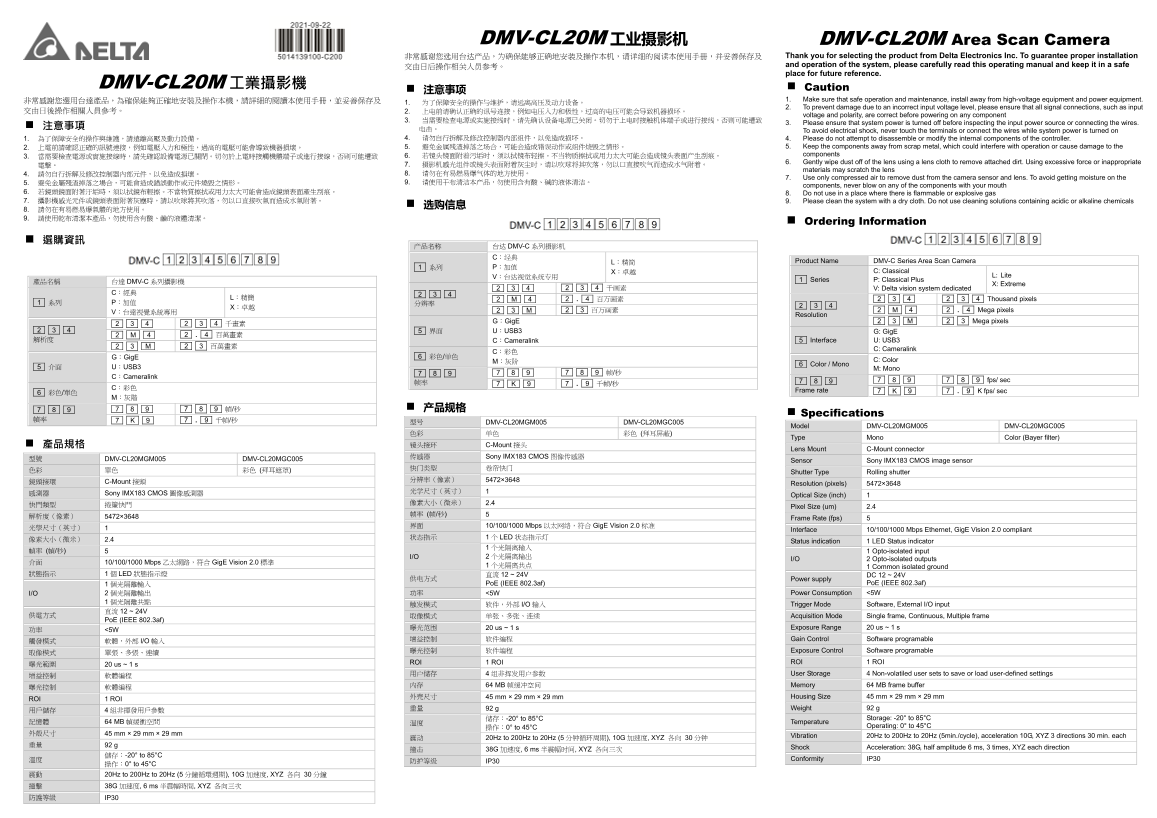
Page 1 Text Content
DMV-CL20M 工业摄影机 DMV-CL20M Area Scan Camera
非常感谢您选用台达产品,为确保能够正确地安装及操作本机,请详细的阅读本使用手册,并妥善保存及 Thank you for selecting the product from Delta Electronics Inc. To guarantee proper installation 交由日后操作相关人员参考。 and operation of the system, please carefully read this operating manual and keep it in a safe place for future reference.
DMV-CL20M 工業攝影機 Caution
非常感謝您選用台達產品,為確保能夠正確地安裝及操作本機,請詳細的閱讀本使用手冊,並妥善保存及 1. Make sure that safe operation and maintenance, install away from high-voltage equipment and power equipment.
2. To prevent damage due to an incorrect input voltage level, please ensure that all signal connections, such as input
voltage and polarity, are correct before powering on any component
3. Please ensure that system power is turned off before inspecting the input power source or connecting the wires.
To avoid electrical shock, never touch the terminals or connect the wires while system power is turned on
1. 為了保障安全的操作與維護,請遠離高壓及動力設備。 4. 请勿自行拆解及修改控制器内部组件,以免造成损坏。 4. Please do not attempt to disassemble or modify the internal components of the controller.
2. 上電前請確認正確的訊號連接,例如電壓入力和極性,過高的電壓可能會導致機器損壞。 5. 避免金属残渣掉落之场合,可能会造成错误动作或组件烧毁之情形。 5. Keep the components away from scrap metal, which could interfere with operation or cause damage to the 6. 若镜头镜面附着污垢时,须以拭镜布轻擦。不当物质擦拭或用力太大可能会造成镜头表面产生刮痕。 components
6. Gently wipe dust off of the lens using a lens cloth to remove attached dirt. Using excessive force or inappropriate
materials may scratch the lens
7. Use only compressed air to remove dust from the camera sensor and lens. To avoid getting moisture on the
components, never blow on any of the components with your mouth
6. 若鏡頭鏡面附著汙垢時,須以拭鏡布輕擦。不當物質擦拭或用力太大可能會造成鏡頭表面產生刮痕。 8. Do not use in a place where there is flammable or explosive gas 7. 攝影機感光元件或鏡頭表面附著灰塵時,請以吹球將其吹落,勿以口直接吹氣而造成水氣附著。 9. Please clean the system with a dry cloth. Do not use cleaning solutions containing acidic or alkaline chemicals
Ordering Information
产品名称 台达 DMV-C 系列摄影机
L:精简 Product Name DMV-C Series Area Scan Camera
X:卓越 C: Classical
V:台达视觉系统专用 L: Lite
產品名稱 台達 DMV-C 系列攝影機 1 Series P: Classical Plus
X: Extreme
2 3 4 2 3 4 千画素 V: Delta vision system dedicated
L:精簡 2 M 4 2 . 4 百万画素 2 3 4 2 3 4 Thousand pixels
2 3 M 2 3 百万画素 2 M 4 2 . 4 Mega pixels
Resolution
G:Gig E 2 3 M 2 3 Mega pixels
2 3 4 5 界面 U:USB3 G: Gig E
解析度 C:Cameralink 5 Interface U: USB3
C: Cameralink
G:Gig E 6 彩色/单色
6 Color / Mono C: Color
5 介面 U:USB3 M: Mono
C:Cameralink
7 8 9 7 8 9 7 8 9 fps/ sec
Frame rate 7 K 9 7 . 9 K fps/ sec
Specifications
型号 DMV-CL20MGM005 DMV-CL20MGC005
Model DMV-CL20MGM005 DMV-CL20MGC005
Type Mono Color (Bayer filter)
產品規格 镜头接环 C-Mount 接头
Lens Mount C-Mount connector
传感器 Sony IMX183 CMOS 图像传感器
型號 DMV-CL20MGM005 DMV-CL20MGC005
Sensor Sony IMX183 CMOS image sensor
Shutter Type Rolling shutter
鏡頭接環 C-Mount 接頭
Resolution (pixels) 5472×3648
感測器 Sony IMX183 CMOS 圖像感測器
Optical Size (inch) 1
Pixel Size (um) 2.4
Frame Rate (fps) 5
界面 10/100/1000 Mbps 以太网络,符合 Gig E Vision 2.0 标准
Interface 10/100/1000 Mbps Ethernet, Gig E Vision 2.0 compliant
状态指示 1 LED 状态指示灯
Status indication 1 LED Status indicator
幀率 (幀/秒) 5 1 Opto-isolated input
I/O 2 Opto-isolated outputs
介面 10/100/1000 Mbps 乙太網路,符合 Gig E Vision 2.0 標準
个光隔离共点 1 Common isolated ground
狀態指示 1 LED 狀態指示燈 12 ~ 24V
供电方式 直流 Power supply DC 12 ~ 24V
個光隔離輸入 Po E (IEEE 802.3af) Po E (IEEE 802.3af)
I/O 個光隔離輸出 功率 <5W Power Consumption <5W
触发模式 软件,外部 I/O 输入 Trigger Mode Software, External I/O input
供電方式 直流 取像模式 单张、多张、连续 Acquisition Mode Single frame, Continuous, Multiple frame
Po E (IEEE 802.3af)
曝光范围 20 us ~ 1 s Exposure Range 20 us ~ 1 s
增益控制 软件编程 Gain Control Software programable
曝光控制 软件编程 Exposure Control Software programable
ROI 1 ROI ROI 1 ROI
曝光範圍 20 us ~ 1 s
用户储存 4 组非挥发用户参数 User Storage 4 Non-volatiled user sets to save or load user-defined settings
内存 64 MB 帧缓冲空间 Memory 64 MB frame buffer
外壳尺寸 45 mm × 29 mm × 29 mm Housing Size 45 mm × 29 mm × 29 mm
ROI 1 ROI
重量 92 g Weight 92 g
用戶儲存 4 組非揮發用戶參數 記憶體 64 MB 幀緩衝空間 温度 储存:-20° to 85°C Temperature Storage: -20° to 85°C
操作:0° to 45°C Operating: 0° to 45°C
外殼尺寸 45 mm × 29 mm × 29 mm
Vibration 20Hz to 200Hz to 20Hz (5min./cycle), acceleration 10G, XYZ 3 directions 30 min. each
震动 20Hz to 200Hz to 20Hz (5 分钟循环周期), 10G 加速度, XYZ 各向 30 分钟
Shock Acceleration: 38G, half amplitude 6 ms, 3 times, XYZ each direction
撞击 38G 加速度, 6 ms 半震幅时间, XYZ 各向三次
溫度 儲存:-20° to 85°C Conformity IP30
防护等级 IP30
操作:0° to 45°C
震動 20Hz to 200Hz to 20Hz (5 分鐘循環週期), 10G 加速度, XYZ 各向 30 分鐘 撞擊 38G 加速度, 6 ms 半震幅時間, XYZ 各向三次 防護等級 IP30
Page Summary Contents For Delta DMV-CL20MDMV Series Camera Operation Manual
Manual Details
| Brand | Delta |
|---|---|
| Pages | 2 |
| File Size | 943.68 KB |
| Published | June 06, 2026 |
Enter the captcha to get the download link:

Frequently Asked Questions
How should I clean the camera lens?
Gently wipe dust off using a lens cloth or use compressed air to remove dust from the sensor/lens, never blow on it with your mouth.
What electrical precautions must be taken during setup?
Only install away from high-voltage equipment. Always ensure system power is off before connecting wires or inspecting power sources to avoid electric shock.
How do I clean the product generally?
Use a dry cloth and never use cleaning solutions containing acidic or alkaline chemicals.