Dell XPS 700 Jet Black Setup Guide and User Manual
Summary
Dell desktop computer setup guide (2006) covering stand installation, monitor connection options, network adapter and modem setup, keyboard/mouse connection, Microsoft Windows XP Media Center Edition components, optional TV tuner, and Dell TV configuration.
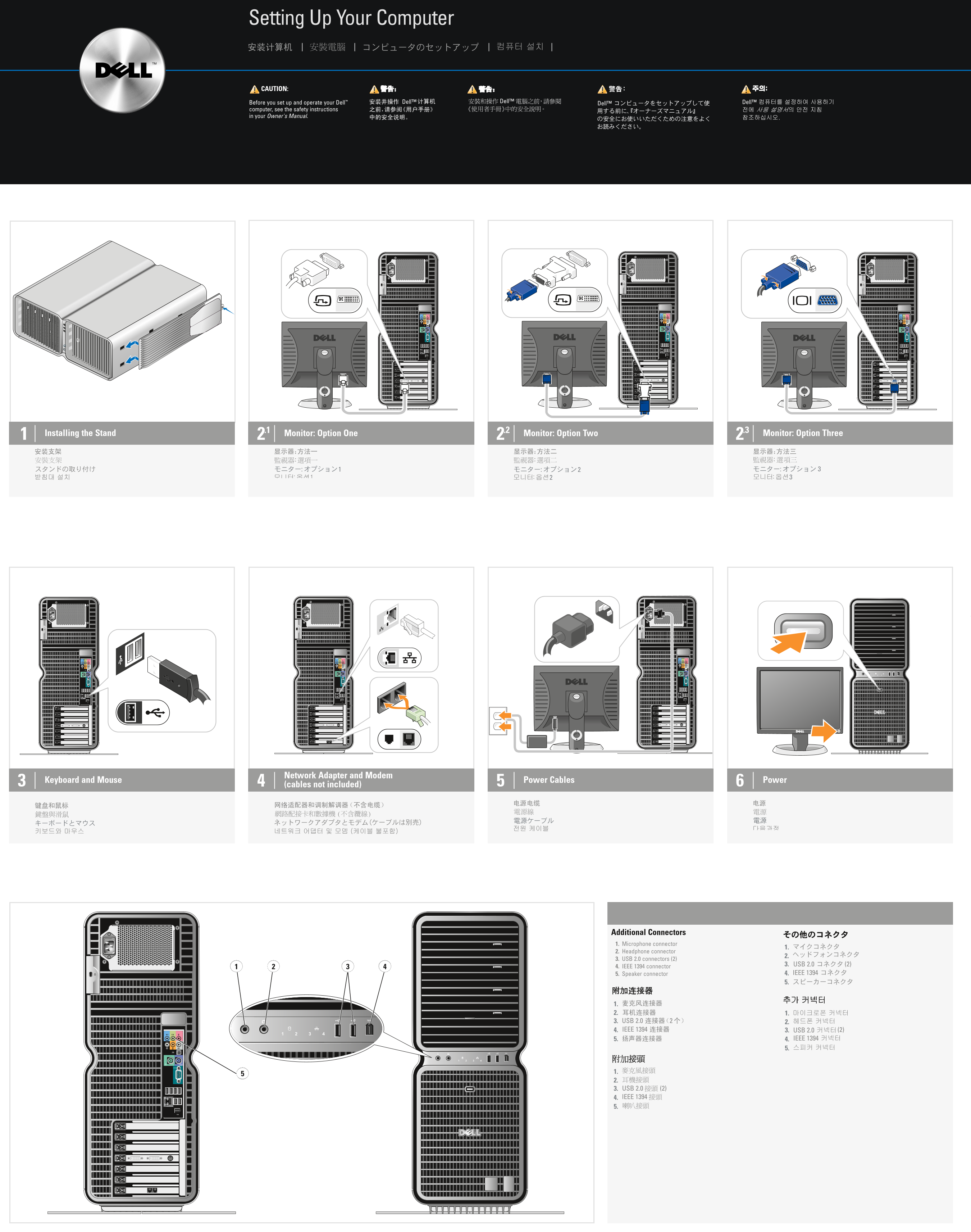
Page 1 Text Content
GH391cc0.qxd 04/04/2006 16:10 Page 1
Setting Up Your Computer
CAUTION:
Before you set up and operate your Dell™ Dell™ computer, see the safety instructions in your Owner's Manual.
2.11 Monitor: Option One 2.2 Monitor: Option Two 2.3 Monitor: Option Three Installing the Stand
Network Adapter and Modem
Keyboard and Mouse Power Cables Power
(cables not included)
Additional Connectors 1. Microphone connector
2. Headphone connector
3. USB 2.0 connectors (2)
4. IEEE 1394 connector
5. Speaker connector 4. 5.
Page Summary Contents For Dell XPS 700 Jet Black Setup Guide and User Manual
Manual Details
| Brand | Dell |
|---|---|
| Pages | 2 |
| File Size | 4.49 MB |
| Published | July 03, 2026 |
Enter the captcha to get the download link:

Frequently Asked Questions
Before setting up the computer, what should I read?
See the safety instructions in your Owner's Manual.
How do I set up optional components like a remote control or TV tuner card?
Connect the components as described in their respective setup instructions. For the TV tuner card, consult the Media Center setup instructions.
Where can I find additional support information for my computer or OS?
Visit support.dell.com, or click Start > Help and Support for general help.
What type of operating system is mentioned for media center use?
If you ordered specialized software, it might be the Microsoft Windows XP Media Center Edition.