Dell Vostro 15 3559 Quick User Guide
Summary
This Quick Start Guide for the Dell Vostro 15 3000 Series notebook (Model P52F, Regulatory Type P52F003) provides multilingual setup instructions in English, Simplified Chinese, Traditional Chinese, Japanese, and Vietnamese. It covers power adapter connection, Windows 7 and Windows 8.1 operating system setup, network connectivity, and security configuration. Highlights Dell Backup and Recovery for data protection, SupportAssist for system health checks, and Dell Help and Support. Designed for small business users and IT administrators.
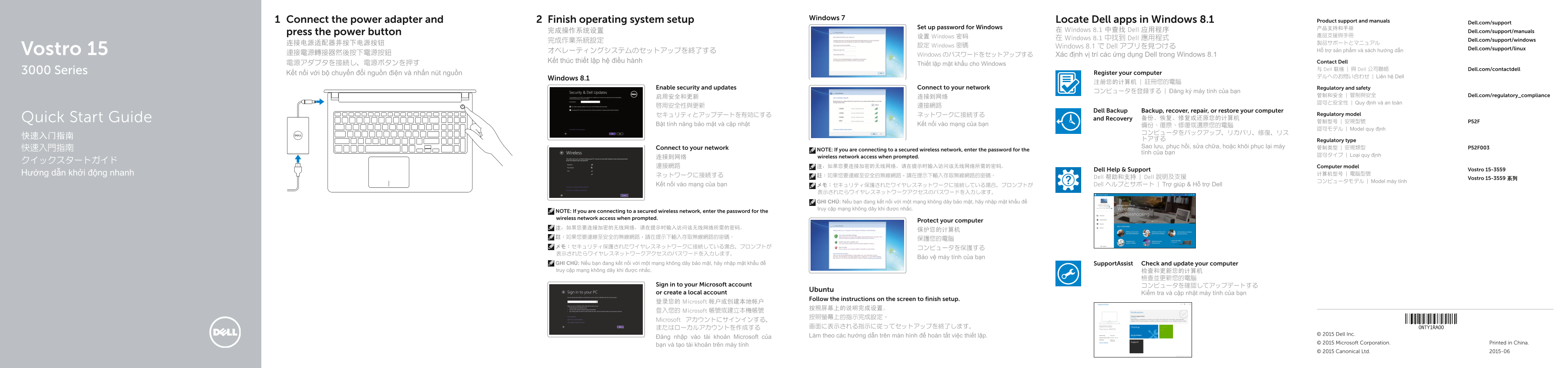
Page 1 Text Content
Windows 7
Connect the power adapter and Finish operating system setup Locate Dell apps in Windows 8.1 Product support and manuals
Dell.com/support
Set up password for Windows 产品支持和手册
完成操作系统设置 在 Windows 8.1 中查找 Dell 应用程序 Dell.com/support/manuals
press the power button
设置 Windows 密码 產品支援與手冊
在 Windows 8.1 中找到 Dell 應用程式 Dell.com/support/windows
設定 Windows 密碼 Windows 8.1 で Dell アプリを見つける
Vostro 15 Dell.com/support/linux
オペレーティングシステムのセットアップを終了する Hỗ trợ sản phẩm và sách hướng dẫn
連接電源轉接器然後按下電源按鈕 Windows のパスワードをセットアップする Xác định vị trí các ứng dụng Dell trong Windows 8.1
Kết thúc thiết lập hệ điều hành Contact Dell
電源アダプタを接続し、電源ボタンを押す Thiết lập mật khẩu cho Windows
与 Dell 联络 | 與 Dell 公司聯絡 Dell.com/contactdell
3000 Series Kết nối với bộ chuyển đổi nguồn điện và nhấn nút nguồn Register your computer
デルへのお問い合わせ | Liên hệ Dell
Windows 8.1
Enable security and updates Connect to your network Regulatory and safety
コンピュータを登録する | Đăng ký máy tính của bạn
启用安全和更新 连接到网络 管制和安全 | 管制與安全 Dell.com/regulatory_compliance 認可と安全性 | Quy định và an toàn
Dell Backup Backup, recover, repair, or restore your computer
セキュリティとアップデートを有効にする ネットワークに接続する Regulatory model
Quick Start Guide and Recovery 备份、恢复、修复或还原您的计算机
Bật tính năng bảo mật và cập nhật Kết nối vào mạng của bạn 備份、復原、修復或還原您的電腦
認可モデル | Model quy định
トアする Regulatory type Connect to your network Sao lưu, phục hồi, sửa chữa, hoặc khôi phục lại máy 管制类型 | 安規類型 P52F003
快速入門指南 NOTE: If you are connecting to a secured wireless network, enter the password for the
tính của bạn
wireless network access when prompted. 認可タイプ | Loại quy định
連接網路 注:如果您要连接加密的无线网络,请在提示时输入访问该无线网络所需的密码。 Computer model
Dell Help & Support Vostro 15-3559
Hướng dẫn khởi động nhanh ネットワークに接続する 计算机型号 | 電腦型號
註:如果您要連線至安全的無線網路,請在提示下輸入存取無線網路的密碼。 Dell 帮助和支持 | Dell 說明及支援
Vostro 15-3559 系列
コンピュータモデル | Model máy tính
Kết nối vào mạng của bạn メモ:セキュリティ保護されたワイヤレスネットワークに接続している場合、プロンプトが Dell ヘルプとサポート | Trợ giúp & Hỗ trợ Dell
表示されたらワイヤレスネットワークアクセスのパスワードを入力します。 GHI CHÚ: Nếu bạn đang kết nối với một mạng không dây bảo mật, hãy nhập mật khẩu để truy cập mạng không dây khi được nhắc.
NOTE: If you are connecting to a secured wireless network, enter the password for the wireless network access when prompted.
Protect your computer
Bảo vệ máy tính của bạn
GHI CHÚ: Nếu bạn đang kết nối với một mạng không dây bảo mật, hãy nhập mật khẩu để Support Assist Check and update your computer truy cập mạng không dây khi được nhắc. 检查和更新您的计算机
Sign in to your Microsoft account コンピュータを確認してアップデートする
Ubuntu
or create a local account Kiểm tra và cập nhật máy tính của bạn
Follow the instructions on the screen to finish setup.
登录您的 Microsoft 帐户或创建本地帐户
登入您的 Microsoft 帳號或建立本機帳號
Microsoft アカウントにサインインする、
Làm theo các hướng dẫn trên màn hình để hoàn tất việc thiết lập. © 2015 Dell Inc.
Đăng nhập vào tài khoản Microsoft của
© 2015 Microsoft Corporation. Printed in China.
bạn và tạo tài khoản trên máy tính
© 2015 Canonical Ltd. 2015-06
Page Summary Contents For Dell Vostro 15 3559 Quick User Guide
Manual Details
| Brand | Dell |
|---|---|
| Pages | 2 |
| File Size | 1.40 MB |
| Published | July 01, 2026 |
Enter the captcha to get the download link:

Frequently Asked Questions
How do I complete the operating system setup after connecting power?
You must follow the on-screen instructions to finish setup, which may require signing in to a Microsoft account or creating a local account.
What should I do when connecting to a secured wireless network?
If you are connecting to a secured Wi-Fi network, remember that you must enter the required access password when prompted.
How can I protect my computer and keep it updated?
You should enable security and updates, register your computer model, and perform regular backups, recovery, or restoration.
Where are the video ports located on this device?
The unit includes a VGA connector (14) and multiple USB connectors (USB 2.0/USB 3.0) for external display connections.