Dell Vostro 15 3561 Quick User Guide
Summary
This Quick Start Guide for the Dell Vostro 15 3000 Series notebook (Regulatory Model P47F, Type P47F007, Model Vostro 15-3561) provides multilingual setup instructions covering power adapter connection, Windows 7 and Ubuntu operating system configuration, network connectivity, and computer protection. It includes detailed keyboard shortcut keys for audio mute, wireless toggle, volume and brightness controls, Fn-key lock, and multimedia playback. Hardware features such as camera, HDMI, VGA, USB 3
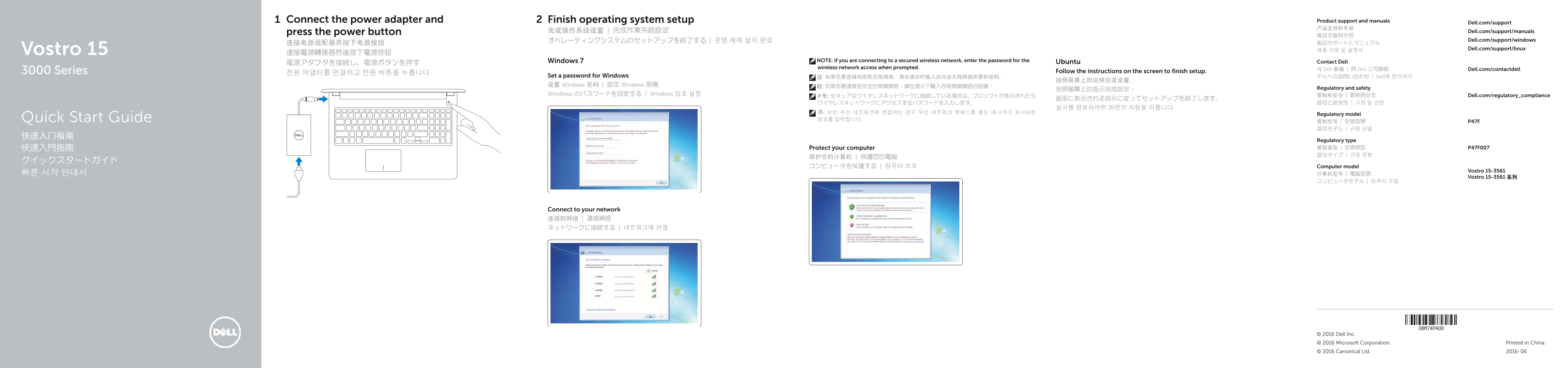
Page 1 Text Content
Connect the power adapter and Finish operating system setup Product support and manuals
Dell.com/support
press the power button 完成操作系统设置 | 完成作業系統設定 Dell.com/support/manuals
オペレーティングシステムのセットアップを終了する | 운영 체제 설치 완료 Dell.com/support/windows
Vostro 15 Dell.com/support/linux
Windows 7 NOTE: If you are connecting to a secured wireless network, enter the password for the Contact Dell
電源アダプタを接続し、電源ボタンを押す Ubuntu
wireless network access when prompted.
与 Dell 联络 | 與 Dell 公司聯絡 Dell.com/contactdell
3000 Series Follow the instructions on the screen to finish setup.
Set a password for Windows 注: 如果您要连接加密的无线网络,请在提示时输入访问该无线网络所需的密码。 デルへのお問い合わせ | Dell에 문의하기
设置 Windows 密码 | 設定 Windows 密碼 註: 如果您要連線至安全的無線網路,請在提示下輸入存取無線網路的密碼。
按照螢幕上的指示完成設定。 Regulatory and safety
Windows のパスワードを設定する | Windows 암호 설정 管制和安全 | 管制與安全 Dell.com/regulatory_compliance
주: 보안 무선 네트워크에 연결하는 경우 무선 네트워크 액세스를 묻는 메시지가 표시되면 Regulatory model Quick Start Guide 암호를 입력합니다.
Regulatory type 快速入門指南 Protect your computer 管制类型 | 安規類型 P47F007 認可タイプ | 규정 유형
コンピュータを保護する | 컴퓨터 보호 Computer model
Vostro 15-3561
Vostro 15-3561 系列
Connect to your network 连接到网络 | 連接網路 ネットワークに接続する | 네트워크에 연결
© 2016 Dell Inc. © 2016 Microsoft Corporation. Printed in China. © 2016 Canonical Ltd. 2016-06
Page Summary Contents For Dell Vostro 15 3561 Quick User Guide
Manual Details
| Brand | Dell |
|---|---|
| Pages | 2 |
| File Size | 485.42 KB |
| Published | July 02, 2026 |
Enter the captcha to get the download link:

Frequently Asked Questions
Where can I find detailed product information?
For more details, refer to the Owner's Manual at Dell.com/support/manuals.