Dell Inspiron 15 3559 Quick User Guide - Windows 8
Summary
Quick Start Guide for the Dell Inspiron 15 3000 Series laptop (Regulatory Model P47F, Inspiron 15-3559). Multi-language document covering power adapter connection, Windows or Ubuntu operating system setup, security and updates enablement, network connectivity, and Microsoft account sign-in. Includes SupportAssist checks, Dell Backup and Recovery tool, and Taiwan regulatory compliance information with voltage and frequency specifications.
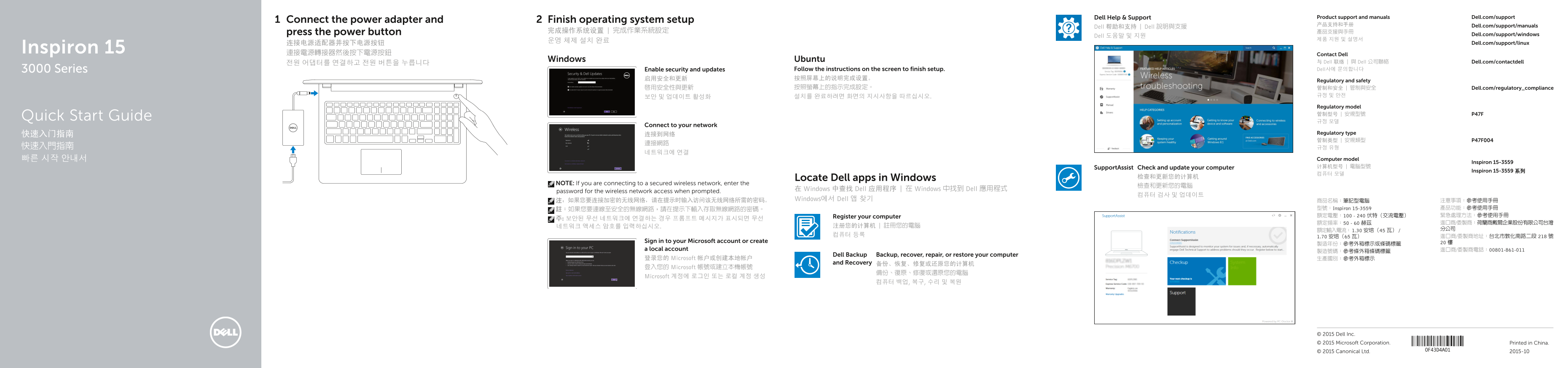
Page 1 Text Content
Dell Help & Support Product support and manuals Dell.com/support
Connect the power adapter and Finish operating system setup
产品支持和手册 Dell.com/support/manuals
Dell 帮助和支持 | Dell 說明與支援
press the power button 完成操作系统设置 | 完成作業系統設定 產品支援與手冊
Dell 도움말 및 지원 Dell.com/support/windows
连接电源适配器并按下电源按钮 Dell.com/support/linux
Inspiron 15 連接電源轉接器然後按下電源按鈕
Contact Dell
Windows Ubuntu 与 Dell 联络 | 與 Dell 公司聯絡 Dell.com/contactdell
3000 Series Enable security and updates Follow the instructions on the screen to finish setup. Dell사에 문의합니다
Regulatory and safety
啟用安全性與更新 按照螢幕上的指示完成設定。 管制和安全 | 管制與安全 Dell.com/regulatory_compliance
보안 및 업데이트 활성화 설치를 완료하려면 화면의 지시사항을 따르십시오. 규정 및 안전 Regulatory model 管制型号 | 安規型號 P47F
Quick Start Guide
Connect to your network
快速入门指南 连接到网络 Regulatory type 管制类型 | 安規類型 P47F004
빠른 시작 안내서 Computer model
Inspiron 15-3559
Support Assist Check and update your computer 计算机型号 | 電腦型號
Inspiron 15-3559 系列
Locate Dell apps in Windows 检查和更新您的计算机
NOTE: If you are connecting to a secured wireless network, enter the
在 Windows 中查找 Dell 应用程序 | 在 Windows 中找到 Dell 應用程式
password for the wireless network access when prompted.
注:如果您要连接加密的无线网络,请在提示时输入访问该无线网络所需的密码。 Windows에서 Dell 앱 찾기 商品名稱:筆記型電腦 注意事項:參考使用手冊
註:如果您要連線至安全的無線網路,請在提示下輸入存取無線網路的密碼。 型號:Inspiron 15-3559 產品功能:參考使用手冊 Register your computer 額定電壓:100 - 240 伏特(交流電壓) 緊急處理方法:參考使用手冊
Sign in to your Microsoft account or create 20 樓
a local account 進口商/委製商電話:00801-861-011
Dell Backup Backup, recover, repair, or restore your computer
登录您的 Microsoft 帐户或创建本地帐户 生產國別:參考外箱標示
and Recovery 备份、恢复、修复或还原您的计算机
登入您的 Microsoft 帳號或建立本機帳號
Microsoft 계정에 로그인 또는 로컬 계정 생성
© 2015 Dell Inc. © 2015 Microsoft Corporation. Printed in China.
© 2015 Canonical Ltd. 2015-10
Page Summary Contents For Dell Inspiron 15 3559 Quick User Guide - Windows 8
Manual Details
| Brand | Dell |
|---|---|
| Pages | 2 |
| File Size | 736.95 KB |
| Published | July 03, 2026 |
Enter the captcha to get the download link:

Frequently Asked Questions
How do I connect my laptop to a secure wireless network?
When prompted, you must enter the password required for accessing that wireless network.
What steps are needed if the operating system setup was interrupted?
Connect the power adapter and press the power button. Follow the screen instructions to finish setup and enable security/updates.
Which port should I use for external monitors?
Use the HDMI Port (Port 6) or any available USB 3.0 port (Port 7).
Where can I find details on physical features like ports or indicators?
For more detailed information, please refer to the specifications section at Dell.com/support.