Dell OptiPlex 7450 Quick User Guide - Windows 10
Summary
Dell OptiPlex 7450 All-in-One Quick Start Guide covering power cable and peripheral connection, optional cable cover Torx screw removal, keyboard/mouse connection (wired or wireless), cable cover installation, stand assembly, power button activation, Windows 10 setup, and Taiwan regulatory import specifications for model W11C.
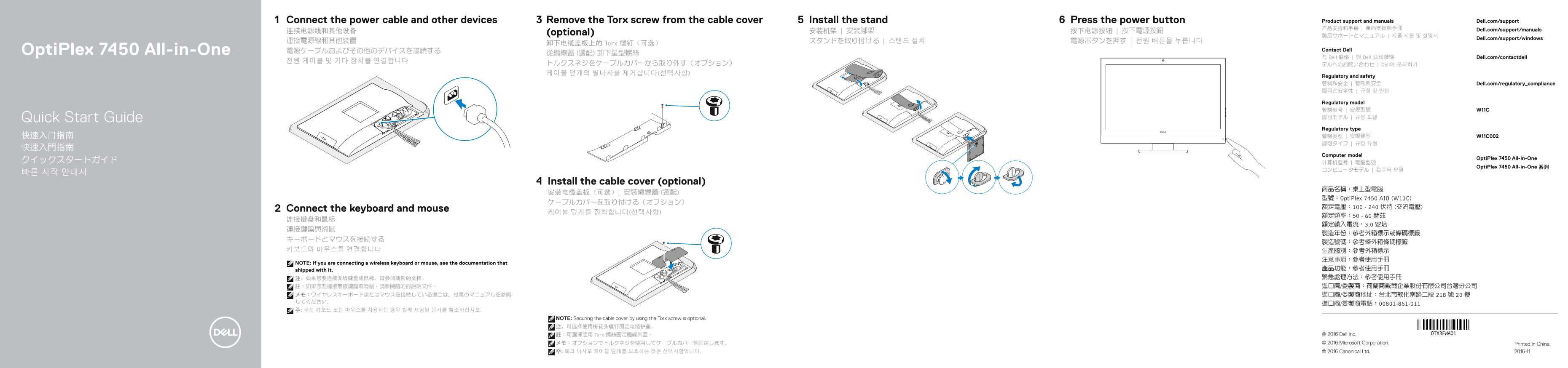
Page 1 Text Content
Connect the power cable and other devices Remove the Torx screw from the cable cover Install the stand Press the power button Product support and manuals Dell.com/support 产品支持和手册 | 產品支援與手冊 Dell.com/support/manuals
连接电源线和其他设备 (optional) 安装机架 | 安裝腳架 按下电源按钮 | 按下電源按鈕
Dell.com/support/windows
卸下电缆盖板上的 Torx 螺钉(可选)
Opti Plex 7450 All-in-One 電源ケーブルおよびその他のデバイスを接続する Contact Dell
与 Dell 联络 | 與 Dell 公司聯絡 Dell.com/contactdell
トルクスネジをケーブルカバーから取り外す(オプション) デルへのお問い合わせ | Dell에 문의하기 케이블 덮개의 별나사를 제거합니다(선택사항)
Regulatory and safety 管制和安全 | 管制與安全 Dell.com/regulatory_compliance 認可と安全性 | 규정 및 안전
Regulatory model 管制型号 | 安規型號 W11C Quick Start Guide 認可モデル | 규정 모델 Regulatory type 快速入门指南 管制类型 | 安規類型 W11C002 認可タイプ | 규정 유형
Computer model
Opti Plex 7450 All-in-One
Opti Plex 7450 All-in-One 系列
Install the cable cover (optional)
型號:Opti Plex 7450 AIO (W11C)
Connect the keyboard and mouse 額定電壓:100 - 240 伏特 (交流電壓)
NOTE: If you are connecting a wireless keyboard or mouse, see the documentation that
shipped with it. 產品功能:參考使用手冊 注:如果您要连接无线键盘或鼠标,请参阅随附的文档。 緊急處理方法:參考使用手冊 註:如果您要連接無線鍵盤或滑鼠,請參閱隨附的說明文件。 進口商/委製商:荷蘭商戴爾企業股份有限公司台灣分公司
NOTE: Securing the cable cover by using the Torx screw is optional. 注:可选择使用梅花头螺钉固定电缆护盖。
註:可選擇使用 Torx 螺絲固定纜線外蓋。 © 2016 Dell Inc. メモ:オプションでトルクネジを使用してケーブルカバーを固定します。 © 2016 Microsoft Corporation. Printed in China.
주: 토크 나사로 케이블 덮개를 보호하는 것은 선택사항입니다. © 2016 Canonical Ltd. 2016-11
Page Summary Contents For Dell OptiPlex 7450 Quick User Guide - Windows 10
Manual Details
| Brand | Dell |
|---|---|
| Pages | 2 |
| File Size | 772.27 KB |
| Published | July 03, 2026 |
Enter the captcha to get the download link:

Frequently Asked Questions
How do I power on the OptiPlex 7450 AIO?
Connect all necessary cables, install the stand (optional), and press the power button.
Does the cable cover need permanent attachment?
Securing the cable cover with a Torx screw is optional.
What are the various display connections available?
The device supports DisplayPort, HDMI output/input ports, and USB 3.0 Type C ports.
Where can I find support documents for this model?
Product support and manuals are available at Dell.com/support.