Dell OptiPlex 5050 Tower Quick User Guide - Windows 10
Summary
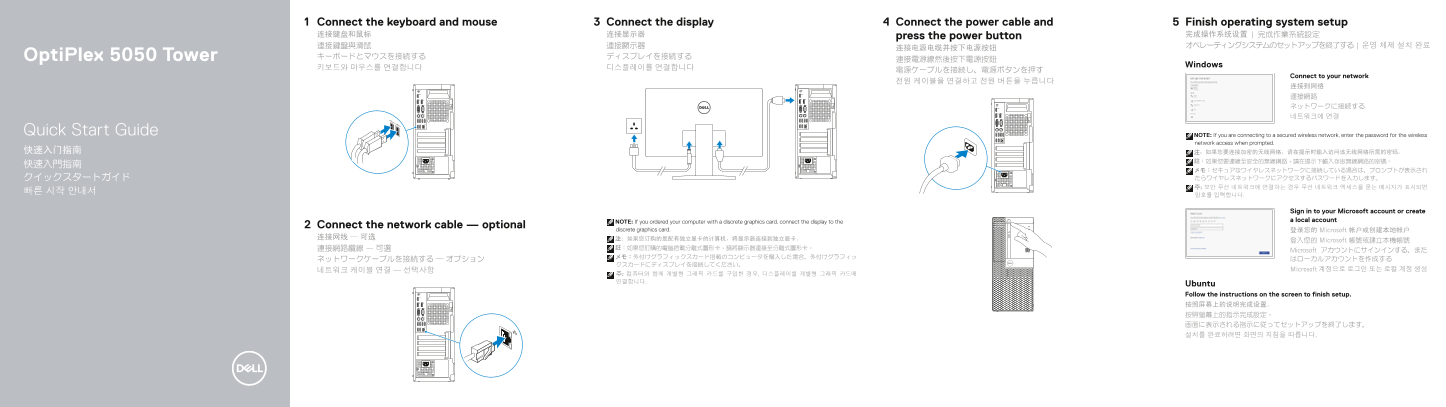
Quick start guide for the Dell OptiPlex 5050 Tower desktop computer, covering keyboard and mouse connection, display hookup with discrete graphics card routing guidance, optional network cable, power cable connection, and Windows or Ubuntu operating system setup. Multilingual instructions in English, Chinese, Japanese, and Korean with hardware features including power button with indicator light, USB 3.0, USB 2.0, HDMI, network port, optical drive, and SupportAssist integration.
Page 1 Text Content
Connect the keyboard and mouse Connect the display Connect the power cable and Finish operating system setup 连接键盘和鼠标 连接显示器 press the power button 完成操作系统设置 | 完成作業系統設定 連接鍵盤與滑鼠 連接顯示器 オペレーティングシステムのセットアップを終了する | 운영 체제 설치 완료
Opti Plex 5050 Tower キーボードとマウスを接続する ディスプレイを接続する
Windows
Connect to your network
Quick Start Guide NOTE: If you are connecting to a secured wireless network, enter the password for the wireless
network access when prompted.
Sign in to your Microsoft account or create NOTE: If you ordered your computer with a discrete graphics card, connect the display to the a local account
Connect the network cable — optional
discrete graphics card. 登录您的 Microsoft 帐户或创建本地帐户
登入您的 Microsoft 帳號或建立本機帳號
Microsoft アカウントにサインインする、また
네트워크 케이블 연결 — 선택사항 Microsoft 계정으로 로그인 또는 로컬 계정 생성
Ubuntu Follow the instructions on the screen to finish setup. 按照屏幕上的说明完成设置。 按照螢幕上的指示完成設定。 画面に表示される指示に従ってセットアップを終了します。 설치를 완료하려면 화면의 지침을 따릅니다.
Page Summary Contents For Dell OptiPlex 5050 Tower Quick User Guide - Windows 10
Manual Details
| Brand | Dell |
|---|---|
| Pages | 2 |
| File Size | 753.97 KB |
| Published | June 18, 2026 |
Enter the captcha to get the download link:

Frequently Asked Questions
How should I connect the display if using a discrete graphics card?
Connect the display to the dedicated (discrete) graphics card port.
What is required when connecting to a secured wireless network?
You must enter the password for the wireless network access when prompted during setup.
Where can I find support documentation after setup is complete?
Visit Dell.com/support or search through Product Support and Manuals on the device.
Does this model have additional physical security options?
Yes, it includes a Kensington cable slot and a dedicated padlock ring.