Dell Latitude 15 Quick Start Troubleshooting Guide
Summary
Quick Start Guide for the Dell Latitude 15 3000 Series laptop supporting both Windows 7 and Windows 8. Multi-language document covering power adapter connection, Windows setup with user/computer name creation, security and updates enablement, password setup, and network connectivity. Distinguishes setup steps between Windows 7 and Windows 8 versions for this entry-level business laptop.
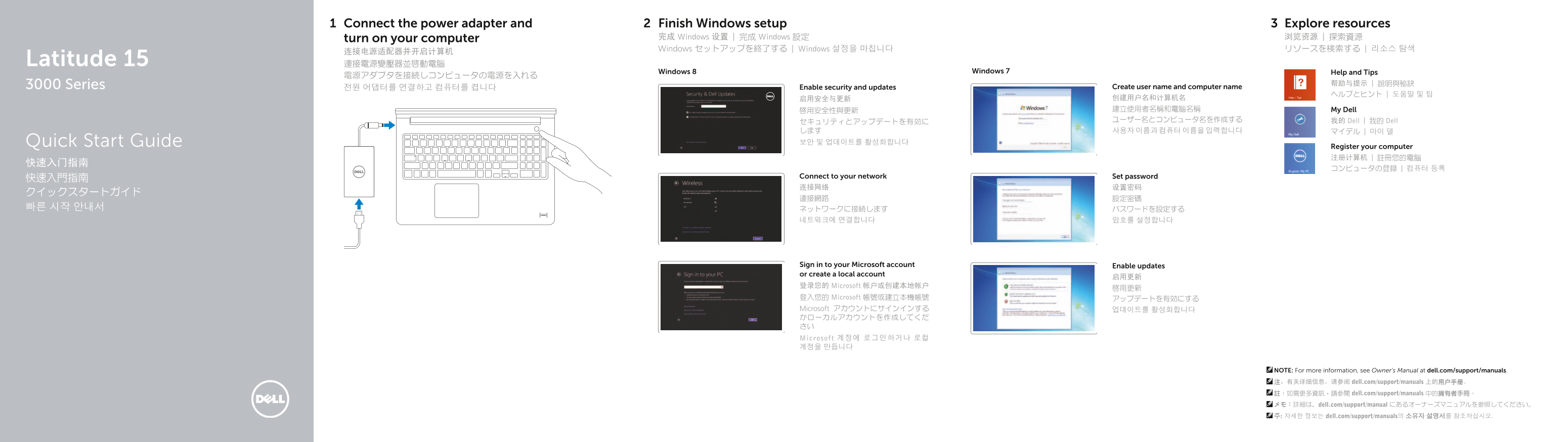
Page 1 Text Content
Connect the power adapter and Finish Windows setup Explore resources
turn on your computer 完成 Windows 设置 | 完成 Windows 設定 浏览资源 | 探索資源 Windows セットアップを終了する | Windows 설정을 마칩니다 リソースを検索する | 리소스 탐색
Latitude 15 連接電源變壓器並啟動電腦
Windows 8 Windows 7 Help and Tips
3000 Series 帮助与提示 | 說明與秘訣
전원 어댑터를 연결하고 컴퓨터를 켭니다 Enable security and updates Create user name and computer name
启用安全与更新 创建用户名和计算机名 啟用安全性與更新 建立使用者名稱和電腦名稱 My Dell ユーザー名とコンピュータ名を作成する 我的 Dell | 我的 Dell
Quick Start Guide 보안 및 업데이트를 활성화합니다
Register your computer 注册计算机 | 註冊您的電腦
快速入門指南 Connect to your network Set password 连接网络 设置密码
Sign in to your Microsoft account Enable updates or create a local account
登录您的 Microsoft 帐户或创建本地帐户
登入您的 Microsoft 帳號或建立本機帳號 アップデートを有効にする Microsoft アカウントにサインインする 업데이트를 활성화합니다 かローカルアカウントを作成してくだ さい Microsof t 계정에 로그인하거나 로컬 계정을 만듭니다
NOTE: For more information, see Owner’s Manual at dell.com/support/manuals. 注:有关详细信息,请参阅 dell.com/support/manuals 上的用户手册。 註:如需更多資訊,請參閱 dell.com/support/manuals 中的擁有者手冊。 メモ:詳細は、dell.com/support/manual にあるオーナーズマニュアルを参照してください。 주: 자세한 정보는 dell.com/support/manuals의 소유자 설명서를 참조하십시오.
Page Summary Contents For Dell Latitude 15 Quick Start Troubleshooting Guide
Manual Details
| Brand | Dell |
|---|---|
| Pages | 2 |
| File Size | 294.60 KB |
| Published | July 03, 2026 |
Enter the captcha to get the download link:

Frequently Asked Questions
How do I find technical support or manuals?
Visit dell.com/support/manuals for the Owner’s Manual and full product documentation.
What basic steps are needed after unboxing the computer?
Connect the power adapter, complete Windows setup, and sign in to your Microsoft account or create a local account.
Where can I find contact information for hardware issues?
You can contact Dell through dell.com/contactdell.