Dell Inspiron 560s Comprehensive Specifications
Summary
This comprehensive guide serves as the essential technical resource for your Dell Inspiron 560s desktop computer. Whether you are a system administrator or a dedicated user planning maintenance, this manual details every component specification—from memory configurations (including DDR3 and multi-gigabyte support) to processor compatibility, internal expansion slots, and detailed port listings. It is vital for understanding hardware upgrades, driver updates, and proper system troubleshooting, ensuring optimal performance and longevity of your PC.
Page 1 Text Content
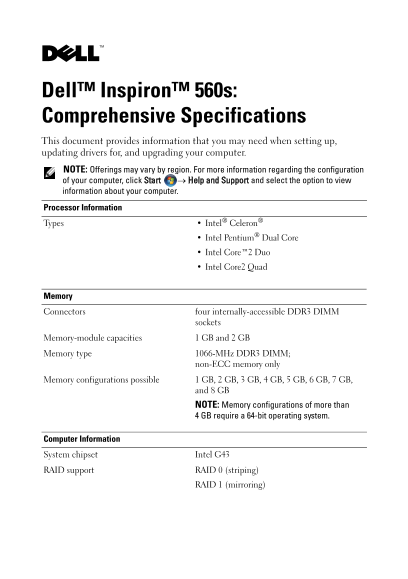
Dell™ Inspiron™ 560s: Comprehensive Specifications This document provides information that you may need when setting up, updating drivers for, and upgrading your computer. NOTE: Offerings may vary by region. For more information regarding the configuration of your computer, click Start → Help and Support and select the option to view information about your computer. Processor Information
Types Intel® Celeron® Intel Pentium® Dual Core Intel Core™2 Duo Intel Core2 Quad
Memory Connectors four internally-accessible DDR3 DIMM
sockets
Memory-module capacities 1 GB and 2 GB Memory type 1066-MHz DDR3 DIMM;
non-ECC memory only
Memory configurations possible 1 GB, 2 GB, 3 GB, 4 GB, 5 GB, 6 GB, 7 GB,
and 8 GB NOTE: Memory configurations of more than GB require a 64-bit operating system.
Computer Information System chipset Intel G43 RAID support RAID 0 (striping)
RAID 1 (mirroring)
Page Summary Contents For Dell Inspiron 560s Comprehensive Specifications
Manual Details
| Brand | Comprehensive |
|---|---|
| Pages | 5 |
| File Size | 99.45 KB |
| Published | May 18, 2026 |
Enter the captcha to get the download link:

Frequently Asked Questions
What is the maximum memory capacity supported by this system?
Memory configurations are possible up to 8 GB, although more than 4 GB requires a 64-bit operating system.
Can I expand storage internally?
The computer provides two internal 3.5-inch bays for SATA hard drives and an externally accessible 5.25-inch bay for optical drives.
What display connections are available?
Available video connectors include a 15-pin VGA connector and one 19-pin HDMI connector.
How do I connect peripherals or audio?
It has two front panel USB connectors, four back-panel USB 2.0 connectors, and provides full 7.1 channel support via back-panel audio jacks.