Dell Inspiron 1464 Comprehensive Specifications
Summary
This comprehensive technical document provides detailed specifications and service guidance for the Dell Inspiron 1464 laptop. It outlines hardware capabilities, including Intel Core processors, up to 8GB DDR3 memory support, an integrated 14-inch WLED display, and advanced connectivity via Wi-Fi (802.11n), HDMI, and multiple USB ports. Readers can use this manual for initial setup, updating drivers, troubleshooting, or upgrading components, making it a vital resource for users and technicians maintaining this professional machine.
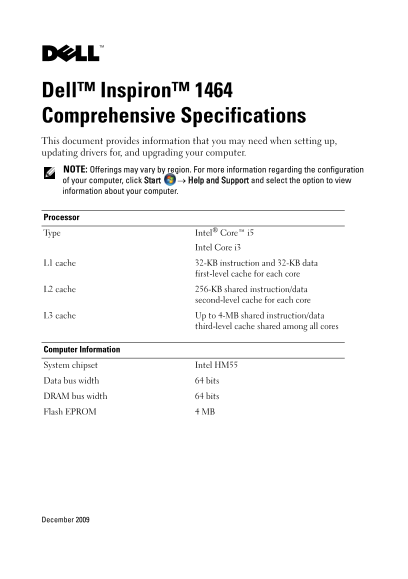
Page 1 Text Content
Mikkelsen CS.fm Page 1 Tuesday, December 8, 2009 6:07 PM
Dell™ Inspiron™ 1464 Comprehensive Specifications This document provides information that you may need when setting up, updating drivers for, and upgrading your computer. NOTE: Offerings may vary by region. For more information regarding the configuration of your computer, click Start → Help and Support and select the option to view information about your computer.
Processor Type Intel® Core™ i5
Intel Core i3
L1 cache 32-KB instruction and 32-KB data
first-level cache for each core
L2 cache 256-KB shared instruction/data
second-level cache for each core
L3 cache Up to 4-MB shared instruction/data
third-level cache shared among all cores
Computer Information System chipset Intel HM55 Data bus width 64 bits DRAM bus width 64 bits Flash EPROM 4 MB
December 2009
Page Summary Contents For Dell Inspiron 1464 Comprehensive Specifications
Manual Details
| Brand | Comprehensive |
|---|---|
| Pages | 8 |
| File Size | 625.30 KB |
| Published | May 18, 2026 |
Enter the captcha to get the download link:

Frequently Asked Questions
What is the maximum amount of RAM supported?
Memory configurations are available in sizes of 2 GB, 3 GB, 4 GB, 6 GB, and 8 GB.
Does the laptop support wireless connectivity options beyond Wi-Fi?
Yes, it includes WLAN (802.11a/b/g/n) and Bluetooth technology.
What kinds of memory cards can be used in the reader?
Supported flash cards include SD, SDHC, MMC, Memory Stick, Memory Stick Pro, and xD-Picture Card.
How is the laptop's brightness controlled?
Brightness can be controlled through keyboard shortcuts. (Refer to the Dell Technology Guide).
What are the operating temperature limits for system components?
The operational temperature range is 0° to 35° C (32° to 95°F) for most listed components.