Dell Inspiron 24 3459 Quick User Guide - Windows 10
Summary
This Quick Start Guide for the Dell Inspiron 24 3000 Series all-in-one desktop (Model W12C, Regulatory Type W12C003, Computer Model Inspiron 24-3459) provides multilingual setup instructions covering stand installation for both easel and pedestal configurations, keyboard and mouse connection, power adapter setup, Windows operating system configuration, and network connectivity. It includes guidance on creating Windows recovery media, enabling Dell updates, and accessing product support via dell.com/support. Designed for home and small office users.
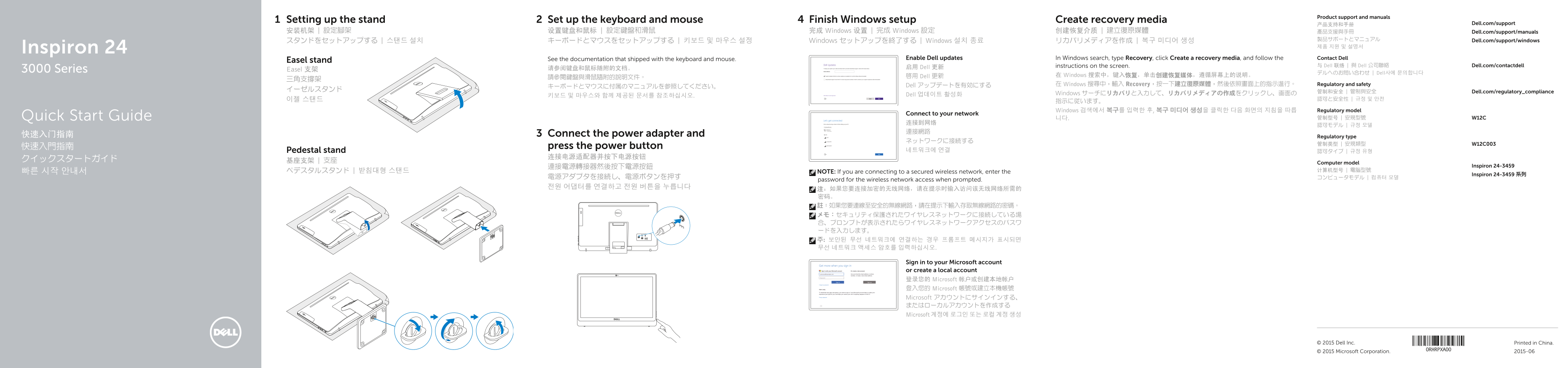
Page 1 Text Content
Product support and manuals
Setting up the stand Set up the keyboard and mouse Finish Windows setup Create recovery media
产品支持和手册 Dell.com/support
安装机架 | 設定腳架 设置键盘和鼠标 | 設定鍵盤和滑鼠 完成 Windows 设置 | 完成 Windows 設定 创建恢复介质 | 建立復原媒體 產品支援與手冊 Dell.com/support/manuals
製品サポートとマニュアル Dell.com/support/windows
スタンドをセットアップする | 스탠드 설치 キーボードとマウスをセットアップする | 키보드 및 마우스 설정 Windows セットアップを終了する | Windows 설치 종료 リカバリメディアを作成 | 복구 미디어 생성
Inspiron 24
See the documentation that shipped with the keyboard and mouse. Enable Dell updates In Windows search, type Recovery, click Create a recovery media, and follow the Contact Dell
Easel stand
instructions on the screen. 与 Dell 联络 | 與 Dell 公司聯絡 Dell.com/contactdell
请参阅键盘和鼠标随附的文档。 启用 Dell 更新
3000 Series Easel 支架
デルへのお問い合わせ | Dell사에 문의합니다
啟用 Dell 更新 在 Windows 搜索中,键入恢复,单击创建恢复媒体,遵循屏幕上的说明。
Dell アップデートを有効にする 在 Windows 搜尋中,輸入 Recovery,按一下建立復原媒體,然後依照畫面上的指示進行。 Regulatory and safety
管制和安全 | 管制與安全 Dell.com/regulatory_compliance
Dell 업데이트 활성화 Windows サーチにリカバリと入力して、リカバリメディアの作成をクリックし、画面の
Windows 검색에서 복구를 입력한 후, 복구 미디어 생성을 클릭한 다음 화면의 지침을 따릅 Regulatory model
Connect to your network
Quick Start Guide 니다. 管制型号 | 安規型號 W12C
快速入门指南 Connect the power adapter and Regulatory type
快速入門指南 press the power button
Pedestal stand 네트워크에 연결 認可タイプ | 규정 유형
Computer model
連接電源轉接器然後按下電源按鈕 Inspiron 24-3459
NOTE: If you are connecting to a secured wireless network, enter the
Inspiron 24-3459 系列
password for the wireless network access when prompted.
Sign in to your Microsoft account or create a local account 登录您的 Microsoft 帐户或创建本地帐户 登入您的 Microsoft 帳號或建立本機帳號 Microsoft アカウントにサインインする、 またはローカルアカウントを作成する Microsoft 계정에 로그인 또는 로컬 계정 생성
© 2015 Dell Inc. Printed in China.
© 2015 Microsoft Corporation. 2015-06
Page Summary Contents For Dell Inspiron 24 3459 Quick User Guide - Windows 10
Manual Details
| Brand | Dell |
|---|---|
| Pages | 2 |
| File Size | 672.98 KB |
| Published | July 02, 2026 |
Enter the captcha to get the download link:

Frequently Asked Questions
How do I get instructions for setting up the easel stand or keyboard/mouse?
Please consult the documentation originally shipped with the accessories or follow instructions displayed on the screen.
What is required when connecting to a secured wireless network?
You must enter the password for accessing that specific wireless network when prompted.
How can I create recovery media if my computer fails?
In Windows search, type 'Recovery,' click 'Create a recovery media,' and follow the on-screen instructions.
Which major ports are available on this model?
The model includes HDMI-in port, USB 2.0/3.0 connectors, an audio output port, and a headset port.