Dell Inspiron 24 5459 Quick User Guide - Windows 10
Summary
Dell Inspiron 24 5000 Series (5459) all-in-one Quick Start Guide with dual stand options (pedestal/articulating), multilingual setup covering stand assembly, keyboard/mouse, power adapter, Windows/Ubuntu OS setup, Dell updates, network connection, and features for model W12C.
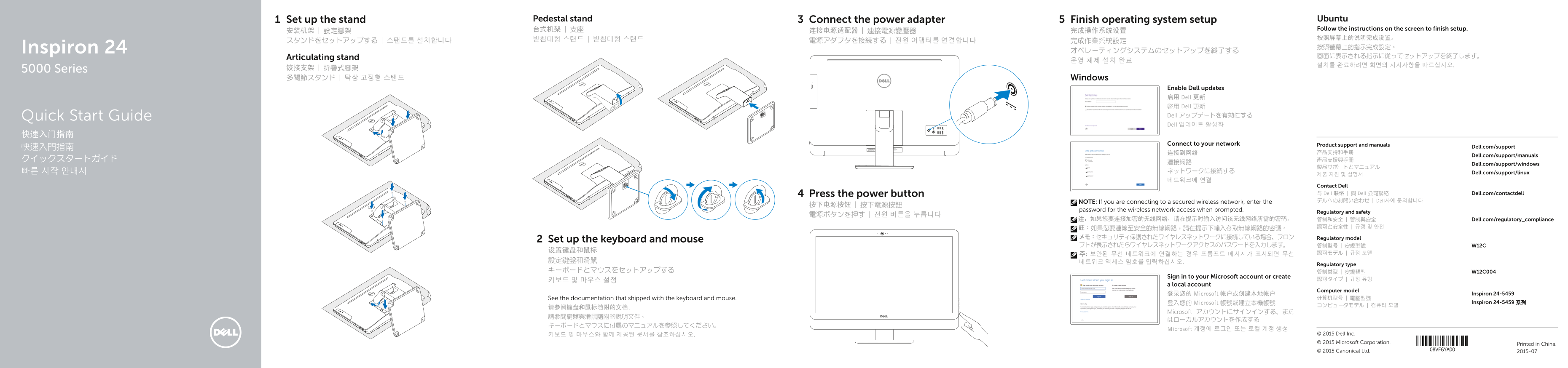
Page 1 Text Content
Set up the stand Pedestal stand Connect the power adapter Finish operating system setup Ubuntu
台式机架 | 支座 Follow the instructions on the screen to finish setup.
Inspiron 24 按照螢幕上的指示完成設定。
Articulating stand 画面に表示される指示に従ってセットアップを終了します。
5000 Series 铰接支架 | 折疊式腳架 多関節スタンド | 탁상 고정형 스탠드 Windows
Enable Dell updates 启用 Dell 更新 啟用 Dell 更新 Quick Start Guide Dell アップデートを有効にする Dell 업데이트 활성화
Connect to your network Product support and manuals
快速入門指南 Dell.com/support
Dell.com/support/manuals
Dell.com/support/windows
빠른 시작 안내서 ネットワークに接続する Dell.com/support/linux
Contact Dell Press the power button 与 Dell 联络 | 與 Dell 公司聯絡 Dell.com/contactdell NOTE: If you are connecting to a secured wireless network, enter the デルへのお問い合わせ | Dell사에 문의합니다
password for the wireless network access when prompted.
Regulatory and safety
注:如果您要连接加密的无线网络,请在提示时输入访问该无线网络所需的密码。 管制和安全 | 管制與安全 Dell.com/regulatory_compliance
メモ:セキュリティ保護されたワイヤレスネットワークに接続している場合、プロン Regulatory model
Set up the keyboard and mouse
Regulatory type
Sign in to your Microsoft account or create
a local account
Computer model
登录您的 Microsoft 帐户或创建本地帐户 Inspiron 24-5459
See the documentation that shipped with the keyboard and mouse. 计算机型号 | 電腦型號
登入您的 Microsoft 帳號或建立本機帳號 Inspiron 24-5459 系列
Microsoft アカウントにサインインする、また
Microsoft 계정에 로그인 또는 로컬 계정 생성
키보드 및 마우스와 함께 제공된 문서를 참조하십시오. © 2015 Dell Inc. © 2015 Microsoft Corporation. Printed in China. © 2015 Canonical Ltd. 2015-07
Page Summary Contents For Dell Inspiron 24 5459 Quick User Guide - Windows 10
Manual Details
| Brand | Dell |
|---|---|
| Pages | 2 |
| File Size | 857.45 KB |
| Published | July 03, 2026 |
Enter the captcha to get the download link:
