Dell Inspiron 24 5459 Quick User Guide - Windows 7
Summary
Quick Start Guide for the Dell Inspiron 24 5000 Series all-in-one desktop (Regulatory Model W12C, Inspiron 24-5459) with pedestal and articulating stand options from 2015. Covers stand setup, keyboard and mouse configuration, power adapter connection, and Windows setup with password and security protection. Features dual microphones, camera with status light, screen-off button, brightness controls, optical drive, and tilt adjustment.
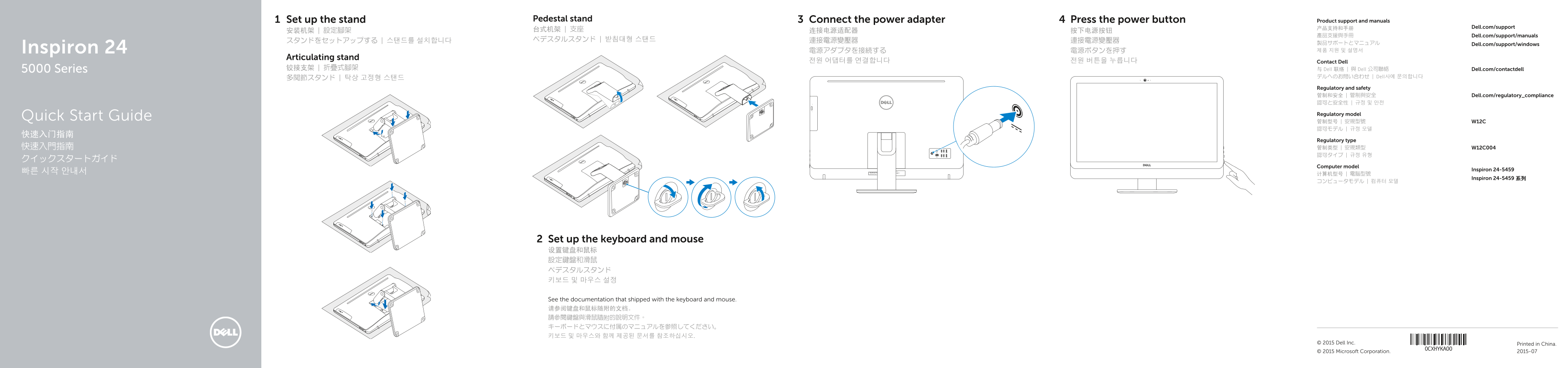
Page 1 Text Content
Set up the stand Pedestal stand Connect the power adapter Press the power button Product support and manuals
产品支持和手册 Dell.com/support
產品支援與手冊 Dell.com/support/manuals
製品サポートとマニュアル Dell.com/support/windows Inspiron 24 電源アダプタを接続する 電源ボタンを押す 제품 지원 및 설명서
Articulating stand
전원 어댑터를 연결합니다 전원 버튼을 누릅니다 Contact Dell
5000 Series 铰接支架 | 折疊式腳架 与 Dell 联络 | 與 Dell 公司聯絡 Dell.com/contactdell
デルへのお問い合わせ | Dell사에 문의합니다
Regulatory and safety 管制和安全 | 管制與安全 Dell.com/regulatory_compliance 認可と安全性 | 규정 및 안전
Regulatory model
Quick Start Guide
Regulatory type
Computer model
Inspiron 24-5459
Inspiron 24-5459 系列
Set up the keyboard and mouse 设置键盘和鼠标 設定鍵盤和滑鼠 ペデスタルスタンド 키보드 및 마우스 설정
See the documentation that shipped with the keyboard and mouse. 请参阅键盘和鼠标随附的文档。 請參閱鍵盤與滑鼠隨附的說明文件。 キーボードとマウスに付属のマニュアルを参照してください。 키보드 및 마우스와 함께 제공된 문서를 참조하십시오.
Printed in China.© 2015 Dell Inc. © 2015 Microsoft Corporation. 2015-07
Page Summary Contents For Dell Inspiron 24 5459 Quick User Guide - Windows 7
Manual Details
| Brand | Dell |
|---|---|
| Pages | 2 |
| File Size | 470.98 KB |
| Published | July 03, 2026 |
Enter the captcha to get the download link:

Frequently Asked Questions
无线网络连接需要什么密码?
如果您要连接加密的无线网络,在提示时输入访问该无线网络所需的密码。
机型如何查询其高级功能和详细信息?
点击开始 -> 所有程序 -> Dell 帮助说明文即可了解有关计算机的功能和高级选项。
设备有哪些视频输出接口?
该设备提供了 HDMI-out(触摸屏)和 HDMI-out(非触摸屏)两个HDMI输出端口,以及音效输出端口。
这个型号是哪种监管类型?
此型号属于安規类型,并有对应的规格号 W12C004。