Dell Information Update - Intel Xeon Processor 3400 Series
Summary
A comprehensive technical guide for advanced users and IT professionals managing system build specifications. This document focuses on crucial BIOS setup updates, detailing processor settings like bus speed monitoring. It provides critical supplemental information regarding system memory compatibility, specifying exactly which RDIMM, UDIMM, and quad-rank modules are unsupported to ensure accurate hardware configuration and optimal performance.
Page 1 Text Content
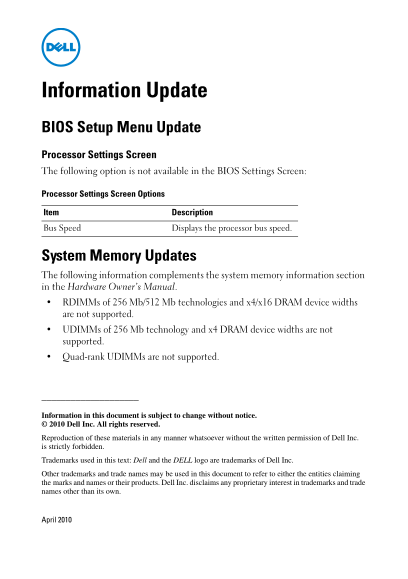
Information Update BIOS Setup Menu Update Processor Settings Screen The following option is not available in the BIOS Settings Screen: Processor Settings Screen Options Item Description Bus Speed Displays the processor bus speed.
System Memory Updates The following information complements the system memory information section in the Hardware Owner’s Manual. RDIMMs of 256 Mb/512 Mb technologies and x4/x16 DRAM device widths are not supported. UDIMMs of 256 Mb technology and x4 DRAM device widths are not supported. Quad-rank UDIMMs are not supported.
Information in this document is subject to change without notice. Dell Inc. All rights reserved.
Reproduction of these materials in any manner whatsoever without the written permission of Dell Inc. is strictly forbidden.
Trademarks used in this text: Dell and the DELL logo are trademarks of Dell Inc.
Other trademarks and trade names may be used in this document to refer to either the entities claiming the marks and names or their products. Dell Inc. disclaims any proprietary interest in trademarks and trade names other than its own.
April 2010
Page Summary Contents For Dell Information Update - Intel Xeon Processor 3400 Series
Manual Details
| Brand | Intel |
|---|---|
| Pages | 7 |
| File Size | 400.32 KB |
| Published | May 29, 2026 |
Enter the captcha to get the download link:

Frequently Asked Questions
Where can I check my processor bus speed?
The Bus Speed option in the Processor Settings screen displays the processor bus speed.
What kind of RDIMM technology is not supported for system memory?
RDIMMs using 256Mb/512Mb technology and x4/x16 DRAM device widths are not supported.
Are all types of UDIMMs supported in the system memory?
No, technologies like 256 Mb with x4 DRAM width or quad-rank UDIMMs are not supported.
Can I change processor settings through the BIOS screen?
The manual notes that certain options on the Processor Settings screen (like some mentioned) may not be available in the BIOS Settings Screen.