Dell Direct from Development - Balanced Memory on 2nd Gen AMD EPYC Processors Reference Guide, Owner's Manual
Summary
This technical guide provides essential guidelines for optimizing memory performance on PowerEdge servers utilizing AMD EPYC Processors. It details how to achieve a balanced or near-balanced DIMM configuration, ensuring maximum memory bandwidth and reduced access latency. This resource is essential for IT professionals and data center engineers who need to properly populate server memory channels to guarantee optimal and reliable infrastructure performance.
Page 1 Text Content
Direct from Development
Server and Infrastructure Engineering
2nd Generation AMD EPYCTM Processors: Balanced Memory Reference Guide
When DIMMs are populated in an unbalanced fashion, memory
Tech Note by
bandwidth can be significantly reduced from its maximum potential. Power Edge customers seeking maximum memory bandwidth
Matt Ogle
and minimized memory access latency should populate DIMMs in a
Trent Bates
balanced configuration, or a near balanced configuration if balanced
Andres Fadul
cannot be implemented. Populating memory in accord with the guidelines in this technote will ensure optimized performance.
Summary
Understanding how to Guidelines for Balanced Memory
configure balanced
memory on a Power Edge 1. Balanced Configuration
server running 2nd • Populate all memory channels with one or two DIMMs for Generation AMD EPYCTM best performance; a total of eight or sixteen DIMMs per CPU Processors is critical for
2. Near Balanced Configuration
securing high memory
• Populate four or twelve DIMMs per CPU
bandwidth and low memory
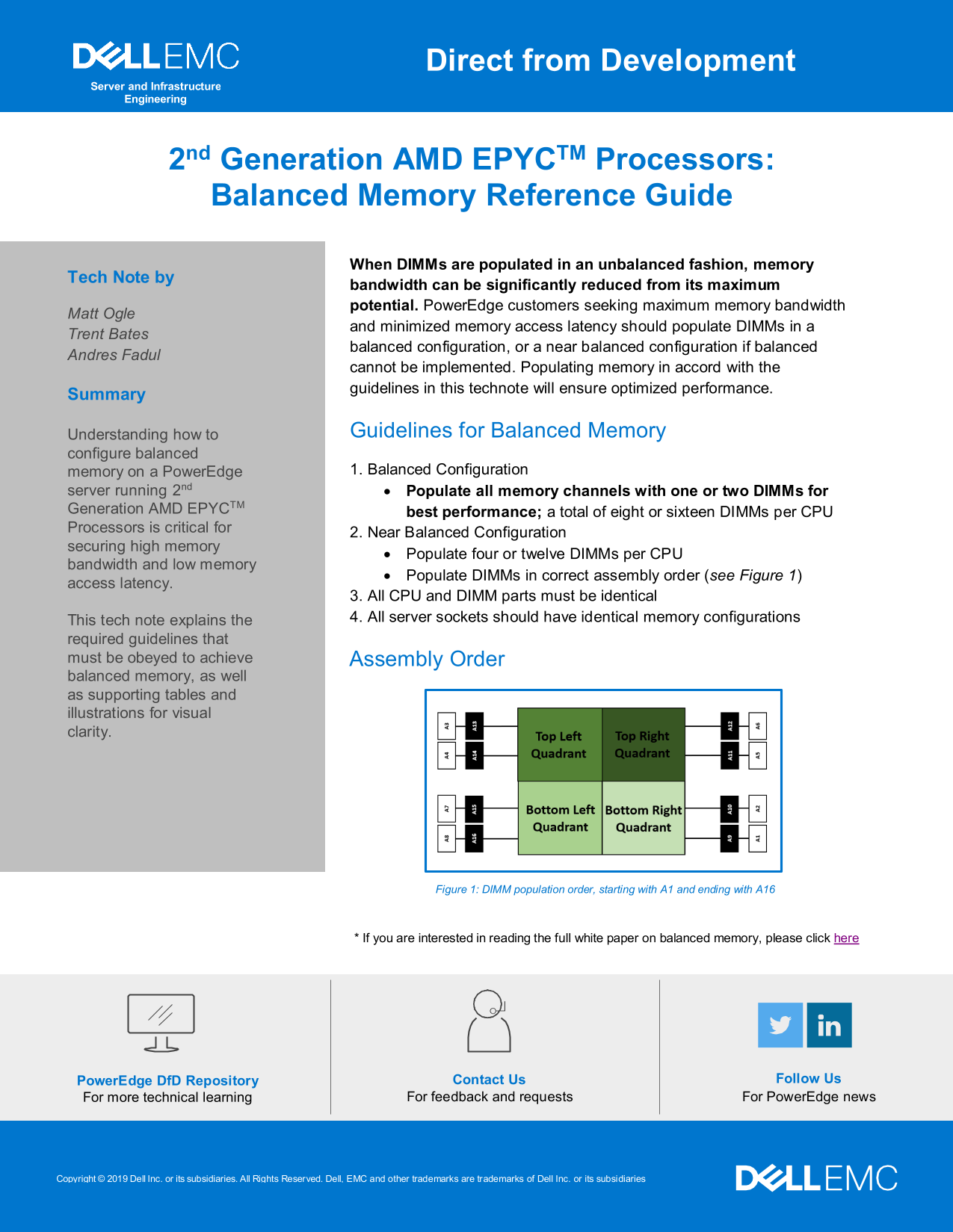
• Populate DIMMs in correct assembly order (see Figure 1)
access latency.
3. All CPU and DIMM parts must be identical This tech note explains the 4. All server sockets should have identical memory configurations
required guidelines that must be obeyed to achieve Assembly Order balanced memory, as well as supporting tables and illustrations for visual clarity.
Figure 1: DIMM population order, starting with A1 and ending with A16
* If you are interested in reading the full white paper on balanced memory, please click here
Power Edge Df D Repository Contact Us Follow Us
For more technical learning For feedback and requests For Power Edge news
Copyright © 2019 Dell Inc. or its subsidiaries. All Rights Reserved. Dell, EMC and other trademarks are trademarks of Dell Inc. or its subsidiaries
Internal Use - Confidential
Page Summary Contents For Dell Direct from Development - Balanced Memory on 2nd Gen AMD EPYC Processors Reference Guide, Owner's Manual
Manual Details
| Brand | Dell |
|---|---|
| Pages | 1 |
| File Size | 104.17 KB |
| Published | June 23, 2026 |
Enter the captcha to get the download link:

Frequently Asked Questions
How do I achieve the best memory performance on a PowerEdge server?
Use a balanced configuration by populating all memory channels with eight or sixteen DIMMs per CPU.
What must be true about my components when setting up the memory?
All CPU and DIMM parts must be identical, and all server sockets should have identical memory configurations.
What is the alternative if a perfectly balanced configuration is not possible?
Utilize a near balanced configuration by populating four or twelve DIMMs per CPU to maintain high bandwidth and low latency.
Is following a specific order important when adding DIMMs?
Yes, DIMM population must follow the correct assembly order, starting with A1 and ending with A16.