Dell C5517H Monitor Specifications, User Guide
Summary
Outline dimension specification sheet for the Dell C5517H monitor, providing nominal physical measurements in millimeters and inches for the display unit without stand. Includes back view dimensions, VESA mounting hole pattern (4-M6x30 screws), and overall chassis envelope dimensions for installation planning and space requirements in professional display deployments.
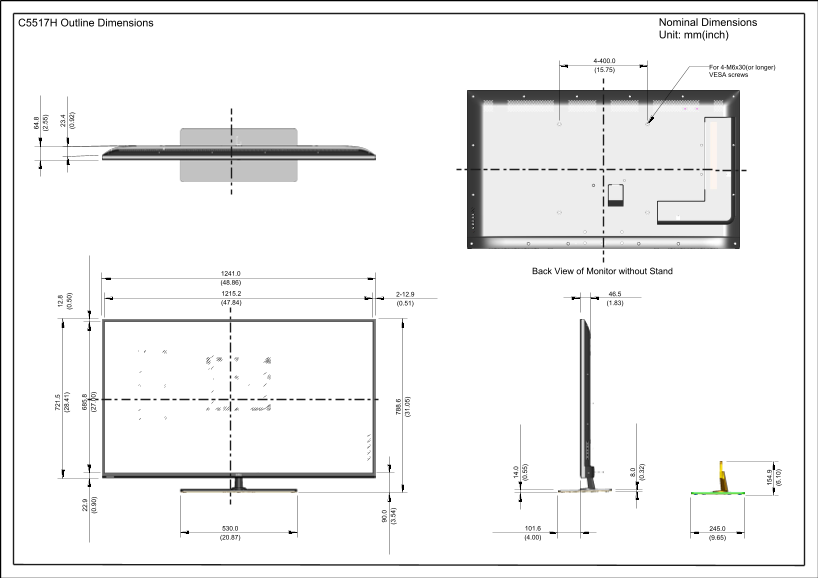
Page 1 Text Content
C5517H Outline Dimensions Nominal Dimensions .8 Unit: mm(inch)
(2 8. For 4-M6x30(or longer)
VESA screws
Back View of Monitor without Stand1241.0
Page Summary Contents For Dell C5517H Monitor Specifications, User Guide
Manual Details
| Brand | Dell |
|---|---|
| Pages | 1 |
| File Size | 162.50 KB |
| Published | June 15, 2026 |
Enter the captcha to get the download link:

Frequently Asked Questions
What are the dimensions of the monitor without a stand?
The overall nominal dimensions are 788.6 mm wide by 46.5 cm high.
Can I mount this monitor using VESA screws, and what type are required?
Yes, the manual indicates mounting supports for 2-12.9 with a standard VESA screw pitch, suitable for M6x30 (or longer) screws.
What is the total height of the unit when including the base?
The maximum vertical dimension shown from the bottom to the top is 721.5 mm.
How wide can this monitor be supported or mounted based on the diagram's width measurements?
One recorded width measurement for mounting/structural support is 685.8 mm.